







Question: Algorithm: 1.Create the file object from the File class for the output file EmployeeEmails.txt. 2.If the file already exists, put message to console and exit
Algorithm:
1.Create the file object from the File class for the output file EmployeeEmails.txt.
2.If the file already exists, put message to console and exit program (return code = 0).
3.Create an object from the Scanner class for input from console for the domain name.
4.Build the domain name string with @ and .com (e.g. @domainname.com)
5.Create a new object from the Scanner class for the input file EmployeeNames.txt.
6.Create String variables for firstName, middleName, and lastName.
7.Create an output object from the PrintWriter class.
8.Using a while loop and the hasNext method, create and assign firstInit, middleInit, and emailAddress and then output these fields using the output.println method.
9.After writing all output, close the output object - output.close().
10.Print File written successfully to the console.
You have been given the assignment to create email addresses from an input file of employee names, and an inputted company domain name using scanner input. The input file name is EmployeeNames.txt, which is provided, and the output file name will be EmployeeEmails.txt. The input file has the following format:
First Middle Last
Mary Elizabeth Jones
Thomas Peter Morris
John Quincy Smith
The email address for each employee with be built using the first and middle initials appended to the last name. All email addresses must be in lower case. The output file has the following format:
First Middle Last Email
Mary Elizabeth Jones mejones@companydomain.com
Thomas Peter Morris tpmorris@companydomain.com
John Quincy Smith jqsmith@companydomain.com
Because you are working with file input, your main method statement should throw an exception. Use the following format:
public static void main(String[] args) throws Exception {}
You can use the String class methods to build the email addresses of the employees. Examples of reading data from a file and writing data to a file are found in the ReadData and WriteData classes posted in Blackboard.
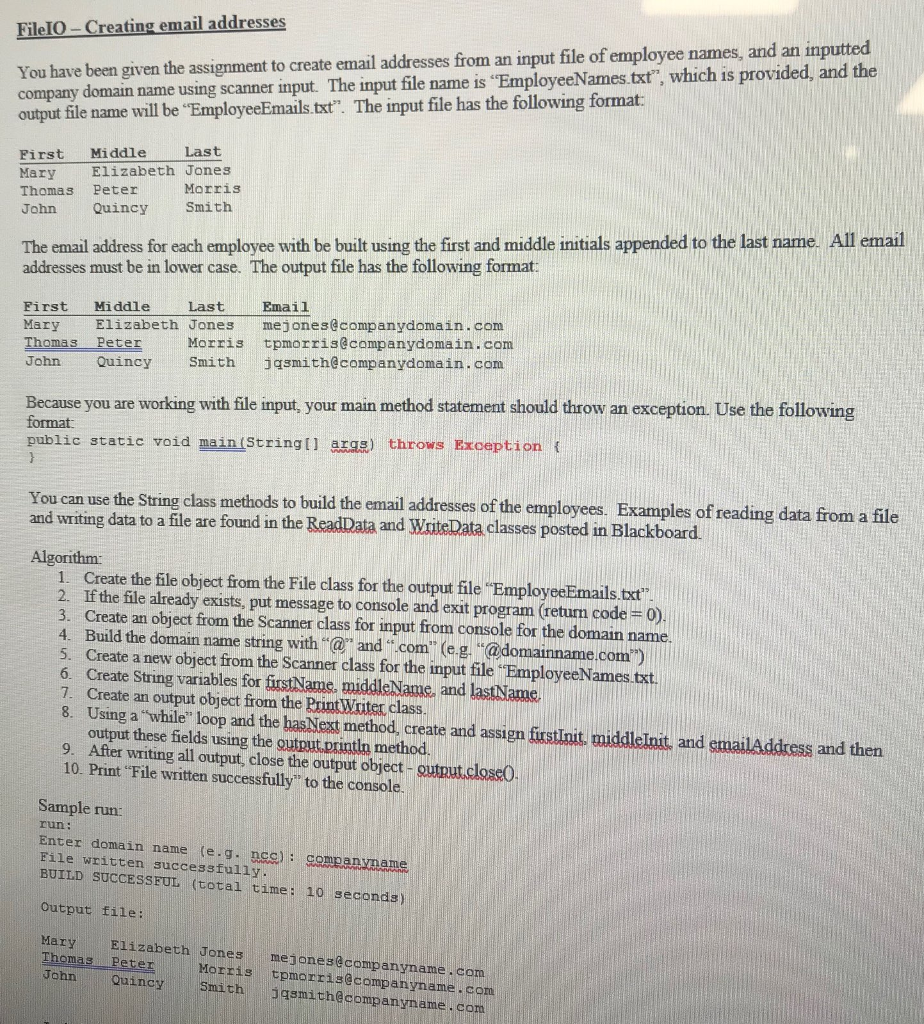
File10-Creating email addresses You have been given the assignment to create email addresses from an input file of employee names, and an inputted name using scanner input. The input file name is "EmployeeNames.txt", which is provided, and the company output file name will be "EmployeeEmails.txt". The input file has the following format Last First Middle Mary Thomas Peter John Quincy Smith Elizabeth Jones Morris The email address for each employee with be built using the first and middle initials appended to the last name. All email addresses must be in lower case. The output file has the following format First Middle LastEmail Mary Elizabeth Jones mejones@companydomain,com Thomas Peter Morris tpmorris@companydomain. com John Quincy Smith jqsmith@companydomain,. com Because you are working with file input, your main method statement should throw an exception. Use the following format public static void main(Stringt aras) throws Exception ( the String class methods to build the email addresses of the employees. Examples of reading data from a file data to a file are found in the ReadData and WriteData classes posted in Blackboard and writing Algorithm: 1. Create the file object from the File class for the output file EmployeeEmails.txt" 2. If the file already exists, put message to console and exit program (return code 0) 3. Create an object from the Scanner class for input from console for the domain name. 4. Build the domain name string with " and "com (e.g. "@domainname.com") 5. Create a new object from the Scanner class for the input file EmployeeNames.txt. 6. Create String variables for fiustName, middleName, and lastName. 7. Create an output object from the Prunt Wxiter class 8. Using a "while" loop and the hasNext method, create and assign frstInit, middleInit, and emailAddress and then output these fields using the gutput.println method. 9. After writing all output, close the output object- output close0 10. Print "File written successfully" to the console Sample run: run: Enter domain name (e.g nca): companvname File written successfully BUILD SUCCESSFUL (total time: 10 seconda) Output file: Mary Elizabeth Jones meiones@companyname .com Thomas Peter Morris tpmorris@companyname.com John Quincy Smithjasmith@companyname , com
Step by Step Solution
There are 3 Steps involved in it

Get step-by-step solutions from verified subject matter experts
 Study Help