







Question: all calculations must show using cell references 3 Prepare a statement of cash flows for Abrahams Manufacturing Company for the year ended January 31, 2018.
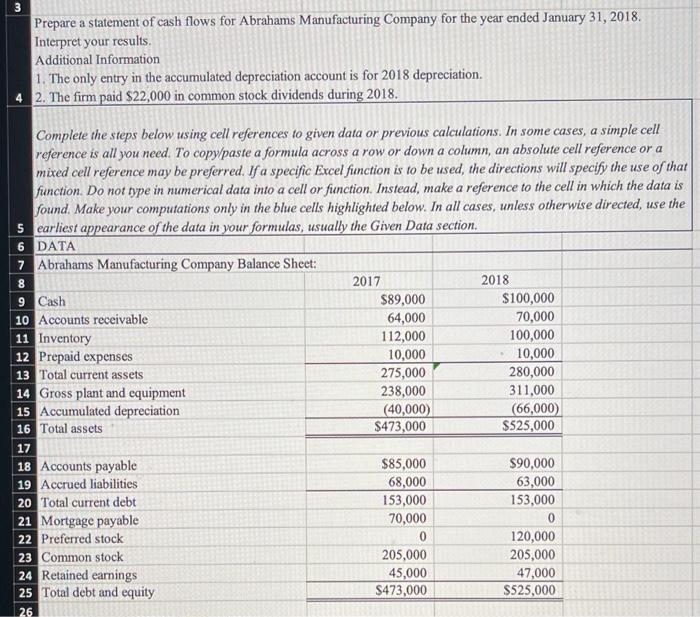
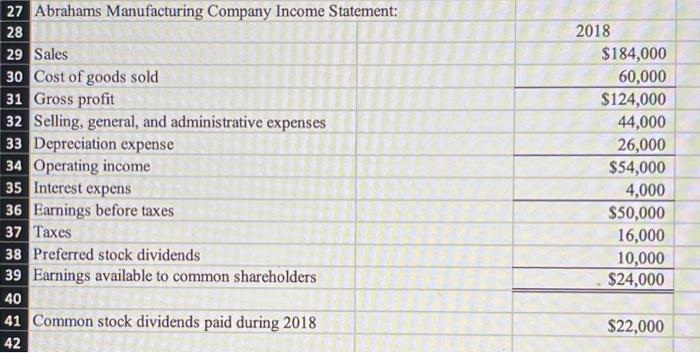
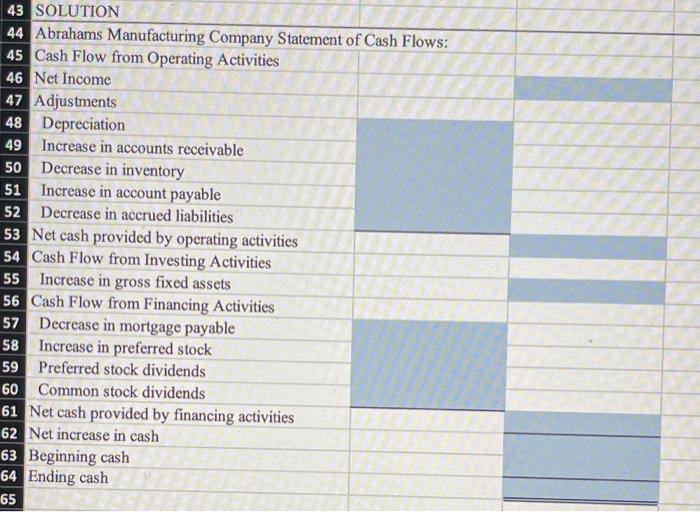
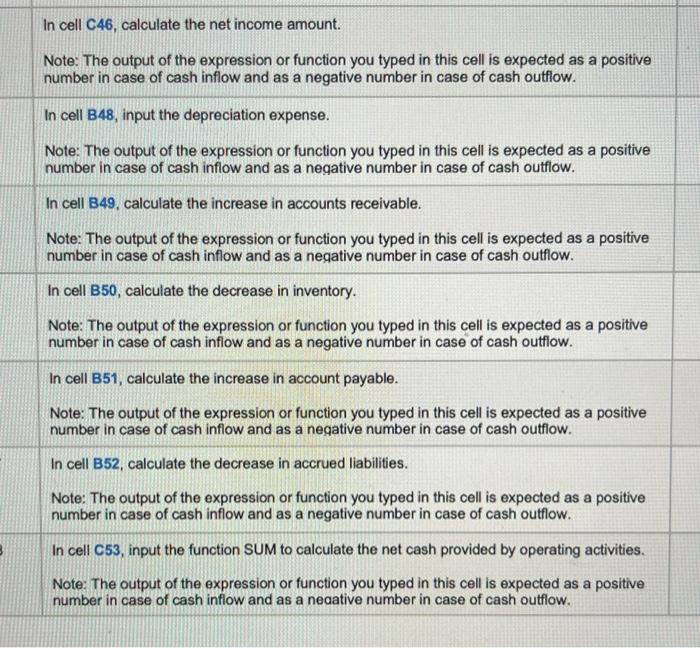
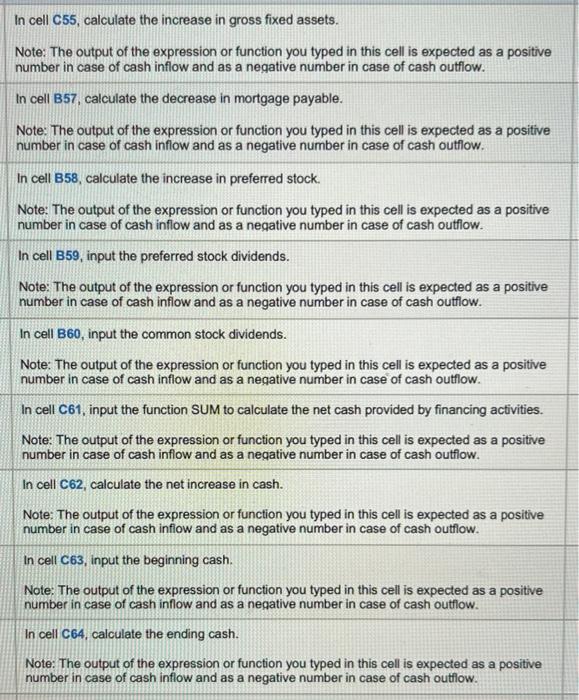
3 Prepare a statement of cash flows for Abrahams Manufacturing Company for the year ended January 31, 2018. Interpret your results. Additional Information 1. The only entry in the accumulated depreciation account is for 2018 depreciation. 4 2. The firm paid $22,000 in common stock dividends during 2018. Complete the steps below using cell references to given data or previous calculations. In some cases, a simple cell reference is all you need. To copy/paste a formula across a row or down a column, an absolute cell reference or a mixed cell reference may be preferred. If a specific Excel function is to be used the directions will specify the use of that function. Do not type in numerical data into a cell or function. Instead, make a reference to the cell in which the data is found. Make your computations only in the blue cells highlighted below. In all cases, unless otherwise directed, use the 5 earliest appearance of the data in your formulas, usually the Given Data section. 6 DATA 7 Abrahams Manufacturing Company Balance Sheet: 8 2018 9 Cash $89,000 $100,000 10 Accounts receivable 64,000 70,000 11 Inventory 112,000 100,000 12 Prepaid expenses 10,000 10,000 13 Total current assets 275,000 280,000 14 Gross plant and equipment 238,000 311,000 15 Accumulated depreciation (40,000) (66,000) 16 Total assets $473,000 $525,000 2017 17 18 Accounts payable 19 Accrued liabilities 20 Total current debt 21 Mortgage payable 22 Preferred stock 23 Common stock 24 Retained earnings 25 Total debt and equity $85,000 68,000 153,000 70,000 0 205,000 45,000 $473,000 $90,000 63,000 153,000 0 120,000 205,000 47,000 S525,000 26 2018 27 Abrahams Manufacturing Company Income Statement: 28 29 Sales 30 Cost of goods sold 31 Gross profit 32 Selling, general, and administrative expenses 33 Depreciation expense 34 Operating income 35 Interest expens 36 Earnings before taxes 37 Taxes 38 Preferred stock dividends 39 Earnings available to common shareholders $184,000 60,000 $124,000 44,000 26,000 $54,000 4,000 $50,000 16,000 10,000 $24,000 40 41 Common stock dividends paid during 2018 $22,000 42 43 SOLUTION 44 Abrahams Manufacturing Company Statement of Cash Flows: 45 Cash Flow from Operating Activities 46 Net Income 47 Adjustments 48 Depreciation 49 Increase in accounts receivable 50 Decrease in inventory 51 Increase in account payable 52 Decrease in accrued liabilities 53 Net cash provided by operating activities 54 Cash Flow from Investing Activities 55 Increase in gross fixed assets 56 Cash Flow from Financing Activities 57 Decrease in mortgage payable 58 Increase in preferred stock 59 Preferred stock dividends 60 Common stock dividends 61 Net cash provided by financing activities 62 Net increase in cash 63 Beginning cash 64 Ending cash 65 In cell 046, calculate the net income amount. Note: The output of the expression or function you typed in this cell is expected as a positive number in case of cash inflow and as a negative number in case of cash outflow. In cell B48, input the depreciation expense. Note: The output of the expression or function you typed in this cell is expected as a positive number in case of cash inflow and as a negative number in case of cash outflow. In cell B49. calculate the increase in accounts receivable. Note: The output of the expression or function you typed in this cell is expected as a positive number in case of cash inflow and as a negative number in case of cash outflow. In cell B50, calculate the decrease in inventory. Note: The output of the expression or function you typed in this cell is expected as a positive number in case of cash inflow and as a negative number in case of cash outflow. In cell B51, calculate the increase in account payable. Note: The output of the expression or function you typed in this cell is expected as a positive number in case of cash inflow and as a negative number in case of cash outflow. In cell B52, calculate the decrease in accrued liabilities. Note: The output of the expression or function you typed in this cell is expected as a positive number in case of cash inflow and as a negative number in case of cash outflow. In cell C53, input the function SUM to calculate the net cash provided by operating activities. Note: The output of the expression or function you typed in this cell is expected as a positive number in case of cash inflow and as a negative number in case of cash outflow. In cell C55, calculate the increase in gross fixed assets. Note: The output of the expression or function you typed in this cell is expected as a positive number in case of cash inflow and as a negative number in case of cash outflow. In cell B57, calculate the decrease in mortgage payable. Note: The output of the expression or function you typed in this cell is expected as a positive number in case of cash inflow and as a negative number in case of cash outflow. In cell B58, calculate the increase in preferred stock. Note: The output of the expression or function you typed in this cell is expected as a positive number in case of cash inflow and as a negative number in case of cash outflow. In cell B59, input the preferred stock dividends. Note: The output of the expression or function you typed in this cell is expected as a positive number in case of cash inflow and as a negative number in case of cash outflow. In cell B60, input the common stock dividends. Note: The output of the expression or function you typed in this cell is expected as a positive number in case of cash inflow and as a negative number in case of cash outflow. In cell C61, input the function SUM to calculate the net cash provided by financing activities. Note: The output of the expression or function you typed in this cell is expected as a positive number in case of cash inflow and as a negative number in case of cash outflow. In cell C62, calculate the net increase in cash. Note: The output of the expression or function you typed in this cell is expected as a positive number in case of cash inflow and as a negative number in case of cash outflow. In cell C63, input the beginning cash. Note: The output of the expression or function you typed in this cell is expected as a positive number in case of cash inflow and as a negative number in case of cash outflow. In cell C64, calculate the ending cash. Note: The output of the expression or function you typed in this cell is expected as a positive number in case of cash inflow and as a negative number in case of cash outflow
Step by Step Solution
There are 3 Steps involved in it

Get step-by-step solutions from verified subject matter experts
 Study Help