







Question: All I need help on is with part 3. For some reason, Chegg won't allow me to submit a photo of my code, so I'll
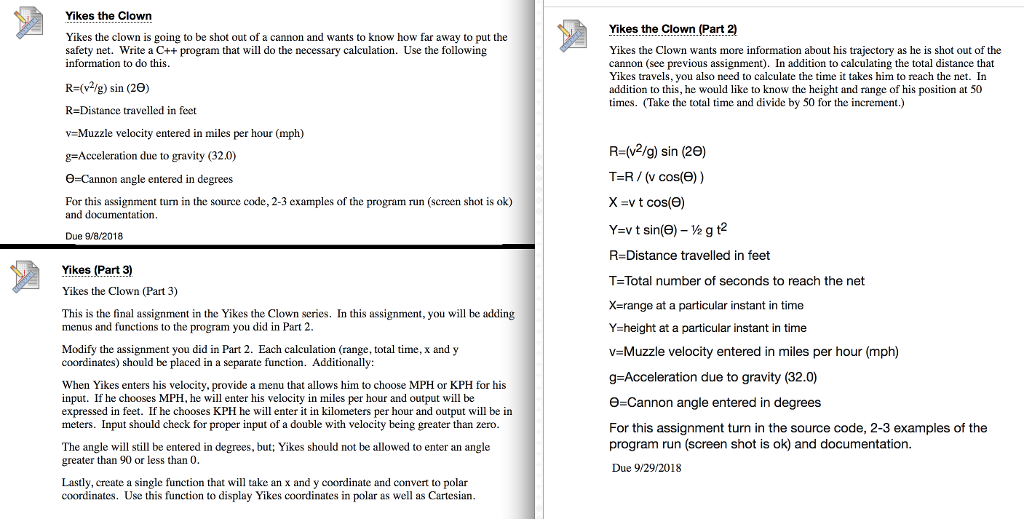
All I need help on is with part 3. For some reason, Chegg won't allow me to submit a photo of my code, so I'll type it. Here"s what I have for part 2:
//clownhw3.C
#include
#include
#include
using namespace std;
const double g_m = 32.0;
const size_t rows{5};
const size_t columns{3};
int main()
{
//flightTime = flightTime / 50.0
//flightTime is T and x_m is the horizontal distance
//Input
double velocity = 0.0, thetaDegrees = 0.0, x_m = 0.0, height_m = 0.0, sec = 0.0, flightTime = 0.0;
cout
cin >> thetaDegrees >> velocity;
//Processing
while (sec
{
x_m = velocity * sec * cos(thetaDegrees);
height_m = (velocity * sec * sin(thetaDegrees)) - (1.0/2.0 * g_m * pow(sec, 2.0));
sec = sec + 50.0;
}
if (velocity >= 0.0 && thetaDegrees >= 0.0 && thetaDegrees
{
x_m = velocity * sec * cos(thetaDegrees);
height_m = (velocity * sec * sin(thetaDegrees)) - (1.0/2.0 * g_m * pow(sec,2.0));
}
if (velocity
{
cerr
}
if (thetaDegrees 90.0)
{
cerr 90.0 Not Allowed ERROR! ";
}
double thetaRadians = thetaDegrees * M_PI / 180.0;
//conversion from mph to ft
velocity = velocity * 5280.0 / 3600.0;
double range_m = (((pow(velocity, 2.0)) / g_m) * sin(2 * thetaRadians));
double flightTime_m = range_m / (velocity * cos(thetaRadians));
//Output
cout
cout
cout
cout
cout
cout setprecision(3);
cout
cout
cout
cout
cout
cout
cout
cout
}
Yikes the Clown Yikes the Clown (Part 2) Yikes the clown is going to be shot out of a cannon and wants to know how far away to put the safety net. Write a C++program that will do the necessary calculation. Use the following information to do this. Yikes the Clown wants more information about his trajectory as he is shot out of the cannon (see previous assignment). In addition to calculating the total distance that Yikes travels, you also need to calculate the time it takes him to reach the net. In addition to this, he would like to know the height and range of his position at 50 times. (Take the total time and divide by 50 for the increment.) R-(vg) sin (20) R-Distance travelled in feet v-Muzzle velocity entered in miles per hour (mph) g-Acceleration due to gravity (32.0) 0-Cannon angle entered in degrees R-(v2/g) sin (20) T=R / (v cos(9)) x -vt cos(e) For this assignment turn in the source code, 2-3 examples of the program run (screen shot is ok) and d Ysv t sin(6)-gt2 R-Distance travelled in feet T-Total number of seconds to reach the net X-range at a particular instant in time Y-height at a particular instant in time V Muzzle velocity entered in miles per hour (mph) g-Acceleration due to gravity (32.0) e-Cannon angle entered in degrees For this assignment turn in the source code, 2-3 examples of the program run (screen shot is ok) and documentation. Due 9/29/2018 Due 8/2018 Yikes (Part 3) Yikes the Clown (Part 3) This is the final assignment in the Yikes the Clown series. In this assignment, you will be adding menus and functions to the program you di d in Part 2 Modify the assignment you did in Part 2. Each calculation (range, total time, x and y coordinates) should be placed in a separate function. Additionally: When Yikes enters his velocity, provide a menu that allows him to choose MPH or KPH for his input. If he chooses MPH, he will enter his velocity in miles per hour and output will be expressed in feet. If he chooses KPH he will enter it in kilometers per hour and output will be in meters. Input should check for proper input of a double with velocity being greater than zero. The angle will still be entered in degrees, but; Yikes should not be allowed to enter an angle greater than 90 or less than 0 Lastly, create a single function that will take an x and y coordinate and convert to polar coordinates. Use this function to display Yikes coordinates in polar as well as Cartesian
Step by Step Solution
There are 3 Steps involved in it

Get step-by-step solutions from verified subject matter experts
 Study Help