







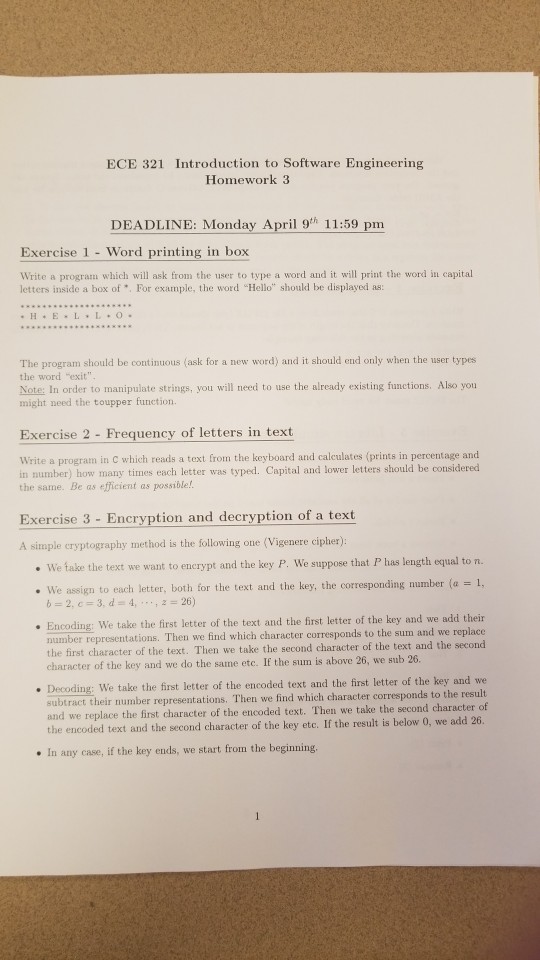
Question: all in c ECE 321 Introduction to Software Engineering Homework 3 DEADLINE: Monday April 9h 11:59 pm Exercise 1 - Word printing in box Write
all in c
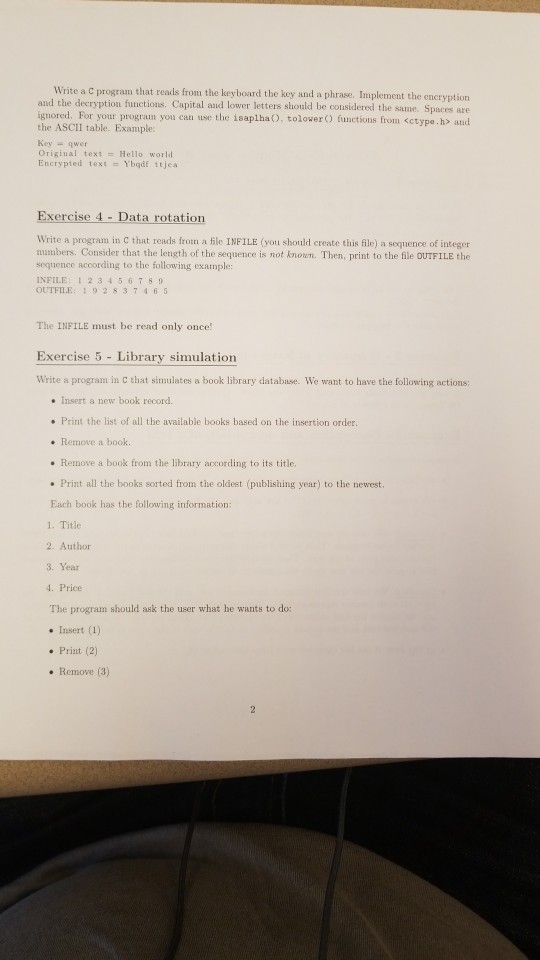
ECE 321 Introduction to Software Engineering Homework 3 DEADLINE: Monday April 9h 11:59 pm Exercise 1 - Word printing in box Write a program which will ask from the user to type a word and it will print the word in capital letters inside a box of . For example, the word Hello" should be displayed as: The program should be continuous (ask for a new word) and it should end only when the user types the word "exit" Note: In order to manipulate strings, you will need to use the already existing functions. Also you might need the toupper function. Exercise 2- Frequency of letters in text in C which reads a text from the keyboard and calculates (prints in percentage and Write a program in number) how many times each letter was typed. Capital and lower letters should be considered the same. Be as efficient as possible! Exercise 3 Encryption and decryption of a text A simple cryptography method is the following one (Vigenere cipher): . We take the text we want to enerypt and the key P. We suppose that P has length equal to n. . We assign to each letter, both for the text and the key, the corresponding number (a 1, b 2, c 3, d- 4, 26) Encoding: We take the first letter of the text and the first letter of the key and we add their number representations. Then we find which character corresponds to the sum and we replace er of the text. Then we take the second character of the text and the second the first charact character of the key and we do the same etc. If the sum is above 26, we sub 26 .Decoding: We take the first letter of the encoded text and the first letter of the key and we subtract their number representations. Then we find which character corresponds to the result and we replace the first character of the encoded text. Then we take the second character of the encoded text and the second character of the key etc. If the result is below 0, we add 26. . In any case, if the key ends, we start from the beginning
Step by Step Solution
There are 3 Steps involved in it

Get step-by-step solutions from verified subject matter experts
 Study Help