



Question: ALL QUESTIONS PLEASE SEPARATE BY NUMBER WHICH ARE WHICH AND FOR MATLAB USAGE (PROGRAMMING) Create vectors called myvec1, myvec2, and myvec3, ranging from 2 to
ALL QUESTIONS PLEASE SEPARATE BY NUMBER WHICH ARE WHICH AND FOR MATLAB USAGE (PROGRAMMING)
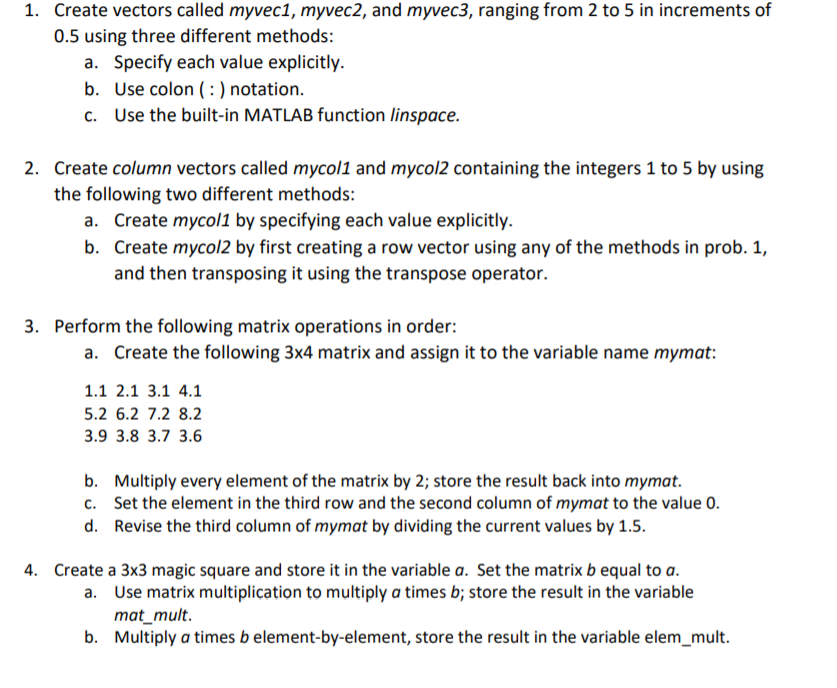
Create vectors called myvec1, myvec2, and myvec3, ranging from 2 to 5 in increments of 0.5 using three different methods: 1. a. Specify each value explicitly. b. Use colon(notation. c. Use the built-in MATLAB function linspace. 2. Create column vectors called mycol1 and mycol2 containing the integers 1 to 5 by using the following two different methods: Create mycol1 by specifying each value explicitly. Create mycol2 by first creating a row vector using any of the methods in prob. 1, and then transposing it using the transpose operator. a. b. 3. Perform the following matrix operations in order: a. Create the following 3x4 matrix and assign it to the variable name mymat: 1.1 2.1 3.1 4.1 2 6.2 7.2 8.2 39 3.8 3.7 3.6 b. Multiply every element of the matrix by 2; store the result back into mymat. c. Set the element in the third row and the second column of mymat to the value 0 d. Revise the third column of mymat by dividing the current values by 1.5 4. Create a 3x3 magic square and store it in the variable a. Set the matrix b equal to a. Use matrix multiplication to multiply a times b; store the result in the variable mat_mult. Multiply a times b element-by-element, store the result in the variable elem_mult. a. b
Step by Step Solution
There are 3 Steps involved in it

Get step-by-step solutions from verified subject matter experts