







Question: All the calculations are needed in excel Part 3 Using Microsoft's Excel, create a spreadsheet that shows the value of the bond on 02/15/2020 for
All the calculations are needed in excel
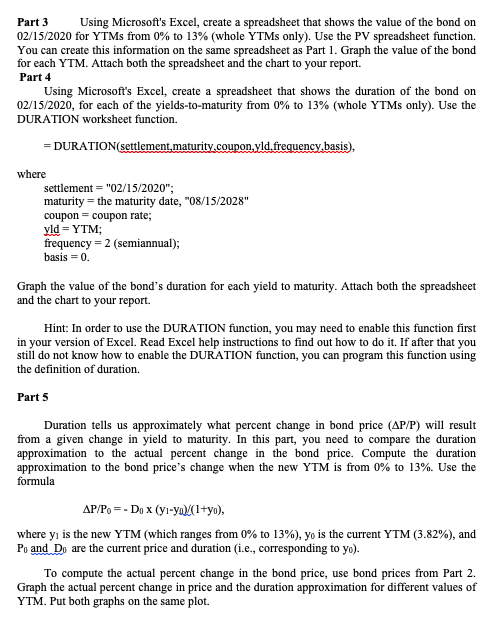
Part 3 Using Microsoft's Excel, create a spreadsheet that shows the value of the bond on 02/15/2020 for YTMs from 0% to 13% (whole YTMs only). Use the PV sp You can create this information on the same spreadsheet as Part 1. Graph the value of the bond for each YTM. Attach both the spreadsheet and the chart to your report. Part 4 Using Microsoft's Excel, create a spreadsheet that shows the duration of the bond on 02/15/2020, for each of the yields-to-maturity from 0% to 13% (whole YTMs only). Use the DURATION worksheet function. - DURATION(settlement,maturity.coupon yld.frequency basis), where settlement="02/15/2020", maturity=the maturity date, 08/15/2028" coupon = coupon rate; yld = YTM; frequency = 2 (semiannual); basis = 0. Graph the value of the bond's duration for each yield to maturity. Attach both the spreadsheet and the chart to your report. Hint: In order to use the DURATION function, you may need to enable this function first in your version of Excel. Read Excel help instructions to find out how to do it. If after that you still do not know how to enable the DURATION function, you can program this function using the definition of duration, Part 5 Duration tells us approximately what percent change in bond price (AP/P) will result from a given change in yield to maturity. In this part, you need to compare the duration approximation to the actual percent change in the bond price. Compute the duration approximation to the bond price's change when the new YTM is from 0% to 13%. Use the formula AP/P = - Dex (yi-yo/(1+yo), where yi is the new YTM (which ranges from 0% to 13%), yo is the current YTM (3.82%), and Po and Do are the current price and duration (i.e., corresponding to yo). To compute the actual percent change in the bond price, use bond prices from Part 2. Graph the actual percent change in price and the duration approximation for different values of YTM. Put both graphs on the same plot. Part 3 Using Microsoft's Excel, create a spreadsheet that shows the value of the bond on 02/15/2020 for YTMs from 0% to 13% (whole YTMs only). Use the PV sp You can create this information on the same spreadsheet as Part 1. Graph the value of the bond for each YTM. Attach both the spreadsheet and the chart to your report. Part 4 Using Microsoft's Excel, create a spreadsheet that shows the duration of the bond on 02/15/2020, for each of the yields-to-maturity from 0% to 13% (whole YTMs only). Use the DURATION worksheet function. - DURATION(settlement,maturity.coupon yld.frequency basis), where settlement="02/15/2020", maturity=the maturity date, 08/15/2028" coupon = coupon rate; yld = YTM; frequency = 2 (semiannual); basis = 0. Graph the value of the bond's duration for each yield to maturity. Attach both the spreadsheet and the chart to your report. Hint: In order to use the DURATION function, you may need to enable this function first in your version of Excel. Read Excel help instructions to find out how to do it. If after that you still do not know how to enable the DURATION function, you can program this function using the definition of duration, Part 5 Duration tells us approximately what percent change in bond price (AP/P) will result from a given change in yield to maturity. In this part, you need to compare the duration approximation to the actual percent change in the bond price. Compute the duration approximation to the bond price's change when the new YTM is from 0% to 13%. Use the formula AP/P = - Dex (yi-yo/(1+yo), where yi is the new YTM (which ranges from 0% to 13%), yo is the current YTM (3.82%), and Po and Do are the current price and duration (i.e., corresponding to yo). To compute the actual percent change in the bond price, use bond prices from Part 2. Graph the actual percent change in price and the duration approximation for different values of YTM. Put both graphs on the same plot
Step by Step Solution
There are 3 Steps involved in it

Get step-by-step solutions from verified subject matter experts
 Study Help