







Question: All the queries must be processed in a single command. (30) (A1) Find employees' names whose salaries are over 28000 and who work for the
All the queries must be processed in a single command. (30)
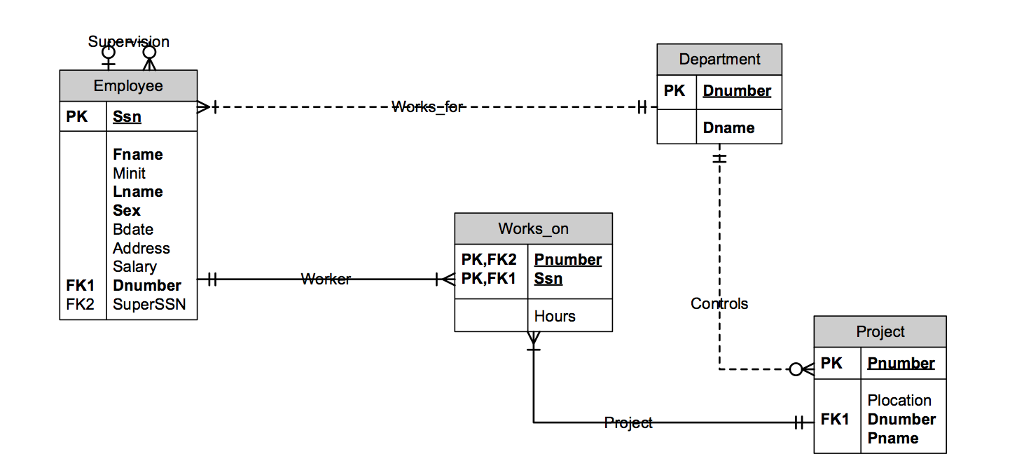
(A1) Find employees' names whose salaries are over 28000 and who work for the research department.
(A2) For each project, find the department name which controls the project. Sort the output by project name.
(A3) Find all employees whose salary is the same as Joyce English's.
(A4) Find the average, the largest, and the smallest salary for each department. Print both department names and department numbers.
(A5) For each department, find the names of all the projects controlled by the department. Sort the output by each department name and project name.
(A6) Show the first name, last name, and the age of each employee who works on projects where the project names begin with 'P. (Note: you are supposed to derive the integer value of "age." Use TRUC function to produce the integer value of the ages.)
Part B: Day of the week you were born (20)
(B1) To the original EMPLOYEE table, insert your own data as an employee. Insert fname, lname, and bdate with your own first name, last name, and date of birth. Use ssn with an arbitrary number for the first 5 digits but the last 4 digits must come from your own student ID (that is the last 4 digits of your ssn data must be the same as the last 4 digits of your own Drexel student ID). Make dno = 5. All other data could be null value. Note that date data must be enclosed by a single quote as in:
INSERT INTO Loan (Loan#, LoanDate) VALUES (12, 03-FEB-2003);
(B2) Display all the employees first name, last name, ssn, and bdate.
(B3) Enter the following command to find the date of the week you were born:
SELECT Fname, Lname, ssn,
TO_CHAR (Bdate, 'DAY MONTH DD, YYYY') Date_Output
FROM EMPLOYEE;
Note, TO_CHAR() is an Oracles built-in function that converts a date into character format. The parameters are as follows:
'DAY' : The complete day name such as WEDNESDAY
'MONTH: The complete month name such as OCTOBER
'DD': The date of the month such as 1, 2, ......, 31
'YYYY' : Year such as 2001
(B4) Enter the following command. Show the output. (5)
COLUMN USER FORMAT A6
COLUMN OBJECT_NAME FORMAT A15
COLUMN OBJECT_TYPE FORMAT A13
SELECT user, object_name, object_type, created, timestamp
FROM user_objects
WHERE object_name not like 'SYS%' and Object_Name not like %$%
ORDER BY Created Desc;
Part C: DML commands. Write the DML commands for the following problems. Execute the commands. Note that certain commands will create error messages. You do not have to correct those errors. Just capture all the output from Oracle. If the command is successful, issue ROLLBACK command to undo the update. If the command is not successful, EXPLAIN in words why the command causes an error. (total 25 points: 5 points/each)
(C1) Try to insert the following data. What happens?
Katy, TX, F, 28000, 987654321, 7> into EMPLOYEE. (C2) Delete the following employee. What happens? Explain. The EMPLOYEE tuple with SSN = 999887777 (C3) Delete the following employee. What happens? Explain. The EMPLOYEE tuple with SSN = 333445555 (C4) Give a 15 % raise to all the employees who work for the project called "ProductZ". Use only one SQL command. (Hint: use a SQL query inside your UPDATE command) (C5) Alicia Zelaya works for the Research department from today. Use only one command. (Hint: use a subquery)
Step by Step Solution
There are 3 Steps involved in it

Get step-by-step solutions from verified subject matter experts
 Study Help