







Question: Allowed Functions list functions: append() string functions: strip() , split() other built-in functions or techniques: len() , range() , min() , in keyword, string/list slicing
Allowed Functions
list functions:
append()
string functions: strip() , split()
other built-in functions or techniques: len() , range() , min() , in keyword, string/list slicing ( [start:stop:step] )
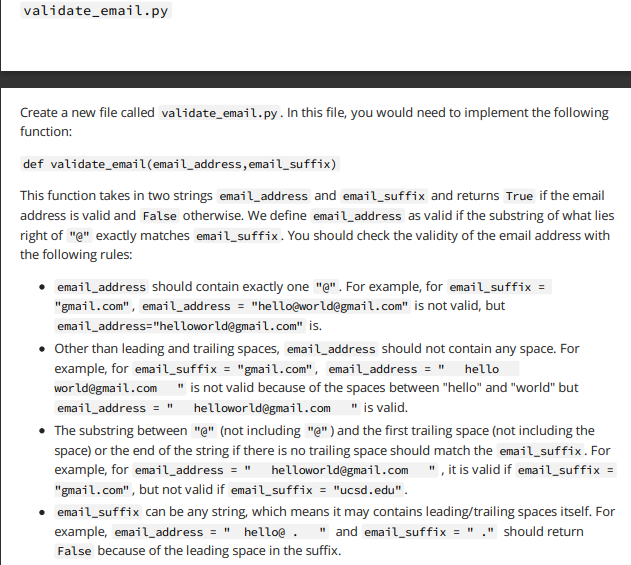
Create a new file called validate_email.py. In this file, you would need to implement the following function: def validate_email(email_address, email_suffix) This function takes in two strings email_address and email_suffix and returns True if the email address is valid and False otherwise. We define email_address as valid if the substring of what lies right of "e" exactly matches email_suffix. You should check the validity of the email address with the following rules: - email_address should contain exactly one "e" . For example, for "gmail.com", email_address = "hello@worldegmail.com" is not valid, but email_address="helloworld@gmail. com" is. - Other than leading and trailing spaces, email_address should not contain any space. For example, for email_suffix = "gmail.com", email_address = world@gmail.com " is not valid because of the spaces between "hello" and "world" but email_address =" helloworld@gmail.com " is valid. - The substring between "e" (not including "e") and the first trailing space (not including the space) or the end of the string if there is no trailing space should match the email_suffix. For example, for email_address =" helloworldegmail.com ", it is valid if "gmail. com", but not valid if email_suffix = "ucsd.edu" . - email_suffix can be any string, which means it may contains leading/trailing spaces itself. For example, email_address =" hello@ . " and email_suffix =" " " should return False because of the leading space in the suffix
Step by Step Solution
There are 3 Steps involved in it

Get step-by-step solutions from verified subject matter experts
 Study Help