







Question: Already solved a need help with the rest Q1. Internet Protocol Configuration (ipconfig) 12.5 points Ipconfig displays the TCP/IP configurations of a host device and
Already solved a need help with the rest
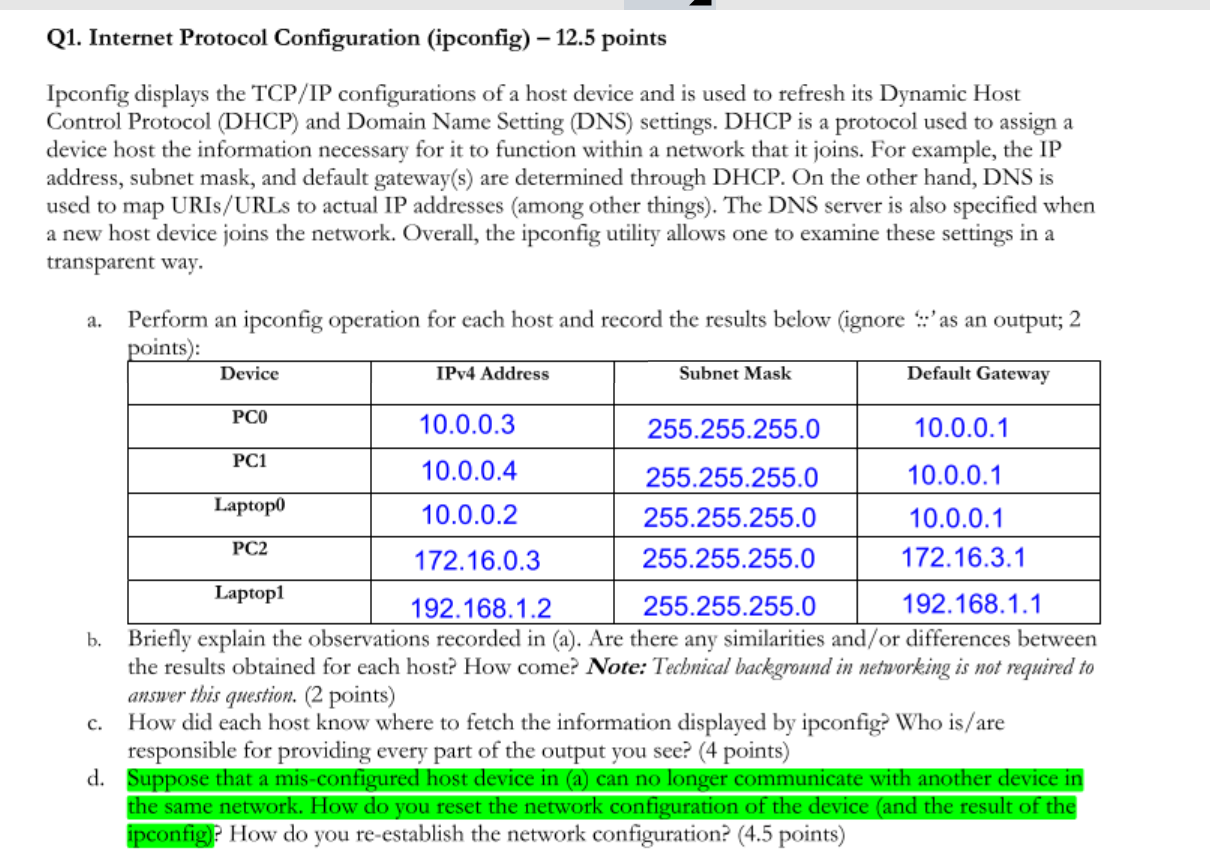
Q1. Internet Protocol Configuration (ipconfig) 12.5 points Ipconfig displays the TCP/IP configurations of a host device and is used to refresh its Dynamic Host Control Protocol (DHCP) and Domain Name Setting (DNS) settings. DHCP is a protocol used to assign a device host the information necessary for it to function within a network that it joins. For example, the IP address, subnet mask, and default gateway(s) are determined through DHCP. On the other hand, DNS is used to map URIs/URLs to actual IP addresses (among other things). The DNS server is also specified when a new host device joins the network. Overall, the ipconfig utility allows one to examine these settings in a transparent way. a. Perform an ipconfig operation for each host and record the results below (ignore ::'as an output; 2 points): Device Subnet Mask Default Gateway IPv4 Address PCO PC1 10.0.0.3 255.255.255.0 10.0.0.1 10.0.0.4 255.255.255.0 10.0.0.1 Laptopo 10.0.0.2 255.255.255.0 10.0.0.1 PC2 172.16.0.3 255.255.255.0 172.16.3.1 Laptop1 192.168.1.2 255.255.255.0 192.168.1.1 b. Briefly explain the observations recorded in (a). Are there any similarities and/or differences between the results obtained for each host? How come? Note: Technical background in networking is not required to answer this question. (2 points) How did each host know where to fetch the information displayed by ipconfig? Who is/are responsible for providing every part of the output you see? (4 points) d. Suppose that a mis-configured host device in (a) can no longer communicate with another device in the same network. How do you reset the network configuration of the device and the result of the ipconfig? How do you re-establish the network configuration? (4.5 points) c. Q1. Internet Protocol Configuration (ipconfig) 12.5 points Ipconfig displays the TCP/IP configurations of a host device and is used to refresh its Dynamic Host Control Protocol (DHCP) and Domain Name Setting (DNS) settings. DHCP is a protocol used to assign a device host the information necessary for it to function within a network that it joins. For example, the IP address, subnet mask, and default gateway(s) are determined through DHCP. On the other hand, DNS is used to map URIs/URLs to actual IP addresses (among other things). The DNS server is also specified when a new host device joins the network. Overall, the ipconfig utility allows one to examine these settings in a transparent way. a. Perform an ipconfig operation for each host and record the results below (ignore ::'as an output; 2 points): Device Subnet Mask Default Gateway IPv4 Address PCO PC1 10.0.0.3 255.255.255.0 10.0.0.1 10.0.0.4 255.255.255.0 10.0.0.1 Laptopo 10.0.0.2 255.255.255.0 10.0.0.1 PC2 172.16.0.3 255.255.255.0 172.16.3.1 Laptop1 192.168.1.2 255.255.255.0 192.168.1.1 b. Briefly explain the observations recorded in (a). Are there any similarities and/or differences between the results obtained for each host? How come? Note: Technical background in networking is not required to answer this question. (2 points) How did each host know where to fetch the information displayed by ipconfig? Who is/are responsible for providing every part of the output you see? (4 points) d. Suppose that a mis-configured host device in (a) can no longer communicate with another device in the same network. How do you reset the network configuration of the device and the result of the ipconfig? How do you re-establish the network configuration? (4.5 points) c
Step by Step Solution
There are 3 Steps involved in it

Get step-by-step solutions from verified subject matter experts
 Study Help