







Question: Am trying to insert data into a column but the 2 methods I've tried haven't worked. Here are the tables: Create Table Customer ( Customer_id
Am trying to insert data into a column but the 2 methods I've tried haven't worked.
Here are the tables:
Create Table Customer ( Customer_id int NOT NULL AUTO_INCREMENT, FirstName VARCHAR(50), LastName VARCHAR(50), MailingAddress Varchar(50), ShippingAddress VARCHAR(50), PhoneNumber Varchar (50), CreditCardLimit VARCHAR(50), DiscountPossible boolean, DiscountAmount int, CONSTRAINT Customer_id_PK PRIMARY KEY (Customer_id) );
Create Table Invoice ( Invoice_id int NOT NULL, Price VARCHAR(50), Customer_id int NOT NULL, CONSTRAINT Invoice_id_PK PRIMARY KEY (Invoice_id), CONSTRAINT Customer_id_FK FOREIGN KEY (Customer_id) REFERENCES Customer(Customer_id) );
Using this command I create new Customer entities and give them basic attributes:
INSERT INTO Customer (FirstName, LastName) VALUES ('John','Smith'); INSERT INTO Customer (FirstName, LastName) VALUES ('Jane','Doe');
Am trying to attach a customer_id and Price to an invoice id entity.
The first method i tried gave both my customer entities Invoice_id 1 and 2 (image one and two). Here's how i wrote the query:
INSERT INTO Invoice (Customer_id, Price, Invoice_id) Values (1, 190, 1); INSERT INTO Invoice (Customer_id, Price, Invoice_id) Values (2, 80, 2);
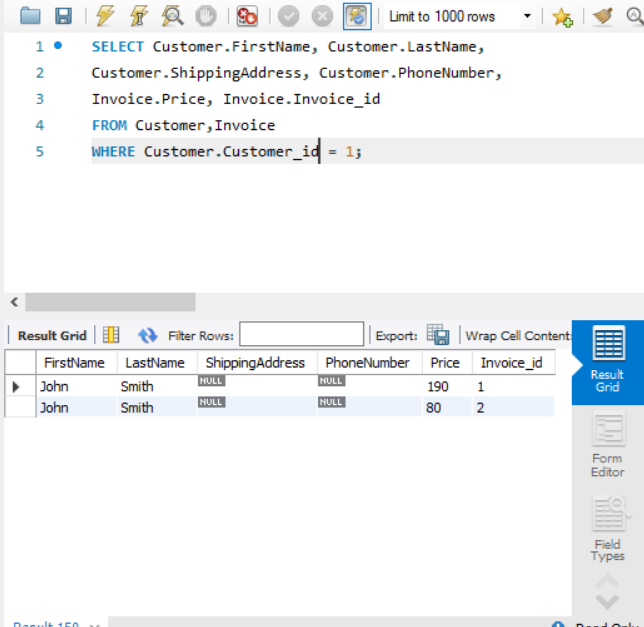
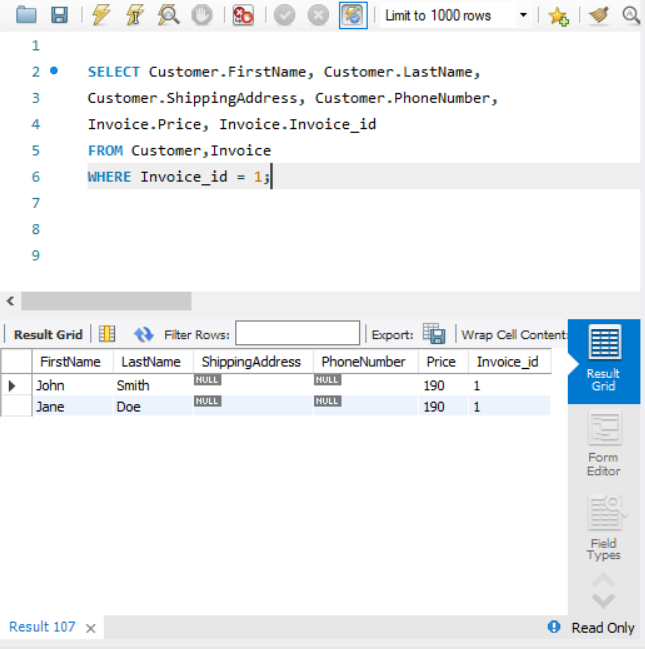
The second method I've tried gives out the exact same thing:
SELECT Customer_id, 190, 1 FROM Customer WHERE Customer_id = 1
UNION
SELECT Customer_id, 80, 2 FROM Customer WHERE Customer_id = 2;
Either none of these methods work or I'm missing something obvious. any ideas?
BIZTA 1. SELECT Customer.FirstName, 2 Customer.ShippingAddress, 3 et Invoice.Price, Invoice. Invoice_id 4 FROM Customer, Invoice 5 WHERE Customer. Customer_id = 13 Result Grid FirstName John John Result 150 Filter Rows: LastName Smith Smith ShippingAddress Limit to 1000 rows Customer. LastName, NULL NULL Customer.PhoneNumber, Export: NULL NULL Wrap Cell Content PhoneNumber Price Invoice_id 190 80 1 2 Result Grid Form Editor Field Types
Step by Step Solution
There are 3 Steps involved in it

Get step-by-step solutions from verified subject matter experts
 Study Help