







Question: An assembly program given in Figure 1 below. include Irvine32.inc data intArray DWORD 200, 300, 4000, 600, 700, 800 code main proc mov E9I, OFFSET
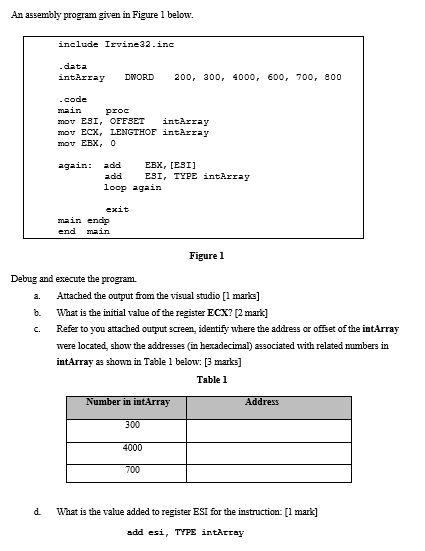
An assembly program given in Figure 1 below. include Irvine32.inc data intArray DWORD 200, 300, 4000, 600, 700, 800 code main proc mov E9I, OFFSET intArray mov ECX, LENGTHOF intArray mov EBX, 0 again: add EBX, (ESI) add ESI, TYPE intArray loop again exit main endir end main Figure 1 Debug and execute the program. Attached the output from the visual studio [1 marks] b. What is the initial value of the register ECX? (2 mark] c. Refer to you attached output screen identify where the address or offset of the intArray were located, show the addresses (in hexadecimal) associated with related numbers in intArray as shown in Table 1 below: [3 marks] Table 1 Number in intArray Address 300 4000 700 d. What is the value added to register ESI for the instruction: [1 mark] add esi, TYPE intaccay An assembly program given in Figure 1 below. include Irvine32.inc data intArray DWORD 200, 300, 4000, 600, 700, 800 code main proc mov E9I, OFFSET intArray mov ECX, LENGTHOF intArray mov EBX, 0 again: add EBX, (ESI) add ESI, TYPE intArray loop again exit main endir end main Figure 1 Debug and execute the program. Attached the output from the visual studio [1 marks] b. What is the initial value of the register ECX? (2 mark] c. Refer to you attached output screen identify where the address or offset of the intArray were located, show the addresses (in hexadecimal) associated with related numbers in intArray as shown in Table 1 below: [3 marks] Table 1 Number in intArray Address 300 4000 700 d. What is the value added to register ESI for the instruction: [1 mark] add esi, TYPE intaccay
Step by Step Solution
There are 3 Steps involved in it

Get step-by-step solutions from verified subject matter experts
 Study Help