





Question: An individual original Kanban chart that includes specific references, peer reviewed sources from the Walden Library: 1. Identify a location anywhere in the world 2.

An individual original Kanban chart that includes specific references, peer reviewed sources from the Walden Library:

1. Identify a location anywhere in the world

2. Within that location, three specific issues for that location in the broad policy areas of environmental sustainability, public safety, public health and technology. The location is a place that exists. Things about the community, including the people who live there, what is important and their contextual needs surrounding
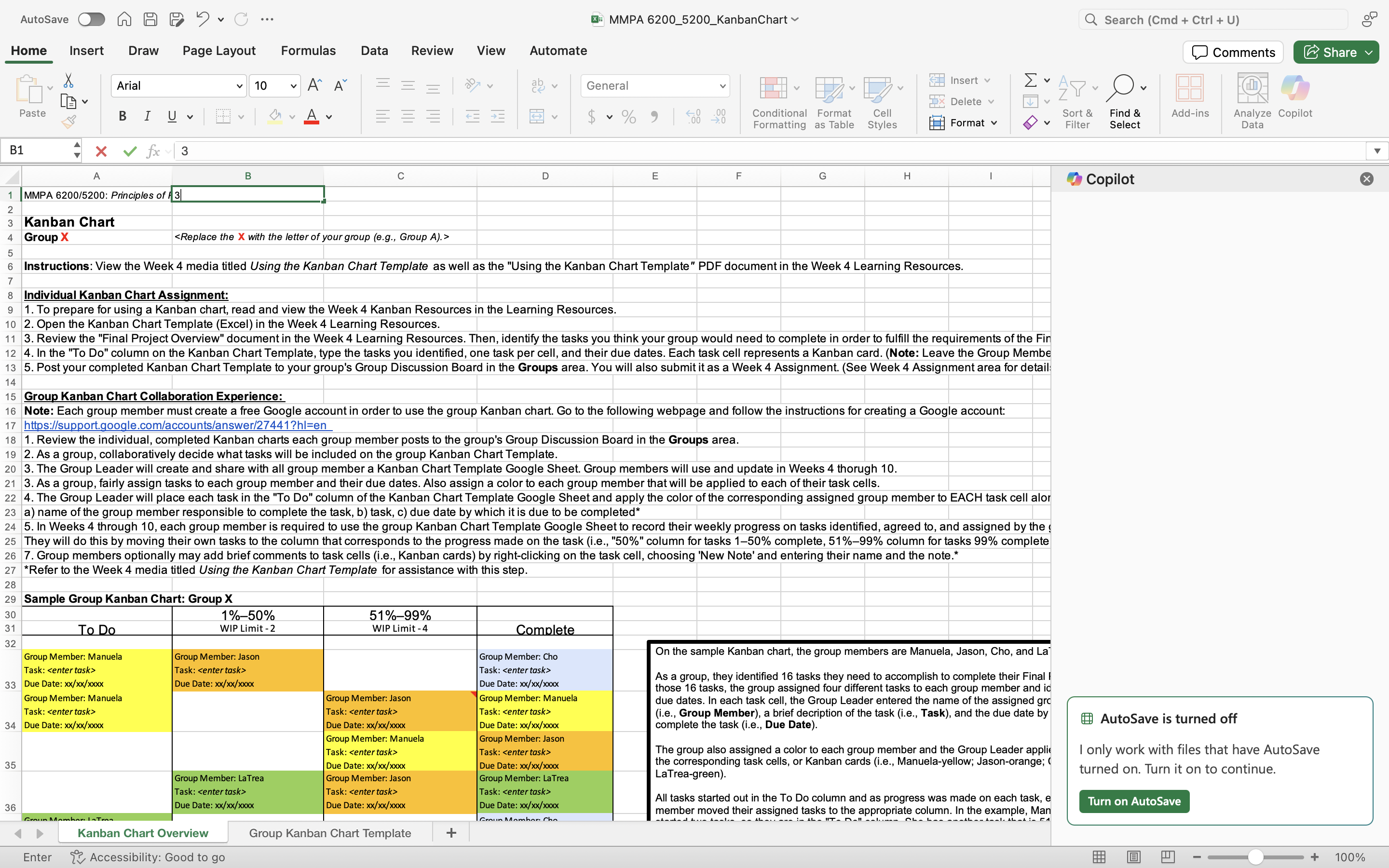
An individual original Kanban chart that includes
AutoSave O A A P J . C ... XMMPA 6200_5200_KanbanChart Q Search (Cmd + Ctrl + U) Home Insert Draw Page Layout Formulas Data Review View Automate Comments Share Arial v 10 AA 207 V ab v General Insert v x Delete v Paste BIU V V A v E $ ~ % " Conditional Format Cell Sort & Find & Add-ins Analyze Copilot Formatting as Table Styles Format Filter Select Data B1 4 X V fx | 3 B C D E F G H Copilot 1 |MMPA 6200/5200: Principles of 1 3 A WN Kanban Chart Group X Instructions: View the Week 4 media titled Using the Kanban Chart Template as well as the "Using the Kanban Chart Template" PDF document in the Week 4 Learning Resources. 7 8 Individual Kanban Chart Assignment: 9 1. To prepare for using a Kanban chart, read and view the Week 4 Kanban Resources in the Learning Resources. 10 2. Open the Kanban Chart Template (Excel) in the Week 4 Learning Resources. 11 3. Review the "Final Project Overview" document in the Week 4 Learning Resources. Then, identify the tasks you think your group would need to complete in order to fulfill the requirements of the Fin 12 4. In the "To Do" column on the Kanban Chart Template, type the tasks you identified, one task per cell, and their due dates. Each task cell represents a Kanban card. (Note: Leave the Group Member 13 5. Post your completed Kanban Chart Template to your group's Group Discussion Board in the Groups area. You will also submit it as a Week 4 Assignment. (See Week 4 Assignment area for detail 14 15 Group Kanban Chart Collaboration Experience: 16 Note: Each group member must create a free Google account in order to use the group Kanban chart. Go to the following webpage and follow the instructions for creating a Google account: 17 https:/support.google.com/accounts/answer/27441?hl=en 18 1. Review the individual, completed Kanban charts each group member posts to the group's Group Discussion Board in the Groups area. 19 2. As a group, collaboratively decide what tasks will be included on the group Kanban Chart Template. 20 3. The Group Leader will create and share with all group member a Kanban Chart Template Google Sheet. Group members will use and update in Weeks 4 thorugh 10. 21 3. As a group, fairly assign tasks to each group member and their due dates. Also assign a color to each group member that will be applied to each of their task cells. 22 4. The Group Leader will place each task in the "To Do" column of the Kanban Chart Template Google Sheet and apply the color of the corresponding assigned group member to EACH task cell alor 23 a) name of the group member responsible to complete the task, b) task, c) due date by which it is due to be completed 24 5. In Weeks 4 through 10, each group member is required to use the group Kanban Chart Template Google Sheet to record their weekly progress on tasks identified, agreed to, and assigned by the They will do this by moving their own tasks to the column that corresponds to the progress made on the task (i.e., "50%" column for tasks 1-50% complete, 51%-99% column for tasks 99% complete 26 7. Group members optionally may add brief comments to task cells (i.e., Kanban cards) by right-clicking on the task cell, choosing 'New Note' and entering their name and the note.* 27 *Refer to the Week 4 media titled Using the Kanban Chart Template for assistance with this step. 28 29 Sample Group Kanban Chart: Group X 30 1%-50% 51%-99% 31 To Do WIP Limit - 2 WIP Limit - 4 Complete 32 Group Member: Manuela Group Member: Jason Group Member: Cho On the sample Kanban chart, the group members are Manuela, Jason, Cho, and Laj Task: Task: Task: 33 Due Date: xx/xx/xxxx Due Date: xx/xx/xxxx As a group, they identified 16 tasks they need to accomplish to complete their Final I Due Date: xx/xx/xxxx those 16 tasks, the group assigned four different tasks to each group member and id Group Member: Manuela Group Member: Jason Group Member: Manuela due dates. In each task cell, the Group Leader entered the name of the assigned gro Task: Task: Task: (i.e., Group Member), a brief decription of the task (i.e., Task), and the due date by 34 Due Date: xx/xx/xxxx Due Date: Xx/xx/Xxxx Due Date: xx/xx/xxxx complete the task (i.e., Due Date). AutoSave is turned off Group Member: Manuela Group Member: Jason Task: Task: The group also assigned a color to each group member and the Group Leader applie I only work with files that have AutoSave 35 Due Date: xx/xx/xxxx Due Date: xx/xx/xxxx the corresponding task cells, or Kanban cards (1.e., Manuela-yellow; Jason-orange; ( Group Member: La Trea Group Member: Jason Group Member: LaTrea LaTrea-green). turned on. Turn it on to continue. Task: Task: Task: All tasks started out in the To Do column and as progress was made on each task, e 36 Due Date: xx/xx/Xxxx Due Date: xx/xx/xxxx Due Date: xx/xx/Xxxx Turn on AutoSave member moved their assigned tasks to the app the appropriate column. In the example, Man Kanban Chart Overview Group Kanban Chart Template + Enter 1 Accessibility: Good to go 100%

Step by Step Solution

There are 3 Steps involved in it

1 Expert Approved Answer
Step: 1 Unlock blur-text-image

Question Has Been Solved by an Expert!

Get step-by-step solutions from verified subject matter experts

Step: 2 Unlock
Step: 3 Unlock

Students Have Also Explored These Related General Management Questions!