



Question: anaconda, python Mail-kmbarrona x m Lesson 2:08-23-18 Dworkingwahcsva x Lebzsimplestatis: 5GL PLUS Comma s i Home xLab3-IntroPandasCUsing Anaconda CSecure https://bleckboard pid-12342642-dt-content-rid-118654/54 1/courses/2018fALSC.221.0001/Lesson%203/Lab3-IntroPandas.pdf 2. Make the
anaconda, python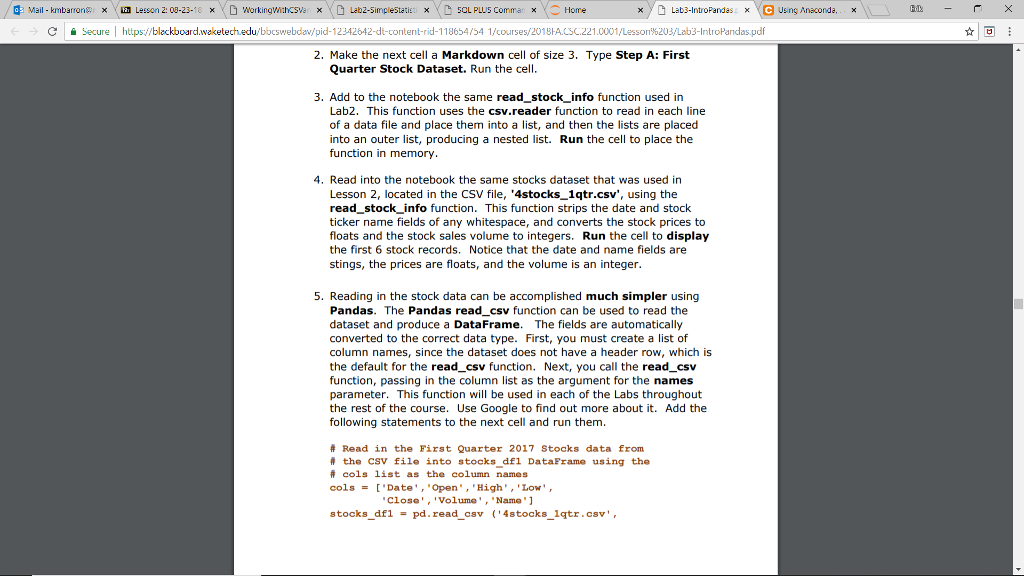
Mail-kmbarrona x m Lesson 2:08-23-18 Dworkingwahcsva x Lebzsimplestatis: 5GL PLUS Comma s i Home xLab3-IntroPandasCUsing Anaconda CSecure https://bleckboard pid-12342642-dt-content-rid-118654/54 1/courses/2018fALSC.221.0001/Lesson%203/Lab3-IntroPandas.pdf 2. Make the next cell a Markdown cell of size 3. Type Step A: First Quarter Stock Dataset. Run the cell 3. Add to the notebook the same read_stock_info function used in Lab2. This function uses the csv.reader function to read in each line of a data file and place them into a list, and then the lists are placed into an outer list, producing a nested list. Run the cell to place the function in memory 4. Read into the notebook the same stocks dataset that was used in Lesson 2, located in the CSV file, '4stocks1qtr.csv', using the read stock info function. This function strips the date and stock ticker name fields of any whitespace, and converts the stock prices to floats and the stock sales volume to integers. Run the cell to display the first 6 stock records. Notice that the date and name fields are stings, the prices are floats, and the volume is an integer 5. Reading in the stock data can be accomplished much simpler using Pandas. The Pandas read_csv function can be used to read the dataset and produce a DataFrame. The fields are automatically converted to the correct data type. First, you must create a list of column names, since the dataset does not have a header row, which is the default for the read_csv function. Next, you call the read_csv function, passing in the column list as the argument for the names parameter. This function will be used in each of the Labs throughout the rest of the course. Use Google to find out more about it. Add the following statements to the next cell and run them # Read in the First Quarter 2017 stocks data from the csv file into stocks dfl DataFrame using the # cols list as the column names cols'Date',"Open,High,'Low', Close''Volume'Name 1 stocks-df1 pd . read-csv ('4stocks_1qtr.csv', =
Step by Step Solution
There are 3 Steps involved in it

Get step-by-step solutions from verified subject matter experts