



Question: Analyze a network diagram and determine all paths in the network in JAVA I already have the GUI Program for it and I want you
Analyze a network diagram and determine all paths in the network in JAVA
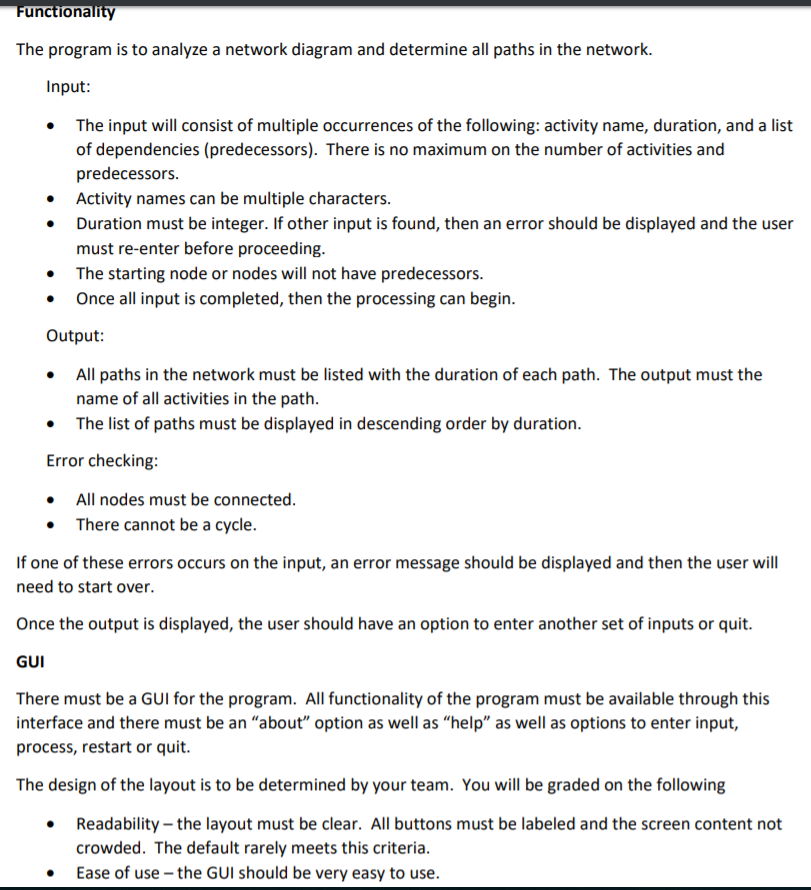
I already have the GUI Program for it and I want you to make the node builderetwork builder:
//importing required classes
import java.awt.BorderLayout; import java.awt.Color; import java.awt.GridLayout; import java.awt.event.ActionEvent; import java.awt.event.ActionListener; import javax.swing.JButton; import javax.swing.JFrame; import javax.swing.JOptionPane; import javax.swing.JPanel; import javax.swing.JTextArea; import javax.swing.JTextField; //defining class, implementing listener to specify action for button public class DisplayGUI extends JFrame implements ActionListener{ //Declaring required component JTextField tf; JButton bt1,bt2,bt3,bt4,bt5,bt6; JTextArea ta1; JPanel pl1,pl2,pl3; //defining the constructor public DisplayGUI(){ //initiallizing the component tf=new JTextField(20); ta1=new JTextArea(); bt1=new JButton("About"); bt2=new JButton("Help"); bt3=new JButton("Project Title"); bt4=new JButton("X"); bt5=new JButton("Calculate"); bt6=new JButton("Reset"); bt4.setBackground(Color.red); pl1=new JPanel(); pl2=new JPanel(); pl3=new JPanel(); //adding the component to panel pl1.add(bt1); pl1.add(bt2); pl1.add(bt3); pl1.add(bt4); pl2.setLayout(new GridLayout(2,1)); pl2.add(bt5); pl2.add(bt6); pl3.add(pl2); pl3.add(tf); //setting the GUI layout and adding the component setLayout(new BorderLayout()); add(pl1,BorderLayout.NORTH); add(pl3,BorderLayout.SOUTH); add(ta1,BorderLayout.CENTER); //adding the listener to the button bt1.addActionListener(this); bt2.addActionListener(this); bt3.addActionListener(this); bt4.addActionListener(this); bt5.addActionListener(this); bt6.addActionListener(this); } //defining the main function public static void main(String[] args) { //Creating an object of the class DisplayGUI ob=new DisplayGUI(); //setting the size of the GUI ob.setSize(700,500); //making it visible ob.setVisible(true); //adding the exit function for closing the GUI ob.setDefaultCloseOperation(JFrame.EXIT_ON_CLOSE); } //function to perform action according to the buttons @Override public void actionPerformed(ActionEvent ae) { //getting the component who created the action String str=ae.getActionCommand(); //if about button is clicked if(str.equals("About")){ //showing the message to the user JOptionPane.showMessageDialog(bt1, "About Program"); } //if the help button is clicked else if(str.equals("Help")){ //showing message to the user JOptionPane.showMessageDialog(bt1, "This is help page"); } else if(str.equals("Project Title")){ } //if calculate button is clicked add the text to the text area else if(str.equals("Calculate")){ ta1.setText(tf.getText()); } //if user want to exit else if(str.equals("X")){ System.exit(1); } //resetting the text area else{ ta1.setText(""); } } }
Example:
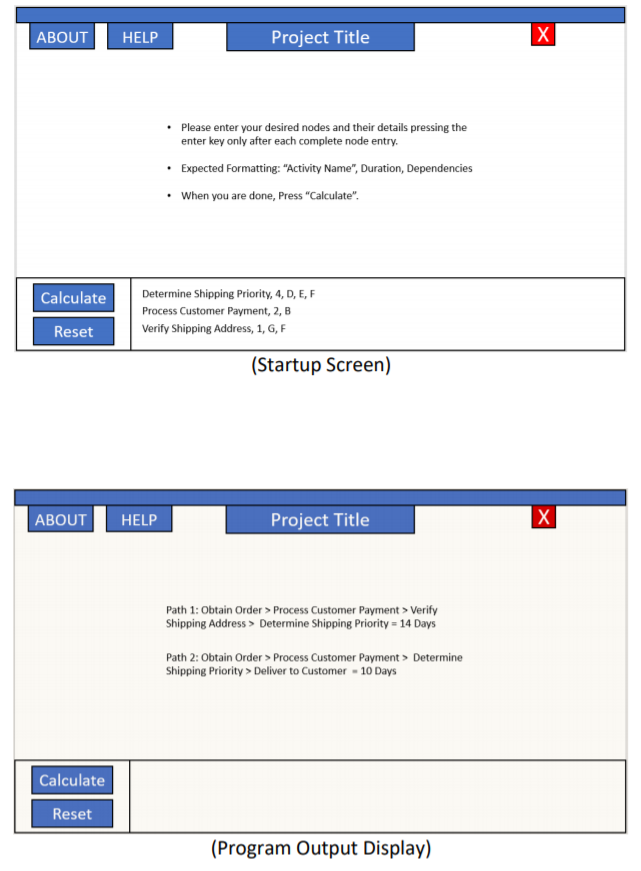
The program is to analyze a network diagram and determine all paths in the network. Input: The input will consist of multiple occurrences of the following: activity name, duration, and a list of dependencies (predecessors). There is no maximum on the number of activities and predecessors Activity names can be multiple characters. . .Duration must be integer. If other input is found, then an error should be displayed and the user must re-enter before proceeding. The starting node or nodes will not have predecessors. Once all input is completed, then the processing can begin. . Output .All paths in the network must be listed with the duration of each path. The output must the . The list of paths must be displayed in descending order by duration. Error checking: name of all activities in the path All nodes must be connected. There cannot be a cycle. If one of these errors occurs on the input, an error message should be displayed and then the user will need to start over. Once the output is displayed, the user should have an option to enter another set of inputs or quit. GUI There must be a GUI for the program. All functionality of the program must be available through this interface and there must be an "about" option as well as "help" as well as options to enter input, process, restart or quit. The design of the layout is to be determined by your team. You will be graded on the following Readability-the layout must be clear. All buttons must be labeled and the screen content not crowded. The default rarely meets this criteria. Ease of use the GUI should be very easy to use The program is to analyze a network diagram and determine all paths in the network. Input: The input will consist of multiple occurrences of the following: activity name, duration, and a list of dependencies (predecessors). There is no maximum on the number of activities and predecessors Activity names can be multiple characters. . .Duration must be integer. If other input is found, then an error should be displayed and the user must re-enter before proceeding. The starting node or nodes will not have predecessors. Once all input is completed, then the processing can begin. . Output .All paths in the network must be listed with the duration of each path. The output must the . The list of paths must be displayed in descending order by duration. Error checking: name of all activities in the path All nodes must be connected. There cannot be a cycle. If one of these errors occurs on the input, an error message should be displayed and then the user will need to start over. Once the output is displayed, the user should have an option to enter another set of inputs or quit. GUI There must be a GUI for the program. All functionality of the program must be available through this interface and there must be an "about" option as well as "help" as well as options to enter input, process, restart or quit. The design of the layout is to be determined by your team. You will be graded on the following Readability-the layout must be clear. All buttons must be labeled and the screen content not crowded. The default rarely meets this criteria. Ease of use the GUI should be very easy to use
Step by Step Solution
There are 3 Steps involved in it

Get step-by-step solutions from verified subject matter experts