







Question: Analyze the routing table on your computer. On a Mac, you can view it with a netstat -rn command. What entries are in your routing
Analyze the routing table on your computer. On a Mac, you can view it with a netstat -rn command. What entries are in your routing table and why are they there? Is your default route in the table and, if yes, what is it?
Please provide the step-by-step solution of the above question by taking the below diagram into consideration.
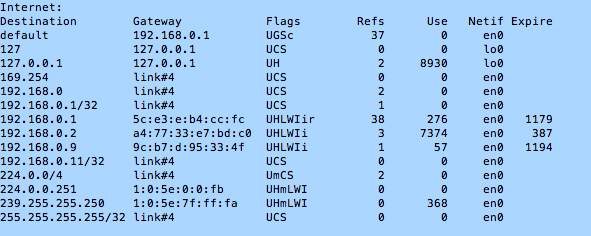
Internet: Destination default 127 127.0.0.1 169.254 192.168.0 192.168.0.1/32 192.168.0.1 192.168.0.2 192.168.0.9 192.168.0.11/32 224.0.0/4 224.0.0.251 239.255.255.250 255.255.255.255/32 Flags UGSc UCS UH UCS UCS UCS UHLWIir UHLWIi UHLWIi UCS UmCS UHmLWI UHmLWI UCS Refs 37 Gateway 192.168.0.1 127.0.0.1 127.0.0.1 Link#4 link#4 Link#4 5c:e3:e:b4:cc:fc a4:77:33:e7:bd:c0 9c:b7:d: 95:33:4f link#4 link#4 1:0:5e:0:0:fb 1:0:5e:7f:ff: fa link#4 Use Netif Expire en0 lo0 lo0 en0 en0 en0 en0 1179 en0 en0 1194 en0 en0 en0 en0 en0 8930 276 7374 57 387 368
Step by Step Solution
There are 3 Steps involved in it

Get step-by-step solutions from verified subject matter experts
 Study Help