







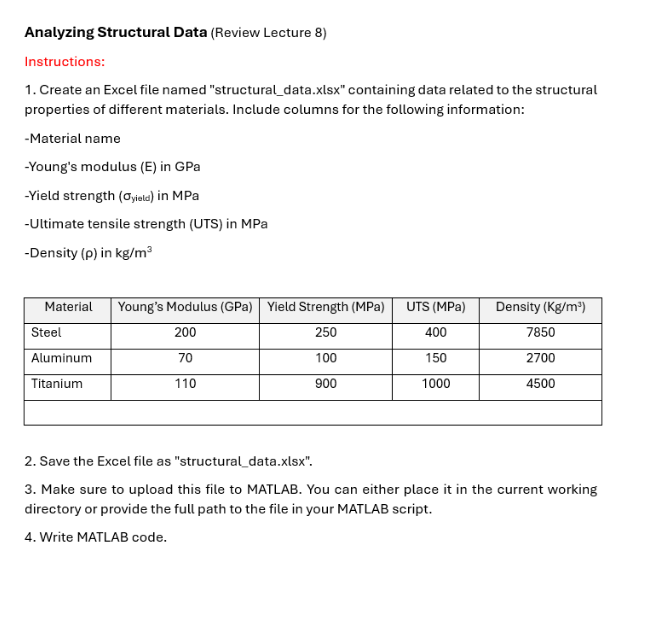
Question: Analyzing Structural Data ( Review Lecture 8 ) Instructions: 1 . Create an Excel file named structural _ data.xlsx containing data related to the
Analyzing Structural Data Review Lecture
Instructions:
Create an Excel file named "structuraldata.xlsx containing data related to the structural properties of different materials. Include columns for the following information:
Material name
Young's modulus E in GPa
Yield strength sigmatext yield in MPa
Ultimate tensile strength UTS in MPa
Density rho in mathrmkgmathrmm
Save the Excel file as "structuraldata.xlsx
Make sure to upload this file to MATLAB. You can either place it in the current working directory or provide the full path to the file in your MATLAB script.
Write MATLAB code.
Step by Step Solution
There are 3 Steps involved in it
1 Expert Approved Answer
Step: 1 Unlock

Question Has Been Solved by an Expert!
Get step-by-step solutions from verified subject matter experts
Step: 2 Unlock
Step: 3 Unlock
 Study Help