







Question: and here is the skeleton //Include the following #include #include #include //you must include this library if you wish to do file i/o #include using
and here is the skeleton
//Include the following
#include
#include
#include //you must include this library if you wish to do file i/o
#include
using namespace std;
/*********************************************************
//Following is the declaration of a order record
**********************************************************/
const int CAPACITY = 100;//declaring capacity as a constant
class order_record
{
public:
string pname;
string cname;
double plant_cost;
int quantity;
double tax_rate;
double net_cost;
double discount_rate;
double discount;
double purchase_tax;
double total_cost;
};
//Prototypes for your functions: input, output, process, and count_inventory will go here
//void input(order_record STR[],int &count); //sample prototype for input
//you add other prototypes
//Function Implementations will go here
///*************************************************************************************
//Name: input
//Precondition: The state what is true before the function is called.
//Postcondition: State what is true after the function has executed.
//Description: Describe what the function does (purpose).
//*************************************************************************************
///*************************************************************************************
//Name: process
//Precondition: The state what is true before the function is called.
//Postcondition: State what is true after the function has executed.
//Description: Describe what the function does (purpose).
//*************************************************************************************
///*************************************************************************************
//Name: output
//Precondition: State what is true before the function is called.
//Postcondition: State what is true after the function has executed.
//Description: Describe what the function does (purpose).
//*************************************************************************************
///*************************************************************************************
//Name: count_inventory
//Precondition: The state what is true before the function is called.
//Postcondition: State what is true after the function has executed.
//Description: Describe what the function does (purpose).
//*************************************************************************************
//Here is your driver to test the program
//Here is your driver to test the program
int main()
{
order_record STR[CAPACITY];
int count = 0;
//if (in.fail())
//{
// cout
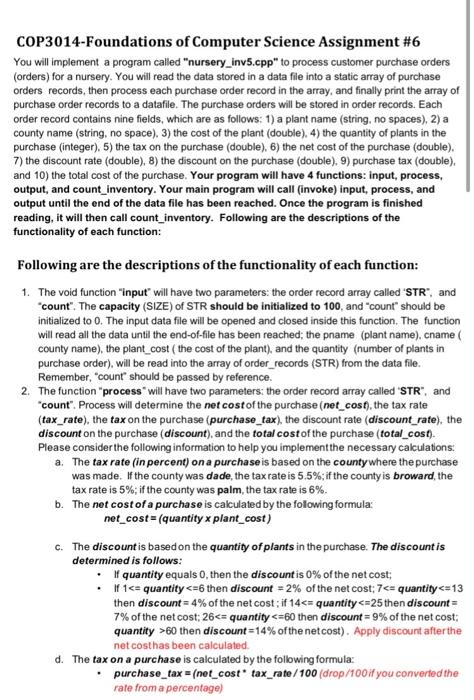
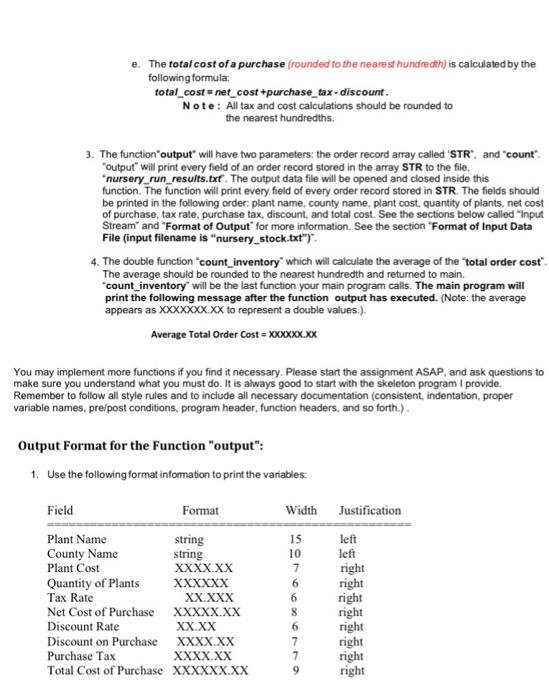
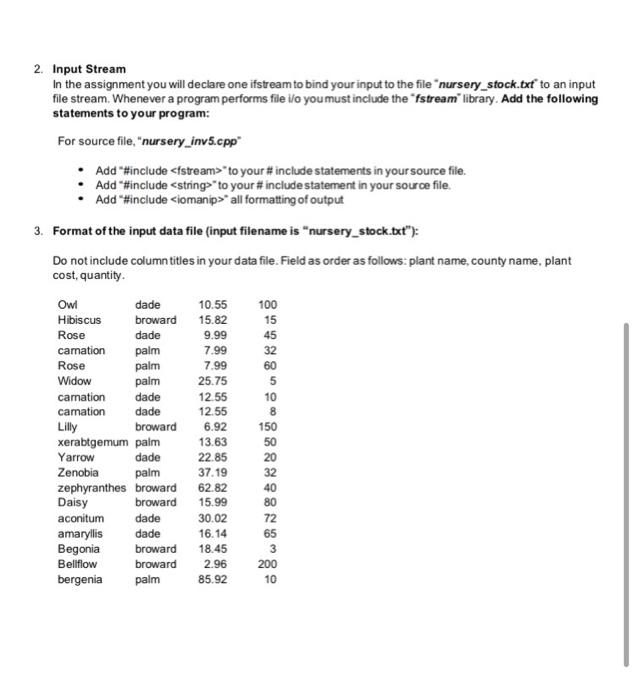
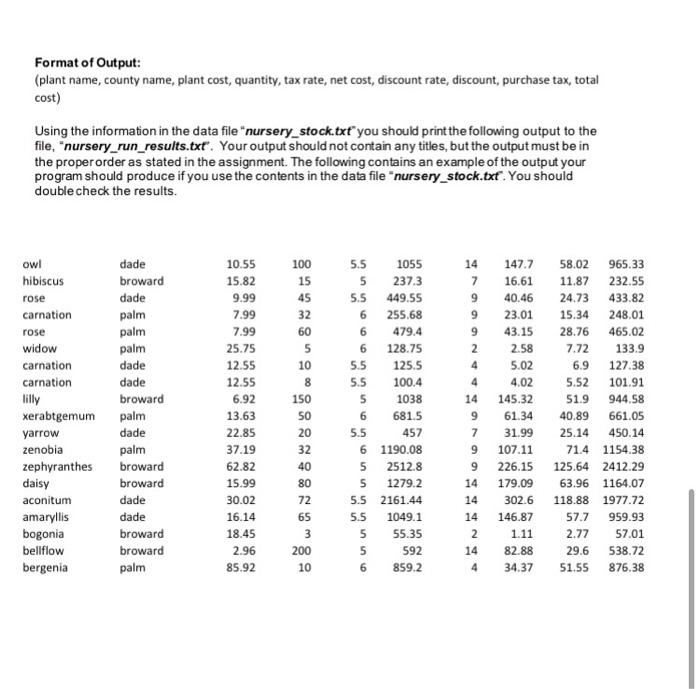
COP3014-Foundations of Computer Science Assignment #6 You will implement a program called "nursery_inv5.cpp" to process customer purchase orders (orders) for a nursery. You will read the data stored in a data file into a static array of purchase orders records, then process each purchase order record in the array, and finally print the array of purchase order records to a datafile. The purchase orders will be stored in order records. Each order record contains nine fields, which are as follows: 1) a plant name (string, no spaces), 2) a county name (string, no space). 3) the cost of the plant (double). 4) the quantity of plants in the purchase (integer), 5) the tax on the purchase (double)6) the net cost of the purchase (double). 7) the discount rate (double), 8) the discount on the purchase (double). 9) purchase tax (double). and 10) the total cost of the purchase. Your program will have 4 functions: input, process, output, and count_inventory. Your main program will call (invoke) input, process, and output until the end of the data file has been reached. Once the program is finished reading, it will then call count_inventory. Following are the descriptions of the functionality of each function: Following are the descriptions of the functionality of each function: 1. The void function "input will have two parameters: the order record array called "STR", and "count". The capacity (SIZE) of STR should be initialized to 100, and "count" should be initialized to 0. The input data file will be opened and closed inside this function. The function will read all the data until the end-of-file has been reached the pname (plant name), cname ( county name), the plant_cost (the cost of the plant), and the quantity (number of plants in purchase order). will be read into the array of order_records (STR) from the data file. Remember,"count" should be passed by reference. 2. The function process will have two parameters: the order record array called 'STR", and "count". Process will determine the net cost of the purchase (net_cost), the tax rate (tax_rate), the tax on the purchase (purchase_tax), the discount rate (discount_rate), the discount on the purchase (discount), and the total cost of the purchase (total_cost). Please consider the following information to help you implement the necessary calculations a. The tax rate (in percent) on a purchase is based on the county where the purchase was made. If the county was dade, the tax rate is 5.5%; if the county is broward, the tax rate is 5%; if the county was palm, the tax rate is 6%. b. The net cost of a purchase is calculated by the folowing formula: net_cost=(quantity x plant_cost) c. The discount is based on the quantity of plants in the purchase. The discount is determined is follows: If quantity equals 0, then the discount is 0% of the net cost . If 160 then discount=14% of the netcost). Apply discount after the net costhas been calculated d. The tax on a purchase is calculated by the following formula purchase_tax = (net_cost tax rate / 100 (drop/100 if you converted the rate from a percentage) e. The total cost of a purchase (rounded to the nearest hundredth) is calculated by the following formula total_cost = net_cost +purchase_tax - discount. Note: All tax and cost calculations should be rounded to the nearest hundredths. 3. The function"output will have two parameters: the order record array called 'STR", and "count". "Output" will print every field of an order record stored in the array STR to the file, *nursery_run_results.txt. The output data file will be opened and closed inside this function. The function will print every field of every order record stored in STR. The fields should be printed in the following order plant name, county name, plant cost, quantity of plants, net cost of purchase, tax rate, purchase tax, discount, and total cost. See the sections below called "Input Stream" and "Format of Output for more information. See the section "Format of Input Data File (input filename is "nursery_stock.txt")" 4. The double function count_inventory' which will calculate the average of the total order cost" The average should be rounded to the nearest hundredth and returned to main. "count_inventory will be the last function your main program calls. The main program will print the following message after the function output has executed. (Note: the average appears as XxxxXxx.xx to represent a double values.). Average Total Order Cost = XXXXXX.XX You may implement more functions if you find it necessary. Please start the assignment ASAP, and ask questions to make sure you understand what you must do. It is always good to start with the skeleton program I provide Remember to follow all style rules and to include all necessary documentation (consistent, indentation, proper variable names, pre/post conditions, program header, function headers, and so forth.). Output Format for the Function "output": 1. Use the following format information to print the variables: Width Justification left left right Field Format Plant Name string County Name string Plant Cost XXXX.XX Quantity of Plants XXXXXX Tax Rate XX.XXX Net Cost of Purchase XXXXX.XX Discount Rate XX.XX Discount on Purchase XXXX.XX Purchase Tax XXXX.XX Total Cost of Purchase XXXXXX.XX 15 10 7 6 6 8 6 7 7 9 right right right right right right right 2. Input Stream In the assignment you will declare one ifstream to bind your input to the file nursery_stock.txt to an input file stream. Whenever a program performs file i/o you must include the "fstream" library. Add the following statements to your program: For source file, "nursery_inv5.cpp Add "#include //}
//else
//{
// input(STR, count);
// process(STR, count);
// output(STR, count);
//}
cout.setf(ios::showpoint);
cout.precision(2);
cout.setf(ios::fixed);
//cout
return 0;
}
Step by Step Solution
There are 3 Steps involved in it
1 Expert Approved Answer
Step: 1 Unlock

Question Has Been Solved by an Expert!
Get step-by-step solutions from verified subject matter experts
Step: 2 Unlock
Step: 3 Unlock
 Study Help