







Question: Android Studio app: I'm not too sure why the Date Picker shifts all of the other elements way too below the screen...Could somebody please help
Android Studio app:
I'm not too sure why the "Date Picker" shifts all of the other elements way too below the screen...Could somebody please help me fix the content. Thank you! :)
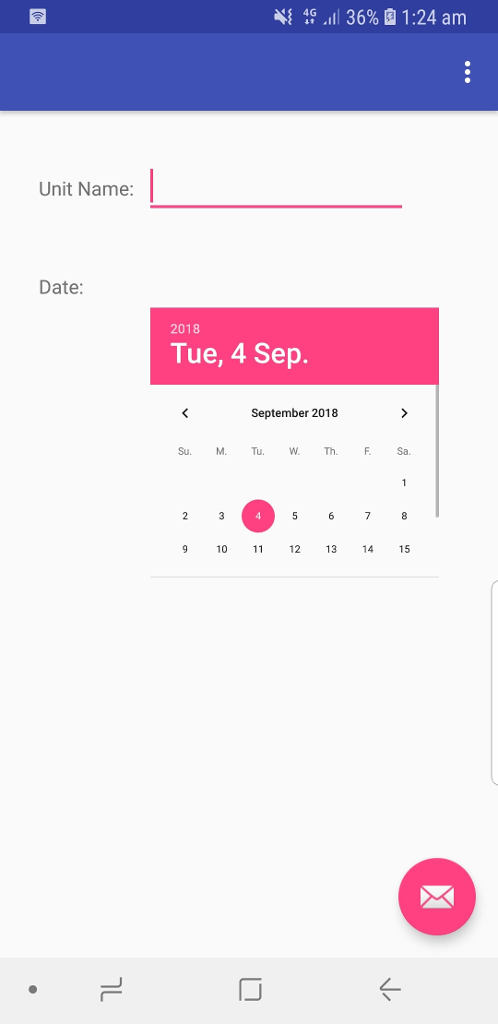
//content.xml
LinearLayout xmlns:android="http://schemas.android.com/apk/res/android" android:orientation="vertical" android:layout_width="match_parent" android:layout_height="match_parent" > TextView android:layout_width="match_parent" android:layout_height="wrap_content" android:id="@+id/response3" /> TextView android:layout_width="match_parent" android:layout_height="wrap_content" android:id="@+id/examrec" /> TableLayout android:id="@+id/add_table" android:layout_width="match_parent" android:layout_height="379dp" android:paddingTop="50dp"> TableRow> TextView android:layout_height="wrap_content" android:layout_marginLeft="25dp" android:padding="3dip" android:text="Unit Name:" /> EditText android:id="@+id/un" android:layout_width="190dp" android:layout_marginRight="130dp" android:layout_marginLeft="5dp" android:layout_height="wrap_content" /> TableRow> TableRow> TextView android:layout_marginLeft="25dp" android:padding="3dip" android:layout_marginTop="37dp" android:text="Date:" /> DatePicker android:id="@+id/date" android:layout_width="314dp" android:layout_height="325dp" android:layout_gravity="center" android:layout_marginLeft="-70dp" android:scaleX="0.6" android:scaleY="0.6" /> TableRow> TableRow android:layout_width="155dp" android:layout_height="182dp"> TextView android:layout_marginLeft="25dp" android:layout_marginTop="100dp" android:padding="3dip" android:text="Time:" /> TableRow> TableRow> TextView android:layout_marginLeft="25dp" android:padding="3dip" android:layout_marginTop="20dp" android:text="Location:" /> EditText android:id="@+id/loc2" android:layout_width="match_parent" android:layout_height="wrap_content" android:layout_marginTop="20dp" android:minWidth="150dip" /> TableRow> Button android:id="@+id/add_button3" android:layout_width="207dp" android:layout_height="wrap_content" android:layout_marginLeft="80dp" android:layout_marginRight="86dp" android:layout_marginTop="14dp" android:padding="6dip" android:text="Add Exam" /> TableLayout> LinearLayout>
4{ 4G "Il 36% , 1:24 am Unit Name: Date: 2018 Tue, 4 Sep. September 2018 Su. MTuhF. Sa Th. 9 10 12 13 4 15
Step by Step Solution
There are 3 Steps involved in it
1 Expert Approved Answer
Step: 1 Unlock

Question Has Been Solved by an Expert!
Get step-by-step solutions from verified subject matter experts
Step: 2 Unlock
Step: 3 Unlock
 Study Help