







Question: Android Studio You need to broadcast the random numbers generated by your customer service so that the main activity registered to intercept the broadcast can
Android Studio
You need to broadcast the random numbers generated by your customer service so that the main activity registered to intercept the broadcast can get the random numbers and display them on an EditText. Here are the important characteristics: There should be two buttons and one EditText, start service, stop service, shown on the app (similar to the following screenshot).
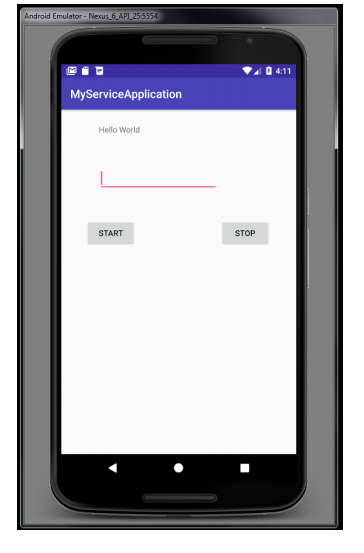
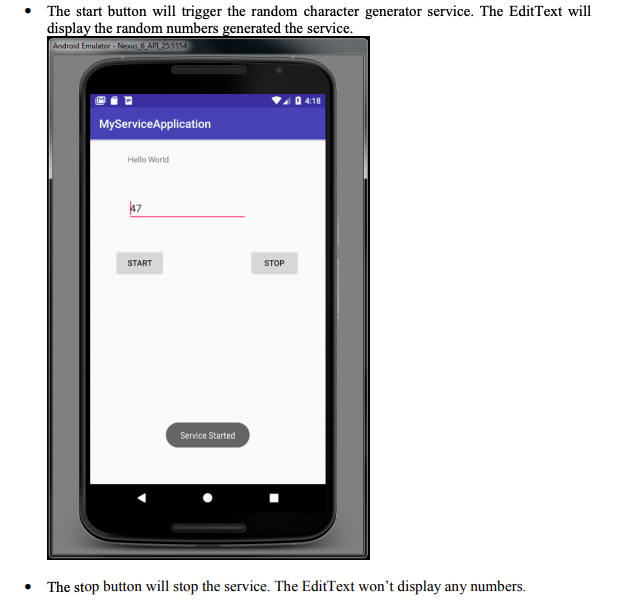
Here is what I got so far. I complete the service function to generate the random number in a logcat, but don't know how to broadcast it in the textfield.
It should be displayed in the textview dynamically. Please help!!
_______________________________________________________________________________________________
activity_main.xml
_______________________________________________________________________________________________
MainActivity.java
package com.example.danielchoo.lab8; import android.content.Context; import android.content.Intent; import android.content.IntentFilter; import android.support.v7.app.AppCompatActivity; import android.os.Bundle; import android.util.Log; import android.view.View; import android.widget.Button; import android.widget.EditText; import android.widget.TextView; import android.content.BroadcastReceiver; import android.widget.Toast; public class MainActivity extends AppCompatActivity { private Button btnStart, btnStop; private TextView myTV; private RandomNumberService myService; public static final String MYFILTER = "com.my.broadcast.RECEIVER"; public static final String MSG = "_message"; private MyBroadcastReceiver myBroadcastReceiver; @Override protected void onCreate(Bundle savedInstanceState) { super.onCreate(savedInstanceState); setContentView(R.layout.activity_main); myTV = (TextView)findViewById(R.id.textView); btnStart = (Button) findViewById(R.id.button); btnStart.setOnClickListener(new View.OnClickListener() { @Override public void onClick(View v) { Intent intent = new Intent(MainActivity.this, RandomNumberService.class); MainActivity.this.startService(intent); } }); btnStop = (Button) findViewById(R.id.button2); btnStop.setOnClickListener(new View.OnClickListener() { @Override public void onClick(View v) { Intent intent = new Intent(MainActivity.this, RandomNumberService.class); MainActivity.this.stopService(intent); } }); // IntentFilter intentFilter = new IntentFilter(); //intentFilter.addAction(MYFILTER); //registerReceiver(myBroadcastReceiver, intentFilter); } @Override protected void onStart() { myBroadcastReceiver = new MyBroadcastReceiver(); IntentFilter intentFilter = new IntentFilter(); intentFilter.addAction(RandomNumberService.ACTIVITY_SERVICE); registerReceiver(myBroadcastReceiver, intentFilter); super.onStart(); } @Override protected void onStop() { unregisterReceiver(myBroadcastReceiver); super.onStop(); } private void setRandomNumber() { onStart(); myTV.setText(myService.getRandomNumber()); } } _______________________________________________________________________________________________
RandomNumberService.java
package com.example.danielchoo.lab8; import android.app.Service; import android.content.Intent; import android.os.Binder; import android.os.IBinder; import android.support.annotation.Nullable; import android.util.Log; import android.widget.Toast; import java.util.Random; public class RandomNumberService extends Service { private int myRandomNumber; private boolean isRandomGeneratorOn; private final int MIN = 0; private final int MAX = 100; private final String TAG = "RandomNumber Service: "; class RandomNumberServiceBinder extends Binder { public RandomNumberService getService() { return RandomNumberService.this; } } private IBinder myBinder = new RandomNumberServiceBinder(); @Override public int onStartCommand(Intent intent, int flags, int startId) { Log.i(TAG, "In OnStartCommand Thread ID is " + Thread.currentThread().getId()); isRandomGeneratorOn = true; new Thread(new Runnable() { @Override public void run() { startRandomGenerator(); } } ).start(); Toast.makeText(this, "Service started...", Toast.LENGTH_SHORT).show(); return START_STICKY; } private void startRandomGenerator() { while (isRandomGeneratorOn) { try { Thread.sleep(1000); if (isRandomGeneratorOn) { myRandomNumber = new Random().nextInt(MAX) + MIN; Log.i(TAG, "Thread ID is " + Thread.currentThread().getId() + ", Random number is " + myRandomNumber); } } catch (InterruptedException e) { Log.i(TAG, "Thread Interrupted."); } } } private void stopRandomGenerator() { isRandomGeneratorOn = false; } public int getRandomNumber() { return myRandomNumber; } @Override public void onDestroy() { super.onDestroy(); stopRandomGenerator(); Log.i(TAG, "Service Destroyed."); Toast.makeText(this,"Service Destroyed...", Toast.LENGTH_SHORT).show(); } @Nullable @Override public IBinder onBind(Intent intent) { Log.i(TAG, "In onBind ..."); return myBinder; } }Android Emulator-Nexus 6 APL 25-5554 MyServiceApplication Hello World START STOP Android Emulator-Nexus 6 APL 25-5554 MyServiceApplication Hello World START STOP
Step by Step Solution
There are 3 Steps involved in it

Get step-by-step solutions from verified subject matter experts
 Study Help