







Question: Answer !!!!!!!!!!!!!!!!!!!!!!!!!! 1. Excel Basics: Column: Row: Cell: Range: Active Cell: Worksheet: Workbook: 2. Create a new file/workbook using Excel 2016. On the 1 sheet,
Answer !!!!!!!!!!!!!!!!!!!!!!!!!!
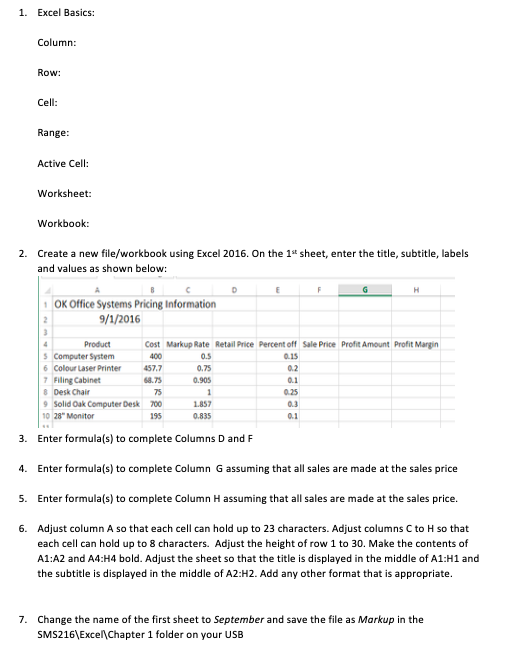
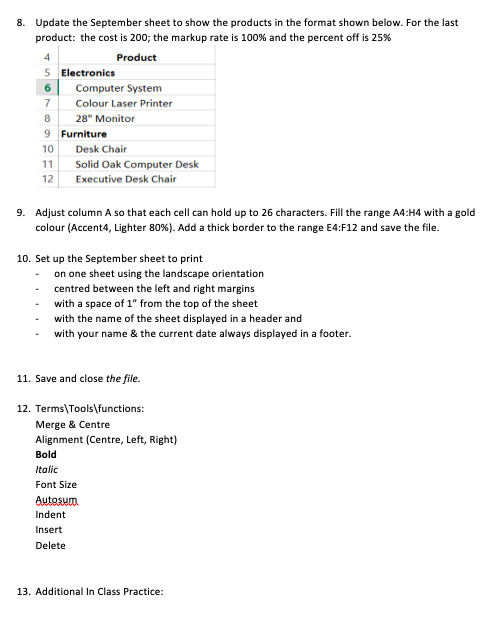
1. Excel Basics: Column: Row: Cell: Range: Active Cell: Worksheet: Workbook: 2. Create a new file/workbook using Excel 2016. On the 1" sheet, enter the title, subtitle, labels and values as shown below: C D H 1 OK Office Systems Pricing Information 9/1/2016 Product Cost Markup Rate Retail Price Percent off Sale Price Profit Amount Profit Margin Computer System 400 0.5 0.15 6 Colour Laser Printer 457.7 0.75 0.2 7 Filing Cabinet 68.75 0.905 Desk Chair 75 9 Solid Oak Computer Desk 700 1.857 0.3 10 28" Monitor 195 0.835 3. Enter formula(s) to complete Columns D and F 4. Enter formula(s) to complete Column G assuming that all sales are made at the sales price 5. Enter formula(s) to complete Column H assuming that all sales are made at the sales price. 6. Adjust column A so that each cell can hold up to 23 characters. Adjust columns C to H so that each cell can hold up to 8 characters. Adjust the height of row 1 to 30. Make the contents of Al:A2 and A4:H4 bold. Adjust the sheet so that the title is displayed in the middle of A1:H1 and the subtitle is displayed in the middle of A2:H2. Add any other format that is appropriate. 7. Change the name of the first sheet to September and save the file as Markup in the SM5216\\ Excel\\ Chapter 1 folder on your USBB. Update the September sheet to show the products in the format shown below. For the last product: the cost is 200; the markup rate is 100% and the percent off is 25%% 4 Product 5 Electronics 6 Computer System 7 Colour Laser Printer 8 28" Monitor 9 Furniture 10 Desk Chair 11 Solid Oak Computer Desk 12 Executive Desk Chair 9. Adjust column A so that each cell can hold up to 26 characters. Fill the range A4:H4 with a gold colour (Accent4, Lighter 80%). Add a thick border to the range E4:F12 and save the file. 10. Set up the September sheet to print on one sheet using the landscape orientation centred between the left and right margins with a space of 1" from the top of the sheet with the name of the sheet displayed in a header and with your name & the current date always displayed in a footer. 11. Save and close the file. 12. Terms\\Tools\\functions: Merge & Centre Alignment (Centre, Left, Right) Bold Italic Font Size Autosum Indent Insert Delete 13. Additional In Class Practice
Step by Step Solution
There are 3 Steps involved in it

Get step-by-step solutions from verified subject matter experts
 Study Help