







Question: Answer all question 1. Construct the frame given bellow using JavaFx and do required operation on click of the button Save, Delete, Update and Reset
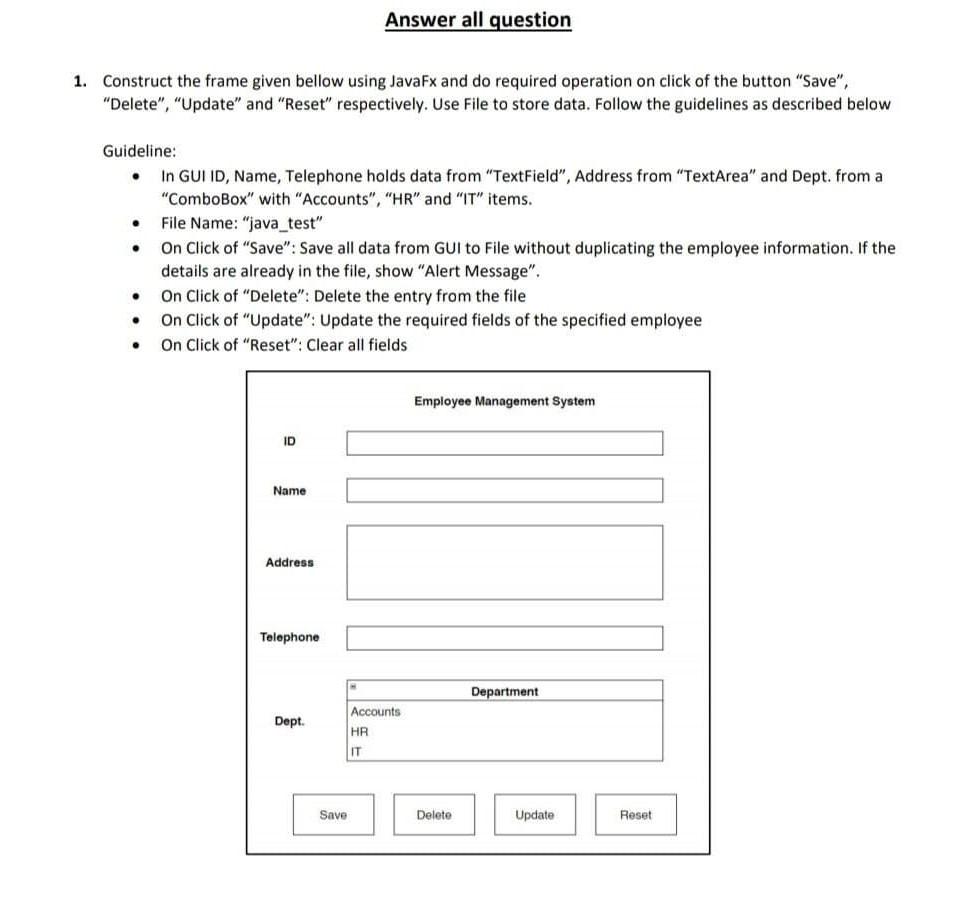
Answer all question 1. Construct the frame given bellow using JavaFx and do required operation on click of the button "Save", "Delete", "Update" and "Reset" respectively. Use File to store data. Follow the guidelines as described below . Guideline: In GUI ID, Name, Telephone holds data from "TextField", Address from "TextArea" and Dept. from a "ComboBox" with "Accounts", "HR" and "IT" items. File Name: "java_test" On Click of "Save": Save all data from GUI to File without duplicating the employee information. If the details are already in the file, show "Alert Message". On Click of "Delete": Delete the entry from the file On Click of "Update": Update the required fields of the specified employee On Click of "Reset": Clear all fields Employee Management System ID Name Address Telephone Department Dept. Accounts HA IT Save Delete Update Reset
Step by Step Solution
There are 3 Steps involved in it

Get step-by-step solutions from verified subject matter experts
 Study Help