







Question: answer EA10-A1 and EA10-a2 IN EXCEL SPREAD SHEET PLEASE how is the question not clear ? i can see everything why cant the imagine description
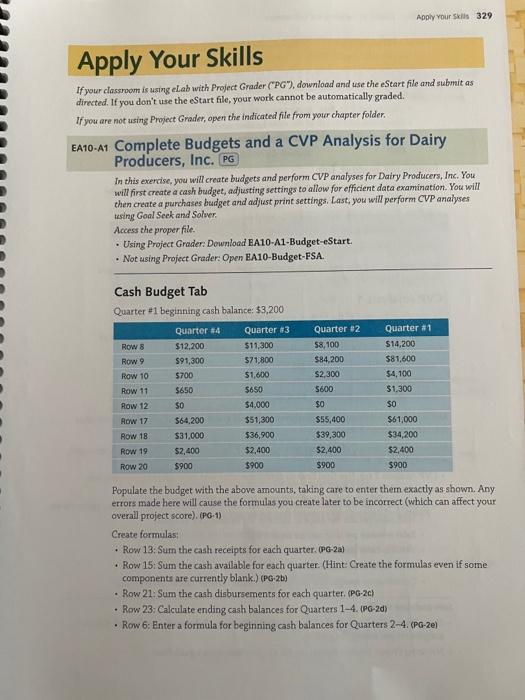
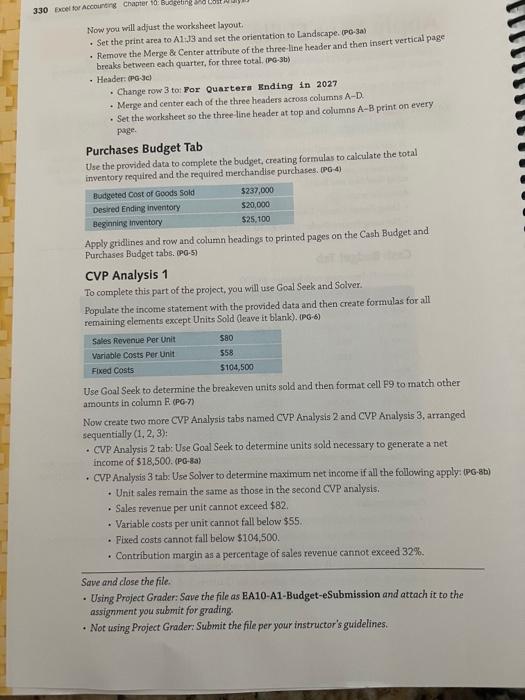
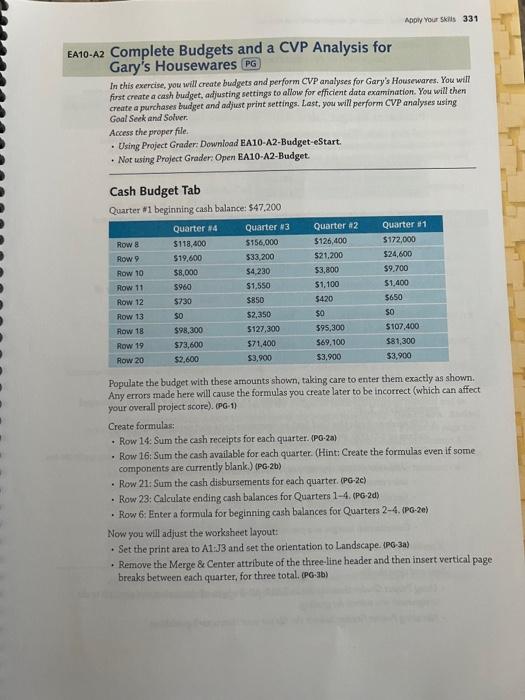
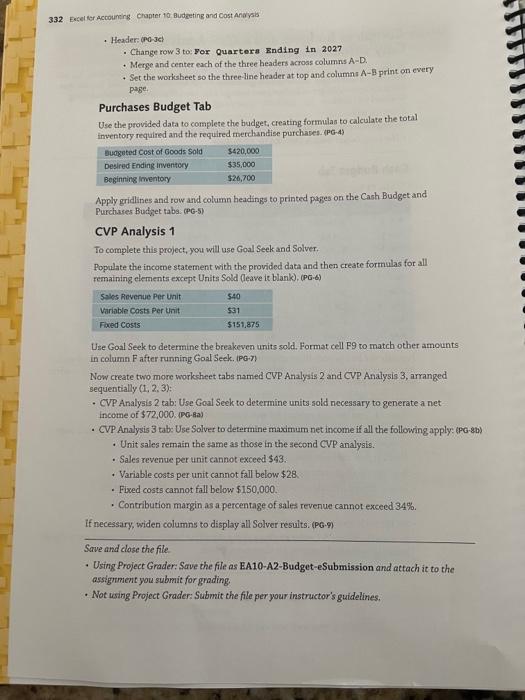
Apply Your Skills If your classroom is using eLab with Project Grader ("PG"), download and use the eStart file and subnuit as directed. If you don't use the eStart file, your work cannot be automatically graded. If you are not using Project Grader, open the indicated file from your chapter folder. EA10-A1 Complete Budgets and a CVP Analysis for Dairy Producers, Inc. PG In this exercise, you will ereate budgets and perform CVP analyses for Dairy Producers, Inc. You will first create a cash budget, aujjusting settings to allow for efficient data examination. You will then create a purchases budget and adjust print settings. Last, you will perform CVP analyses tasing Goal Seek and Solver. Access the proper file. - Using Project Grader: Dewnload EA10-A1-Budget-eStart. - Not using Project Grader: Open EA10-Budget-FSA. Cash Budget Tab Quarter $1 beginning cash balance; $3,200 Populate the budget with the above amounts, taking care to enter them exactly as shown. Any errors made here will cause the formulas you create later to be incorrect (which can affect your overall project score), (PG-1) Create formulas: - Row 13: Surn the cash receipts for each quarter: (PG2a) - Row 15: Sum the cash avalable for each quarter. (Hint: Create the formulas even if some components are currently blank.) (PG-2b) - Row 21: Sum the cash disbursements for each quarter. (PG-2c) - Row 23: Calculate ending cash balances for Quarters 1-4. (PG-2d) - Row 6: Enter a formula for beginning cash balances for Quarters 2-4, (PG-2e) Now you will adjust the worksheer layout - Set the print area to A1+13 and set the orientation to Landscape. (PG-3a) - Remove the Merge \& Center attribute of the three-line lieader and then insert vertical page breaks between each quarter, for three total. (PG-3b) - Header: (pg-3ci - Change row 3 tot For Quartera Ending in 2027 - Merge and center each of the three headers acrosa colurnns A-D. - Set the worksheet so the three-line header at top and columns AB print on every plige. Purchases Budget Tab Use the provided data to complete the budget, creating formulas to calculate the total inventory required and the required merchandise purchases, (PG4) Apply gridlines and row and column headings to printed pages on the Cash Budget and Purchases Budget tabs. 090-5] CVP Analysis 1 To complete this part of the project, you will use Goal Seek and Solver. Populate the income statement with the provided data and then create formulas for all remaining elements except Units Sold (leave it blank). (PG-6) Use Goal Seek to determine the breakeven units sold and then format cell F9 to match other amounts in column R,(pG7) Now create two more CVP Analysis tabs named CVP Analysis 2 and CVP Analysis 3 , arranged sequentially (1,2,3) : - CVP Analysis 2 tab: Use Goal Seek to determine units sold necessary to generate a net income of $18,500.(PG8s} - CVP Analysis 3 tabe Use Solver to determine maximum net income if all the following apply: (PG-8b) - Unit sales remain the same as those in the second CVP analysis. - Sales tevenue per unit cannot exceed $82. - Variable costs per unit cannot fall below $55. - Fixed costs cannot fall below $104,500. - Contribution margin as a percentage of sales revenue cannot exceed 32%. Save and close the file. - Using Project Grader: Save the file as BA10-A1-Budget-eSubmission and attach it to the assignment you submit for grading - Not using Project Grader: Submit the file per your instructor's guidelines. 110-A2 Complete Budgets and a CVP Analysis for Gary's Housewares In this exercise, you will create budgets and perform CVP analyses for Gary's Housewares. You will first create a cash budget, adjusting settings to allow for efficient data examination. You will chen create a purchases buidget and adjust print settings. Last, you will perform CVP analyses using Goal Seek and Sotver. Access the proper file. - Using Project Grader Download BA10-A2-Budget-eStart. - Not using Project Grader Open EA10-A2-Budget. Cash Budget Tab Quarter *1 beginning cash balance: $47,200 Populate the budget with these amounts shown, taking care to enter them exactly as shown. Any errors made here will cause the formulas you create later to be incorrect (which can affect your overall project score). (PG-1) Create formulas; - Row 14: Sum the cash receipts for each quarter. (P0-2a) - Row 16: Sum the cash available for each quarter. (Hint: Create the formulas even if some components are currently blank.) (PG.2b) - Row 21: Sum the cash disbursements for each quarter. (PG-2C) - Row 23: Calculate ending cash balances for Quarters 1-4, (PG-2d) - Row 6: Enter a formula for beginning cash balances for Quarters 2-4, (PG-2e) Now you will adjust the worksheet layout: - Set the print area to At:J3 and set the orientation to Landscape- (PG-3a) - Remove the Merge 8 Center attribute of the three-line header and then insert vertical page breaks between each quarter, for three total. (PG-3b) Exsel ser Accouncing Chapter 10 Budeeting and Cost Andysis - Headere (P0-3et - Change row 3 to: For Quartora Rnding 1 n 2027 + Merge and center each of the three headers across columns A=D. + Set the worksheet so the three-line header at top and columnt A - M print on every Page. Purchases Budget Tab Use the provided data to complete the hudget, creating formulas to calculate the total inventory required and the required metchandise purchases. (PG-4) Apply gridlines and tow and column headings to printed parges on the Cash Budget and Purchases Budnet taba. (PG-5) CVP Analysis 1 To complete this project, you will use Goal Seek and Solver. Populate the incocne statement with the provided data and then create formulas for all femaining elements except Units Sold (leave it blank). (PG.6) Use Goal Seek to determine the breakeven units sold. Format cell F9 to match other amounts in column F after running Goal Seek. (PG-n) Now create two more worksheet tabs named CVP Analysis 2 and CVP Analysis 3 , arranged sequentially (1,2,3) : - CVP Analysis 2 tab: Use Coal Seek to determine units sold necessary to generate a net income of $72,000 (P9-8a) - CVP Analysis 3 tab: Use Solver to detarmine maximum net income if all the following apply: (PG-8b) - Unit sales remain the same as those in the second CVP analysis. - Sales revenue per unit cannot exceed $43. - Variable costs per unit cannot fall below $28 - Fired costs cannot fall below $150,000. - Contribution margin as a percentage of sales revenue cannot exceed 34%. If necessary, widen columns to display all Solver resuits. (PG.P) Apply Your Skills If your classroom is using eLab with Project Grader ("PG"), download and use the eStart file and subnuit as directed. If you don't use the eStart file, your work cannot be automatically graded. If you are not using Project Grader, open the indicated file from your chapter folder. EA10-A1 Complete Budgets and a CVP Analysis for Dairy Producers, Inc. PG In this exercise, you will ereate budgets and perform CVP analyses for Dairy Producers, Inc. You will first create a cash budget, aujjusting settings to allow for efficient data examination. You will then create a purchases budget and adjust print settings. Last, you will perform CVP analyses tasing Goal Seek and Solver. Access the proper file. - Using Project Grader: Dewnload EA10-A1-Budget-eStart. - Not using Project Grader: Open EA10-Budget-FSA. Cash Budget Tab Quarter $1 beginning cash balance; $3,200 Populate the budget with the above amounts, taking care to enter them exactly as shown. Any errors made here will cause the formulas you create later to be incorrect (which can affect your overall project score), (PG-1) Create formulas: - Row 13: Surn the cash receipts for each quarter: (PG2a) - Row 15: Sum the cash avalable for each quarter. (Hint: Create the formulas even if some components are currently blank.) (PG-2b) - Row 21: Sum the cash disbursements for each quarter. (PG-2c) - Row 23: Calculate ending cash balances for Quarters 1-4. (PG-2d) - Row 6: Enter a formula for beginning cash balances for Quarters 2-4, (PG-2e) Now you will adjust the worksheer layout - Set the print area to A1+13 and set the orientation to Landscape. (PG-3a) - Remove the Merge \& Center attribute of the three-line lieader and then insert vertical page breaks between each quarter, for three total. (PG-3b) - Header: (pg-3ci - Change row 3 tot For Quartera Ending in 2027 - Merge and center each of the three headers acrosa colurnns A-D. - Set the worksheet so the three-line header at top and columns AB print on every plige. Purchases Budget Tab Use the provided data to complete the budget, creating formulas to calculate the total inventory required and the required merchandise purchases, (PG4) Apply gridlines and row and column headings to printed pages on the Cash Budget and Purchases Budget tabs. 090-5] CVP Analysis 1 To complete this part of the project, you will use Goal Seek and Solver. Populate the income statement with the provided data and then create formulas for all remaining elements except Units Sold (leave it blank). (PG-6) Use Goal Seek to determine the breakeven units sold and then format cell F9 to match other amounts in column R,(pG7) Now create two more CVP Analysis tabs named CVP Analysis 2 and CVP Analysis 3 , arranged sequentially (1,2,3) : - CVP Analysis 2 tab: Use Goal Seek to determine units sold necessary to generate a net income of $18,500.(PG8s} - CVP Analysis 3 tabe Use Solver to determine maximum net income if all the following apply: (PG-8b) - Unit sales remain the same as those in the second CVP analysis. - Sales tevenue per unit cannot exceed $82. - Variable costs per unit cannot fall below $55. - Fixed costs cannot fall below $104,500. - Contribution margin as a percentage of sales revenue cannot exceed 32%. Save and close the file. - Using Project Grader: Save the file as BA10-A1-Budget-eSubmission and attach it to the assignment you submit for grading - Not using Project Grader: Submit the file per your instructor's guidelines. 110-A2 Complete Budgets and a CVP Analysis for Gary's Housewares In this exercise, you will create budgets and perform CVP analyses for Gary's Housewares. You will first create a cash budget, adjusting settings to allow for efficient data examination. You will chen create a purchases buidget and adjust print settings. Last, you will perform CVP analyses using Goal Seek and Sotver. Access the proper file. - Using Project Grader Download BA10-A2-Budget-eStart. - Not using Project Grader Open EA10-A2-Budget. Cash Budget Tab Quarter *1 beginning cash balance: $47,200 Populate the budget with these amounts shown, taking care to enter them exactly as shown. Any errors made here will cause the formulas you create later to be incorrect (which can affect your overall project score). (PG-1) Create formulas; - Row 14: Sum the cash receipts for each quarter. (P0-2a) - Row 16: Sum the cash available for each quarter. (Hint: Create the formulas even if some components are currently blank.) (PG.2b) - Row 21: Sum the cash disbursements for each quarter. (PG-2C) - Row 23: Calculate ending cash balances for Quarters 1-4, (PG-2d) - Row 6: Enter a formula for beginning cash balances for Quarters 2-4, (PG-2e) Now you will adjust the worksheet layout: - Set the print area to At:J3 and set the orientation to Landscape- (PG-3a) - Remove the Merge 8 Center attribute of the three-line header and then insert vertical page breaks between each quarter, for three total. (PG-3b) Exsel ser Accouncing Chapter 10 Budeeting and Cost Andysis - Headere (P0-3et - Change row 3 to: For Quartora Rnding 1 n 2027 + Merge and center each of the three headers across columns A=D. + Set the worksheet so the three-line header at top and columnt A - M print on every Page. Purchases Budget Tab Use the provided data to complete the hudget, creating formulas to calculate the total inventory required and the required metchandise purchases. (PG-4) Apply gridlines and tow and column headings to printed parges on the Cash Budget and Purchases Budnet taba. (PG-5) CVP Analysis 1 To complete this project, you will use Goal Seek and Solver. Populate the incocne statement with the provided data and then create formulas for all femaining elements except Units Sold (leave it blank). (PG.6) Use Goal Seek to determine the breakeven units sold. Format cell F9 to match other amounts in column F after running Goal Seek. (PG-n) Now create two more worksheet tabs named CVP Analysis 2 and CVP Analysis 3 , arranged sequentially (1,2,3) : - CVP Analysis 2 tab: Use Coal Seek to determine units sold necessary to generate a net income of $72,000 (P9-8a) - CVP Analysis 3 tab: Use Solver to detarmine maximum net income if all the following apply: (PG-8b) - Unit sales remain the same as those in the second CVP analysis. - Sales revenue per unit cannot exceed $43. - Variable costs per unit cannot fall below $28 - Fired costs cannot fall below $150,000. - Contribution margin as a percentage of sales revenue cannot exceed 34%. If necessary, widen columns to display all Solver resuits. (PG.P)
Step by Step Solution
There are 3 Steps involved in it

Get step-by-step solutions from verified subject matter experts
 Study Help