



Question: answer fast, due at 11 Inc. has provided its sales and expense data for the most recent period. The Controller has asked you prepare a
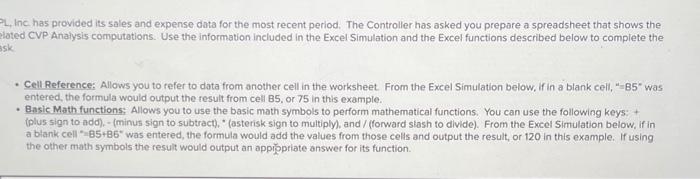
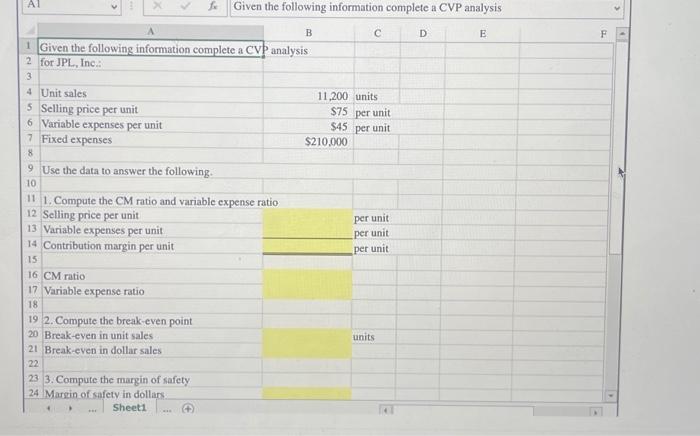
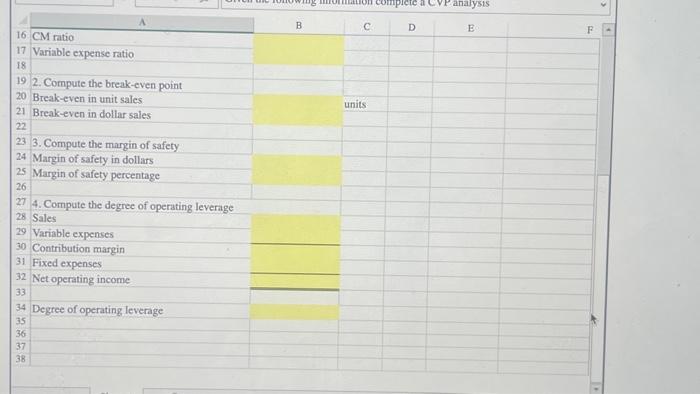
Inc. has provided its sales and expense data for the most recent period. The Controller has asked you prepare a spreadsheet that shows the oted CVP Anaysis computations. Use the information included in the Excel Simulation and the Excel functions described below to complete the - Cellieference: Allows you to refer to data from another cell in the worksheet. From the Excel Simulation below, if in a blank celi, "B5" was entered, the formula would output the result from cell 85 , or 75 in this example. - Basic Math functions: Allows you to use the basic math symbols to perform mathematical functions. You can use the following keys: + (plus sign to add). - (minus sign to subtract). "(asterisk sign to multiply), and/ (forward siash to dlvide). From the Excel Simulation below, if in a blank cell "B5+B6" was entered, the formula would add the values from those cels and output the result, or 120 in this example. If using the other math symbols the result would output an appiopriate answer for its function. \begin{tabular}{|l|l|l|l|l|l|} \hline 16 & \multicolumn{1}{|c|}{ A } \\ \hline 17 & CM ratio & Bariable expense ratio \\ \hline 18 & & C \\ 19 & 2. Compute the break-even point \\ \hline 20 & Break-even in unit sales \\ \hline 21 & Break-even in dollar sales \\ \hline 22 & \\ \hline 23 & 3. Compute the margin of safety \\ \hline 24 & Margin of safety in dollars \\ \hline 25 & Margin of safety percentage \\ \hline 26 & \\ \hline 27 & 4. Compute the degree of operating leverage \\ \hline 28 & Sales \\ \hline 29 & Variable expenses \\ \hline 30 & Contribution margin \\ \hline 31 & Fixed expenses \\ \hline 32 & Net operating income \\ \hline 33 & \\ \hline 34 & Degree of operating leverage \\ \hline 35 & \\ \hline 36 & \\ \hline 37 & \\ \hline 38 & \\ \hline \end{tabular}
Step by Step Solution
There are 3 Steps involved in it

Get step-by-step solutions from verified subject matter experts