







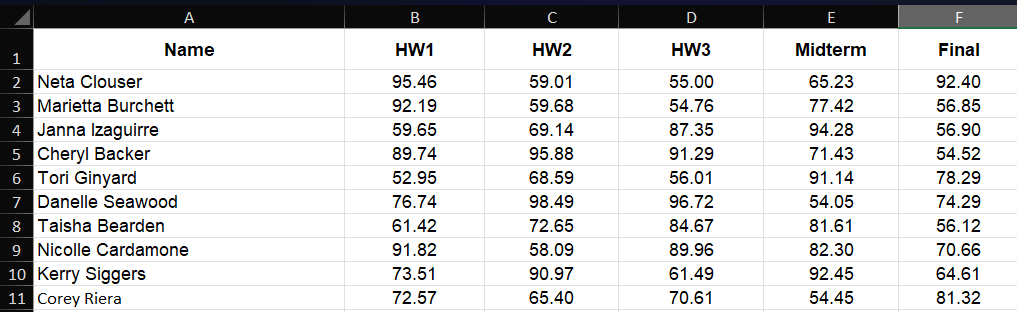
Question: Answer in Matlab code please In the attached Excel file, you can find the grades of 1 0 students in EE 3 0 0 1
Answer in Matlab code please
In the attached Excel file, you can find the grades of students in EE course. It contains the grades of three homework assignments, midterm and final exams.
a Create an mfile that asks the user to choose the student's name using a menu. Then shows the information in this format:
'Student's Name' grades in EE :
HW grade: 'grade for HW
HW grade: 'grade for HW
HW grade: 'grade for HW
Total HW grade: 'grade for all HW assignments' see the notes
Midterm Exam Grade: 'grade for Midterm'
Final Exam Grade: 'grade for Final Exam'
Final Grade: 'final grade in the course' see notes
b Add another item to your menu in addition to all the names and label it EE When the user chooses this option, display te followings:
EE Performance:
Average of HW: 'average of HW
Average of HW: 'average for HW
Average of HW: 'average for HH
Average of Total HW grade: 'average for all HW assignments' see the notes
Average of Midterm Exam: 'average for Midterm'
Average of Final Exam Grade: 'average for Final Exam'
Average of Final Grade: 'average for final grade in the course' see notes
Note: Grade distribution for this course is as follows:
Homework assignments: all assignments are weighted equally
Midterm Exam:
Final Exam:
An example of the output of this m file is given below:
Tori Ginyard grade in EE :
HW Garde:
HW Garde:
HW Garde:
Total HW Garde:
Midterm Exam Garde:
Final Exam Garde:
Final Garde:
Note that the excel file generates the grades randomly and it changes the grades every time you run the mfile. Therefore you will not see the same grades for the same student!
In the attached Excel file, you can find the grades of students in EE course. It contains the grades
of three homework assignments, midterm and final exams.
a Create an mfile that asks the user to choose the student's name using a menu. Then shows the informa
tion in this format:
'Student's Name' grades in EE :
HW grade: 'grade for HW
HW grade: 'grade for HW
HW grade: 'grade for HW
Total HW grade: 'grade for all HW assignments' see the notes
Midterm Exam Grade: 'grade for Midterm'
Final Exam Grade: 'grade for Final Exam'
Final Grade: 'final grade in the course' see notes
b Add another item to your menu in addition to all the names and label it EE When the user
chooses this option, display te followings:
EE Performance:
Average of HW: 'average of HW
Average of HW: 'average for HW
Average of HW: 'average for HH
Average of Total HW grade: 'average for all HW assignments' see the notes
Average of Midterm Exam: 'average for Midterm'
Average of Final Exam Grade: 'average for Final Exam'
Average of Final Grade: 'average for final grade in the course' see notes
Note: Grade distribution for this course is as follows:
Homework assignments: all assignments are weighted equally
Midterm Exam:
Final Exam:
An example of the output of this m file is given below:
Tori Ginyard grade in EE :
HW Garde:
HW Garde:
HW Garde:
Total HW Garde:
Midterm Exam Garde:
Final Exam Garde:
Final Garde:
Note that the excel file generates the grades randomly and it changes the grades every time you run the
mfile. Therefore you will not see the same grades for the same student!
Step by Step Solution
There are 3 Steps involved in it
1 Expert Approved Answer
Step: 1 Unlock

Question Has Been Solved by an Expert!
Get step-by-step solutions from verified subject matter experts
Step: 2 Unlock
Step: 3 Unlock
 Study Help