







Question: ANSWER MUST BE IN PYTHON. Please help me. You can pick any 5 items that you want. May you include comments(algorithm) to explain what the
ANSWER MUST BE IN PYTHON. Please help me. You can pick any 5 items that you want. May you include comments(algorithm) to explain what the code is doing.
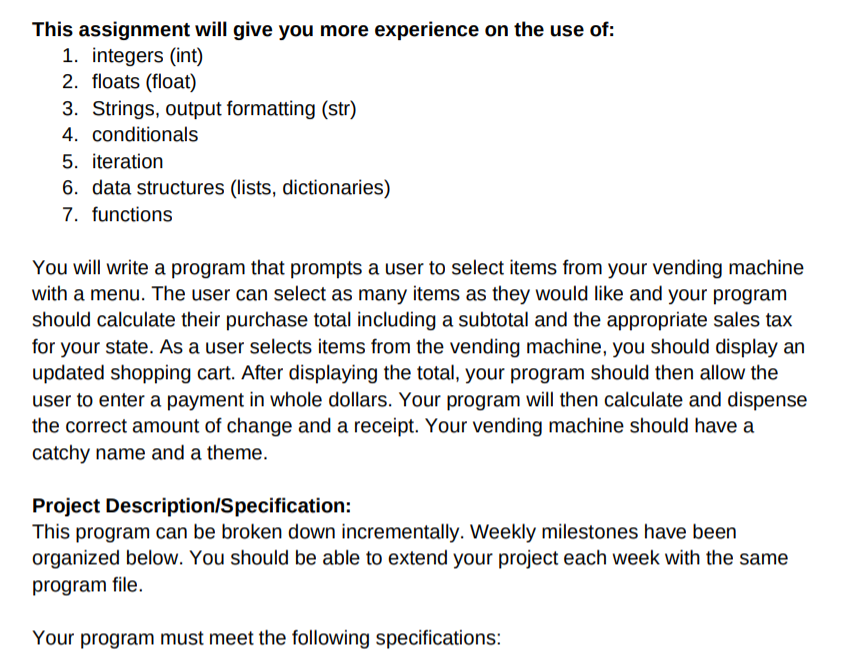
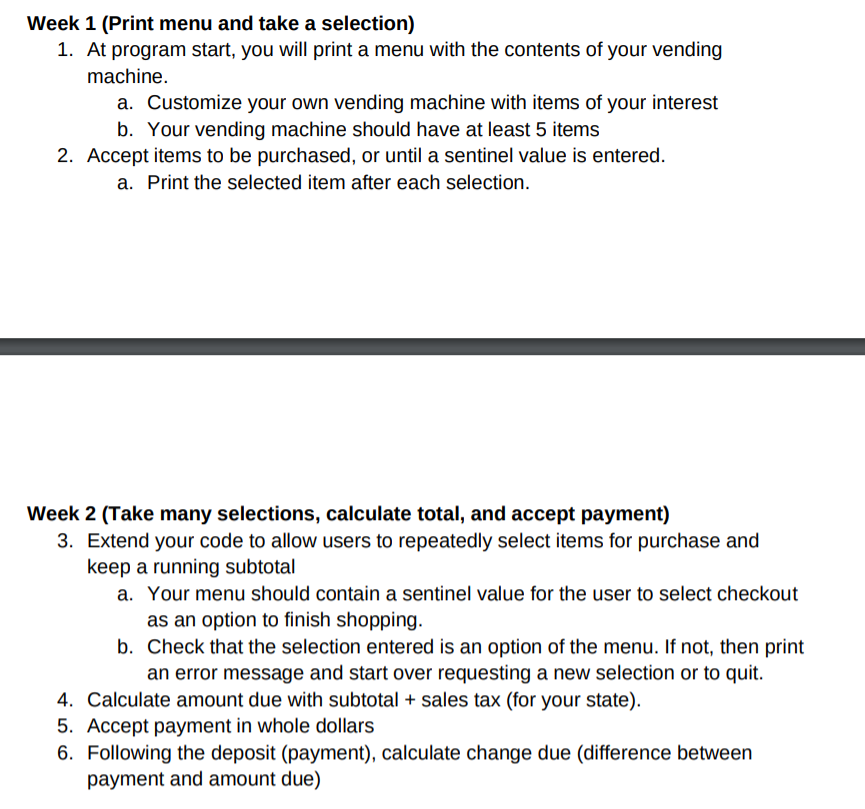
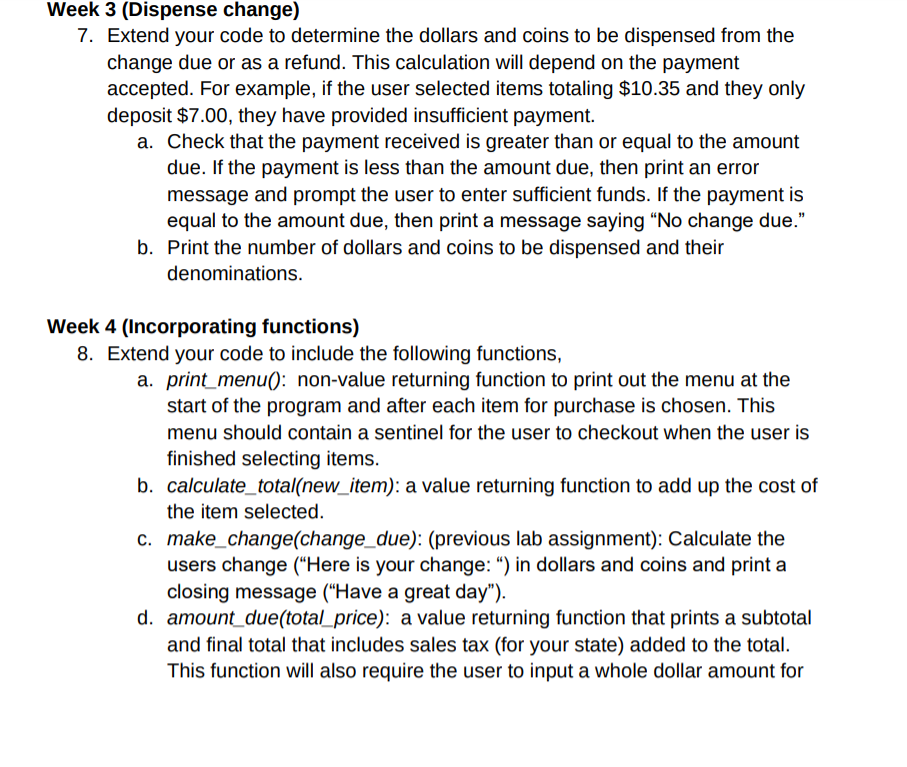
This assignment will give you more experience on the use of: 1. integers (int) 2. floats (float) 3. Strings, output formatting (str) 4. conditionals 5. iteration 6. data structures (lists, dictionaries) 7. functions You will write a program that prompts a user to select items from your vending machine with a menu. The user can select as many items as they would like and your program should calculate their purchase total including a subtotal and the appropriate sales tax for your state. As a user selects items from the vending machine, you should display an updated shopping cart. After displaying the total, your program should then allow the user to enter a payment in whole dollars. Your program will then calculate and dispense the correct amount of change and a receipt. Your vending machine should have a catchy name and a theme. Project Description/Specification: This program can be broken down incrementally. Weekly milestones have been organized below. You should be able to extend your project each week with the same program file. Your program must meet the following specifications: Week 1 (Print menu and take a selection) 1. At program start, you will print a menu with the contents of your vending machine. a. Customize your own vending machine with items of your interest b. Your vending machine should have at least 5 items 2. Accept items to be purchased, or until a sentinel value is entered. a. Print the selected item after each selection. Week 2 (Take many selections, calculate total, and accept payment) 3. Extend your code to allow users to repeatedly select items for purchase and keep a running subtotal a. Your menu should contain a sentinel value for the user to select checkout as an option to finish shopping. b. Check that the selection entered is an option of the menu. If not, then print an error message and start over requesting a new selection or to quit. 4. Calculate amount due with subtotal + sales tax (for your state). 5. Accept payment in whole dollars 6. Following the deposit (payment), calculate change due (difference between payment and amount due) Week 3 (Dispense change) 7. Extend your code to determine the dollars and coins to be dispensed from the change due or as a refund. This calculation will depend on the payment accepted. For example, if the user selected items totaling $10.35 and they only deposit $7.00, they have provided insufficient payment. a. Check that the payment received is greater than or equal to the amount due. If the payment is less than the amount due, then print an error message and prompt the user to enter sufficient funds. If the payment is equal to the amount due, then print a message saying No change due. b. Print the number of dollars and coins to be dispensed and their denominations. Week 4 (Incorporating functions) 8. Extend your code to include the following functions, a. print_menu(): non-value returning function to print out the menu at the start of the program and after each item for purchase is chosen. This menu should contain a sentinel for the user to checkout when the user is finished selecting items. b. calculate_total(new_item): a value returning function to add up the cost of the item selected. c. make_change(change_due): (previous lab assignment): Calculate the users change ("Here is your change: ) in dollars and coins and print a closing message ("Have a great day"). d. amount_due(total_price): a value returning function that prints a subtotal and final total that includes sales tax (for your state) added to the total. This function will also require the user to input a whole dollar amount for This assignment will give you more experience on the use of: 1. integers (int) 2. floats (float) 3. Strings, output formatting (str) 4. conditionals 5. iteration 6. data structures (lists, dictionaries) 7. functions You will write a program that prompts a user to select items from your vending machine with a menu. The user can select as many items as they would like and your program should calculate their purchase total including a subtotal and the appropriate sales tax for your state. As a user selects items from the vending machine, you should display an updated shopping cart. After displaying the total, your program should then allow the user to enter a payment in whole dollars. Your program will then calculate and dispense the correct amount of change and a receipt. Your vending machine should have a catchy name and a theme. Project Description/Specification: This program can be broken down incrementally. Weekly milestones have been organized below. You should be able to extend your project each week with the same program file. Your program must meet the following specifications: Week 1 (Print menu and take a selection) 1. At program start, you will print a menu with the contents of your vending machine. a. Customize your own vending machine with items of your interest b. Your vending machine should have at least 5 items 2. Accept items to be purchased, or until a sentinel value is entered. a. Print the selected item after each selection. Week 2 (Take many selections, calculate total, and accept payment) 3. Extend your code to allow users to repeatedly select items for purchase and keep a running subtotal a. Your menu should contain a sentinel value for the user to select checkout as an option to finish shopping. b. Check that the selection entered is an option of the menu. If not, then print an error message and start over requesting a new selection or to quit. 4. Calculate amount due with subtotal + sales tax (for your state). 5. Accept payment in whole dollars 6. Following the deposit (payment), calculate change due (difference between payment and amount due) Week 3 (Dispense change) 7. Extend your code to determine the dollars and coins to be dispensed from the change due or as a refund. This calculation will depend on the payment accepted. For example, if the user selected items totaling $10.35 and they only deposit $7.00, they have provided insufficient payment. a. Check that the payment received is greater than or equal to the amount due. If the payment is less than the amount due, then print an error message and prompt the user to enter sufficient funds. If the payment is equal to the amount due, then print a message saying No change due. b. Print the number of dollars and coins to be dispensed and their denominations. Week 4 (Incorporating functions) 8. Extend your code to include the following functions, a. print_menu(): non-value returning function to print out the menu at the start of the program and after each item for purchase is chosen. This menu should contain a sentinel for the user to checkout when the user is finished selecting items. b. calculate_total(new_item): a value returning function to add up the cost of the item selected. c. make_change(change_due): (previous lab assignment): Calculate the users change ("Here is your change: ) in dollars and coins and print a closing message ("Have a great day"). d. amount_due(total_price): a value returning function that prints a subtotal and final total that includes sales tax (for your state) added to the total. This function will also require the user to input a whole dollar amount for
Step by Step Solution
There are 3 Steps involved in it

Get step-by-step solutions from verified subject matter experts
 Study Help