







Question: answer these step by step please Introduction By default, Windows OS's do not use the machine's MAC address for the IPv6 Link-local IPv6 Address. Computers
answer these step by step please
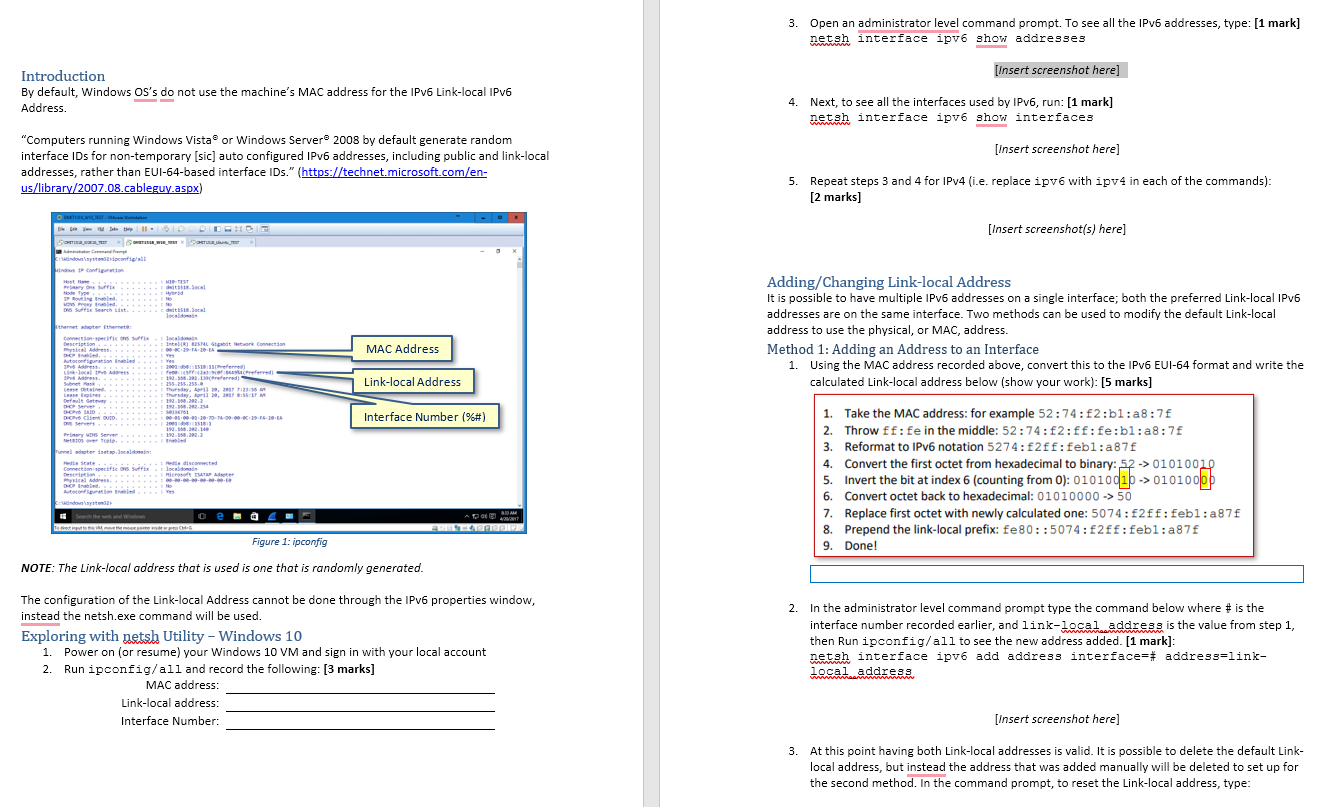
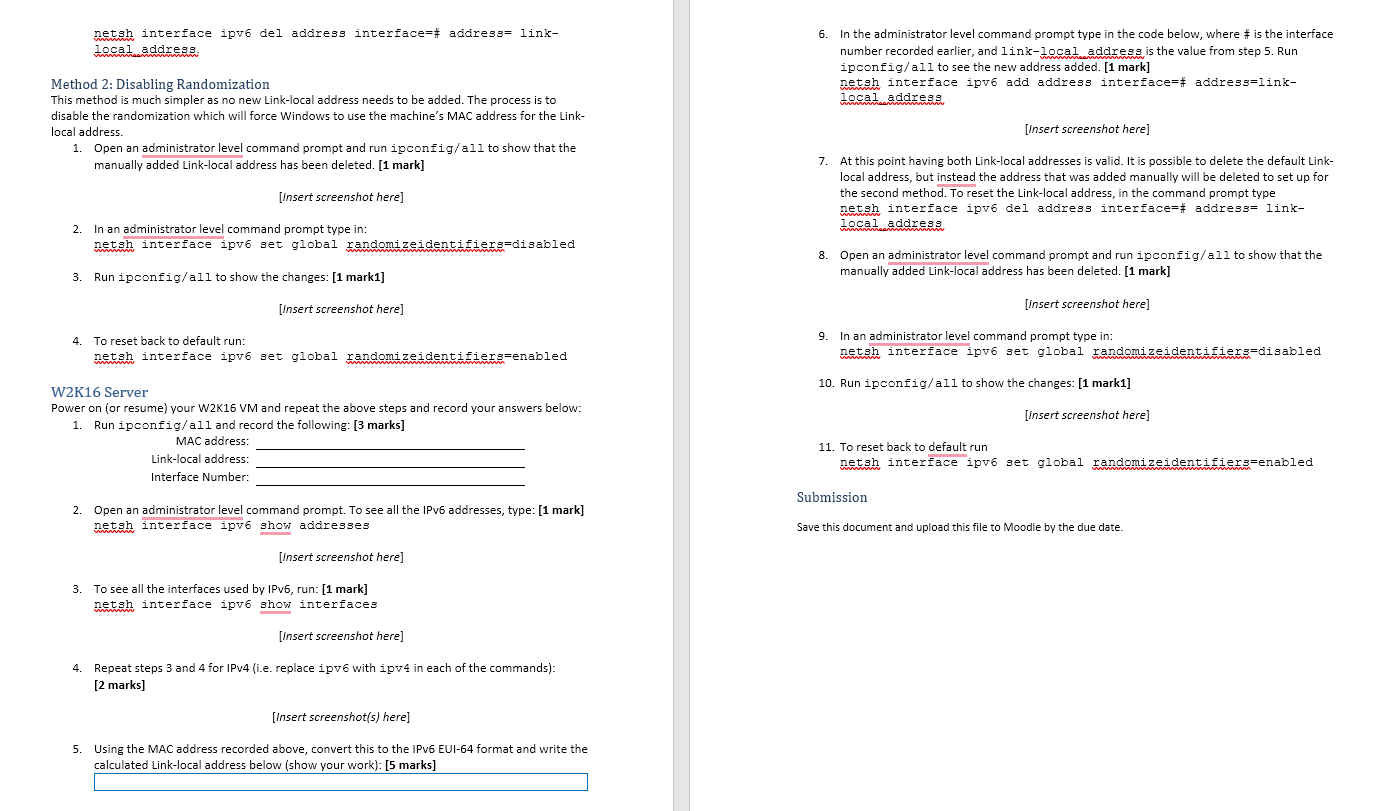
Introduction By default, Windows OS's do not use the machine's MAC address for the IPv6 Link-local IPv6 Address. "Computers running Windows Vista or Windows Server 2008 by default generate random interface IDs for non-temporary [sic] auto configured IPv6 addresses, including public and link-local addresses, rather than EUI-64-based interface IDs." (https://technet.microsoft.com/en- us/library/2007.08.cableguy.aspx) ONETISER_W10_TEST - Varme Workstation Bi lin xin vt Din Hp QL l 20 SOMETINIEKTEST indowsystem2-ipconfig/all indows IP Configuration Primary ons suffix Node Type: Moting Proxy Dessute Search List. www Ethernet adapter Ethernet: connection specific ons suffi Description Physical Addres DHCP led Autoconsgurationabled Li-local Address IP Address Lease btained Lease Expres. Default Gatea DHCP server DHCP SAID 410 DCP Client outc on Servers Primary Server Netto 3 over Talp Tunnel adapterisata.localda edia State Connection-specific on suffix Description Physical Address.. DHCP Enable indows\system32 DOMETERJANJ M-TEST daitisis.local Hvorld deitis1.Jocal localdomain Intel()82574 Gigabt Network Connection 00-C-29-14-20-E4 2003131831ferred) 192.158.22.139Preferred) 255.255.255.4 Thursday, April 29, 2007 7123156 20, 2017 8:55:17 fe Preferred) 192.168.292.2 192.100.202.234 0034761 t 00-01:00-1-26-70-74-00-00-0-29-14-20-14 192.168.22.140 12.10.200.2 Med disconnected localdo Microsoft ISATA A 00-00-00-00-00-00-00-19 a direct input to the v4, move the mouse portes de se press (Hr MAC Address Link-local Address Interface Number (%#) Figure 1: ipconfig NOTE: The Link-local address that is used is one that is randomly generated. 8.30 AM 4/9/2017 ===%-4000DID The configuration of the Link-local Address cannot be done through the IPv6 properties window, instead the netsh.exe command will be used. Exploring with netsh Utility - Windows 10 1. Power on (or resume) your Windows 10 VM and sign in with your local account 2. Run ipconfig/all and record the following: [3 marks] MAC address: Link-local address: Interface Number: 3. 4 5. Open an administrator level command prompt. To see all the IPv6 addresses, type: [1 mark] netsh interface ipv6 show addresses [Insert screenshot here] Next, to see all the interfaces used by IPv6, run: [1 mark] netsh interface ipv6 show interfaces www [Insert screenshot here] Repeat steps 3 and 4 for IPv4 (i.e. replace ipv6 with ipv4 in each of the commands): [2 marks] [Insert screenshot(s) here] Adding/Changing Link-local Address It is possible to have multiple IPv6 addresses on a single interface; both the preferred Link-local IPv6 addresses are on the same interface. Two methods can be used to modify the default Link-local address to use the physical, or MAC, address. Method 1: Adding an Address to an Interface 1. Using the MAC address recorded above, convert this to the IPv6 EUI-64 format and write the calculated Link-local address below (show your work): [5 marks] 1. Take the MAC address: for example 52:74: 2:b1:a8:7f 2. Throw ff: fe in the middle: 52:74:f2:ff:fe:b1:a8:7f Reformat to IPv6 notation 5274:f2ff:febl:a87f 3. Convert the first octet from hexadecimal to binary: 52 -> 01010010 5. Invert the bit at index 6 (counting from 0): 01010010 -> 01010000 6. Convert octet back to hexadecimal: 01010000 -> 50 7. Replace first octet with newly calculated one: 5074: f2ff: febl:a87f 8. Prepend the link-local prefix: fe80::5074:f2ff:febl:a87f 9. Done! 2. In the administrator level command prompt type the command below where # is the interface number recorded earlier, and link-local address is the value from step 1, then Run ipconfig/all to see the new address added. [1 mark]: netsh interface ipv6 add address interface-# address-link- local address [Insert screenshot here] 3. At this point having both Link-local addresses is valid. It is possible to delete the default Link- local address, but instead the address that was added manually will be deleted to set up for the second method. In the command prompt, to reset the Link-local address, type:
Step by Step Solution
There are 3 Steps involved in it

Get step-by-step solutions from verified subject matter experts
 Study Help