







Question: answer this question please ( the options were cut out so i added two pictures) In the L2V1 - Boolean Comparisons and IF Statements -
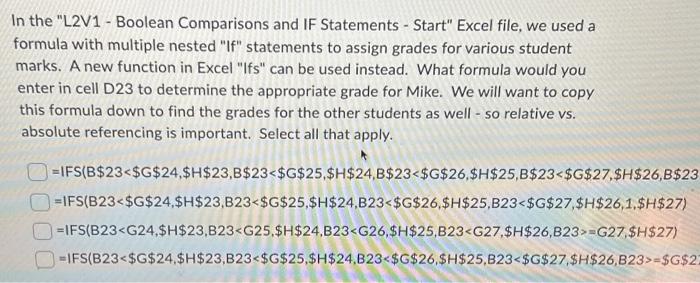
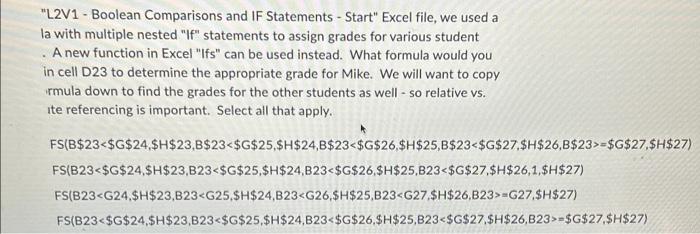
In the "L2V1 - Boolean Comparisons and IF Statements - Start" Excel file, we used a formula with multiple nested "If" statements to assign grades for various student marks. A new function in Excel "Ifs" can be used instead. What formula would you enter in cell D23 to determine the appropriate grade for Mike. We will want to copy this formula down to find the grades for the other students as well - so relative vs. absolute referencing is important. Select all that apply. =IFS(B$23=G27,$H$27)=IFS(B23=$G$ "L2V1 - Boolean Comparisons and IF Statements - Start" Excel file, we used a la with multiple nested "If" statements to assign grades for various student . A new function in Excel "Ifs" can be used instead. What formula would you in cell D23 to determine the appropriate grade for Mike. We will want to copy rmula down to find the grades for the other students as well - so relative vs. ite referencing is important. Select all that apply. FS(B$23=$G$27,$H$27)FS(B23=G27,$H$27)FS(B23=$G$27,$H$27)
Step by Step Solution
There are 3 Steps involved in it

Get step-by-step solutions from verified subject matter experts
 Study Help