







Question: Answer this question The Matlab code shown in the figure is for the ADALINE neural networks described in class notes section Help 7 (page 8).
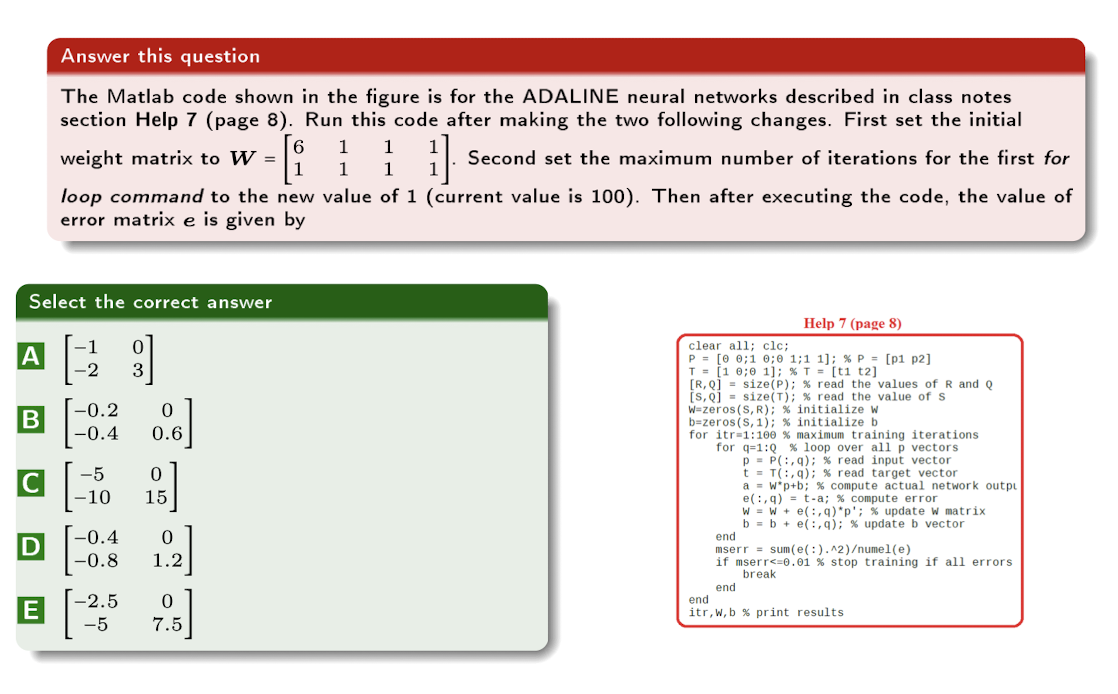
Answer this question The Matlab code shown in the figure is for the ADALINE neural networks described in class notes section Help 7 (page 8). Run this code after making the two following changes. First set the initial 6 1 1 weight matrix to W = Second set the maximum number of iterations for the first for 1 1 loop command to the new value of 1 (current value is 100). Then after executing the code, the value of error matrix e is given by Select the correct answer A 1 -2 B -0.2 -0.4 0 0.6 -5 -10 0 15 Help 7 (page 8) clear all; clc; P = [@ 0;1 0; 1;1 1]; % P = (P1 P2] T = (1 0;0 1]; % T = [t1 t2] [R, Q] = size(P); % read the values of R and Q is, Q1 = size(); % read the value of S Wazeros(S,R); % initialize w b=zeros (S, 1); % initialize b for itr=1:100 % maximum training iterations for q=1:0 % loop over all p vectors P = P(:,9); % read input vector t = T(:,1); % read target vector a = w*p+b; % compute actual network outpu e(:,q) = t-a; % compute error W = W + e(:,9)*p'; % update w matrix b = b + el:,9); % update b vector end mserr = sum(e(:).^2)umel(e) if mserr
Step by Step Solution
There are 3 Steps involved in it

Get step-by-step solutions from verified subject matter experts
 Study Help