







Question: Answer: you will create a custom number format for cell E3 . Delete the inaccurate values in the range E4:E12. Apply the pre-existing range names

Answer:
you will create a custom number format for cell E3
. Delete the inaccurate values in the range E4:E12.
Apply the pre-existing range names to the worksheet.
Enter a reference to the Total Cost for Outage (cell B6) in cell E3.
Create a one-variable data table to detail the sensitivity of expense based on an outage range of one to five hours based on half-hour increments. Add a Custom number format to cell E3 to display the word Cost.
Create a footer with your name, the sheet name code, and the file name code.
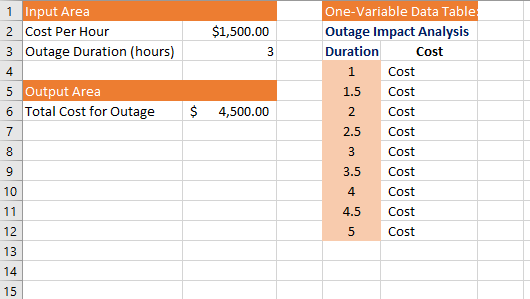
\begin{tabular}{|c|c|c|c|c|} \hline \multicolumn{3}{|c|}{ Input Area } & \multirow{2}{*}{\multicolumn{2}{|c|}{\begin{tabular}{l} One-Variable Data Table \\ Outage Impact Analysis \end{tabular}}} \\ \hline 2 & Cost Per Hour & $1,500.00 & & \\ \hline 3 & Outage Duration (hours) & 3 & Duration & Cost \\ \hline 4 & & & 1 & Cost \\ \hline 5 & \multicolumn{2}{|l|}{ Output Area } & 1.5 & Cost \\ \hline 6 & Total Cost for Outage & $4,500.00 & 2 & Cost \\ \hline 7 & & & 2.5 & Cost \\ \hline 8 & & & 3 & Cost \\ \hline 9 & & & 3.5 & Cost \\ \hline 10 & & & 4 & Cost \\ \hline 11 & & & 4.5 & Cost \\ \hline 12 & & & 5 & Cost \\ \hline 13 & & & & \\ \hline 14 & & & & \\ \hline 15 & & & & \\ \hline \end{tabular} You work as an IT manager for Bower Industries, a Web hosting company that provides off-site Web hosting for online businesses. Your current service level agreement promises customers 24/7 server availability; however, in the unlikely event of a server outage, you need to gauge the economic impact. Based on your current user base, you estimate a cost of $1,500 an hour in customer refunds if an outage were to occur. Your assistant has attempted to create a one-variable data table to further estimate the economic impact of outages between one and five hours in length. Unfortunately, the one-variable data table is not returning the correct results due to an error in the input values. You will correct the error as well as add existing range names to the Total Cost for Outage formula. Finally, you will create a custom number format for cell E3. Open e06d1NetworkOutage and save it as 206d1NetworkOutage LastFirst. Delete the inaccurate values in the range E4:E12. Apply the pre-existing range names to the worksheet. Enter a reference to the Total Cost for Dutage (cell B6) in cell E3. Create a one-variable data table to detail the sensitivity of expense based on an outage range of one to five hours based on half-hour increments. Add a Custom number format to cell E3 to display the word Cost. Create a footer with your name, the sheet name code, and the file name code. Save and close the file. Submit 06d1NetworkOutage_LastFirst. Just to be clear you must keep the one-variable table, if you substitute a formula to calculate the correct results it will be marked incorrect. Pay attention to what the input for the data table must be, you may want to refer to pages 447 and 450 in the digital text
Step by Step Solution
There are 3 Steps involved in it

Get step-by-step solutions from verified subject matter experts
 Study Help