







Question: Answers all the questions in java 1. Write a simple Java Swing/AWT based application for Counter. The UI contains a Label (Counter), a non-editable TextField
Answers all the questions in java 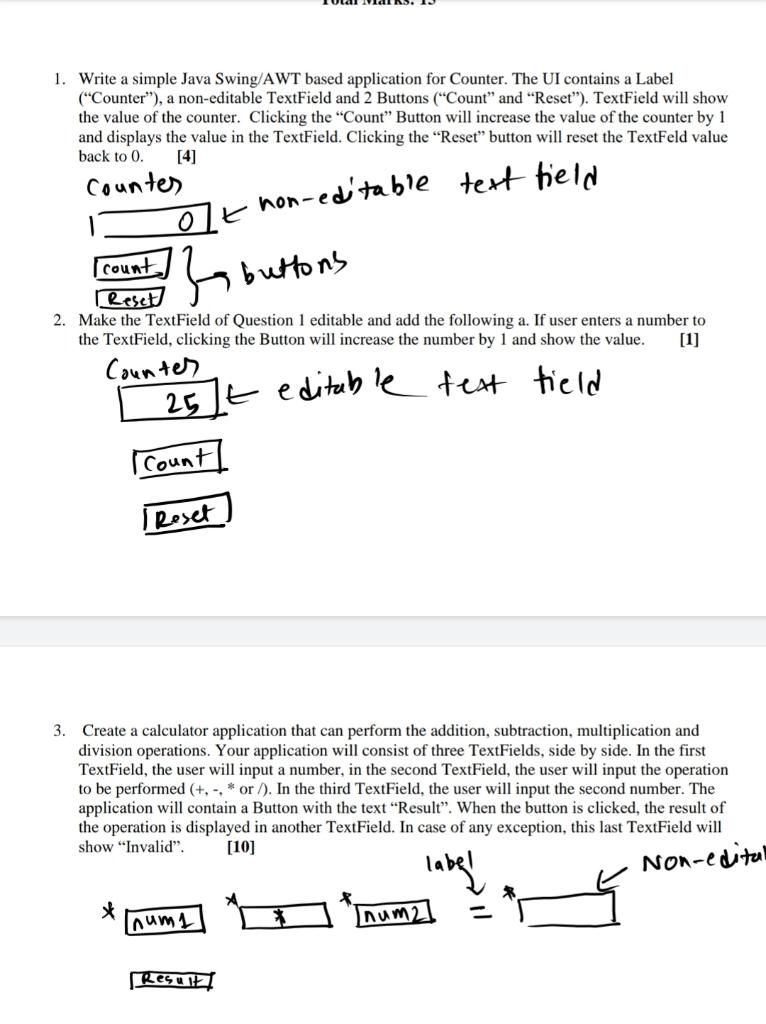
1. Write a simple Java Swing/AWT based application for Counter. The UI contains a Label ("Counter"), a non-editable TextField and 2 Buttons ("Count" and "Reset"). TextField will show the value of the counter. Clicking the "Count Button will increase the value of the counter by 1 and displays the value in the TextField. Clicking the Reset" button will reset the TextFeld value back to 0. [4] Counter o t non-editable text field Is buttons count Reset 2. Make the TextField of Question 1 editable and add the following a. If user enters a number to the TextField, clicking the Button will increase the number by 1 and show the value. [1] Counter 25 t editable test field Count Reset 3. Create a calculator application that can perform the addition, subtraction, multiplication and division operations. Your application will consist of three TextFields, side by side. In the first TextField, the user will input a number, in the second TextField, the user will input the operation to be performed (+, -, * or ). In the third TextField, the user will input the second number. The application will contain a Button with the text Result". When the button is clicked, the result of the operation is displayed in another TextField. In case of any exception, this last TextField will show "Invalid". [10] label Non-edital * num num Result
Step by Step Solution
There are 3 Steps involved in it

Get step-by-step solutions from verified subject matter experts
 Study Help