







Question: Answers below questions by writing SQL statements and with screen prints where mentioned. Create table name stating with your Campus ID. Example AX23456_TableName T_Customer_22
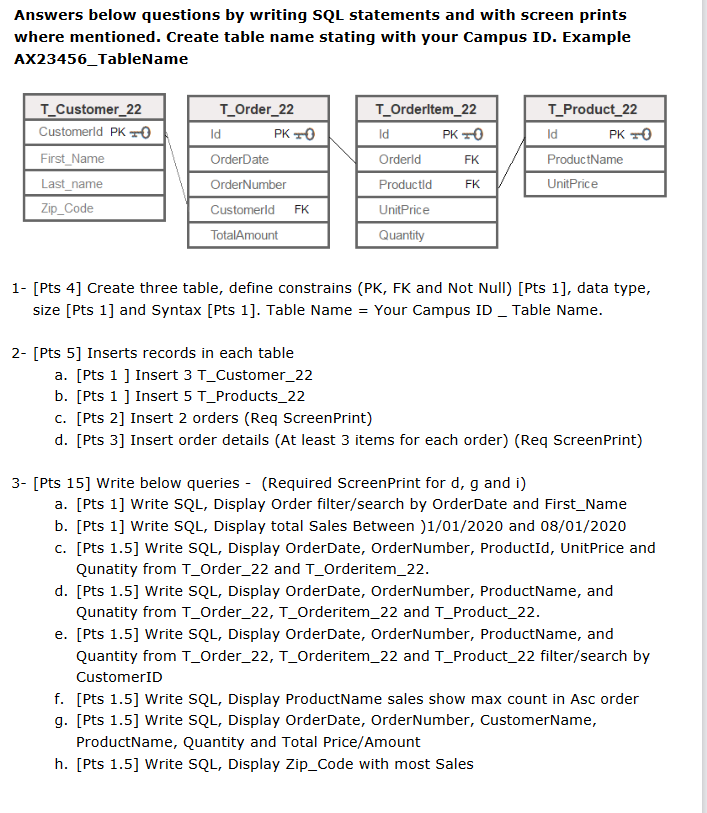
Answers below questions by writing SQL statements and with screen prints where mentioned. Create table name stating with your Campus ID. Example AX23456_TableName T_Customer_22 Customerld PK TO First Name Last_name Zip_Code T_Order_22 Id OrderDate OrderNumber Customerld FK TotalAmount PK +0 T_Orderltem_22 PK +0 FK Id Orderld Productid UnitPrice Quantity FK T_Product_22 Id PK +0 ProductName UnitPrice 1- [Pts 4] Create three table, define constrains (PK, FK and Not Null) [Pts 1], data type, size [Pts 1] and Syntax [Pts 1]. Table Name = Your Campus ID_ Table Name. 2- [Pts 5] Inserts records in each table a. [Pts 1 ] Insert 3 T_Customer_22 b. [Pts 1 ] Insert 5 T_Products_22 c. [Pts 2] Insert 2 orders (Req Screen Print) d. [Pts 3] Insert order details (At least 3 items for each order) (Req Screen Print) 3- [Pts 15] Write below queries - (Required Screen Print for d, g and i) a. [Pts 1] Write SQL, Display Order filter/search by OrderDate and First_Name b. [Pts 1] Write SQL, Display total Sales Between )1/01/2020 and 08/01/2020 c. [Pts 1.5] Write SQL, Display OrderDate, OrderNumber, ProductId, UnitPrice and Qunatity from T_Order_22 and T_Orderitem_22. d. [Pts 1.5] Write SQL, Display OrderDate, OrderNumber, ProductName, and Qunatity from T_Order_22, T_Orderitem_22 and T_Product_22. e. [Pts 1.5] Write SQL, Display OrderDate, OrderNumber, ProductName, and Quantity from T_Order_22, T_Orderitem_22 and T_Product_22 filter/search by CustomerID f. [Pts 1.5] Write SQL, Display ProductName sales show max count in Asc order g. [Pts 1.5] Write SQL, Display OrderDate, Order Number, CustomerName, ProductName, Quantity and Total Price/Amount h. [Pts 1.5] Write SQL, Display Zip Code with most Sales
Step by Step Solution
There are 3 Steps involved in it

Get step-by-step solutions from verified subject matter experts
 Study Help