







Question: Appendix 4.1: task41.asm ; This program aims to show you how to display a string on screen. ; DATA SEGMENT msg DB Welcome to Micro
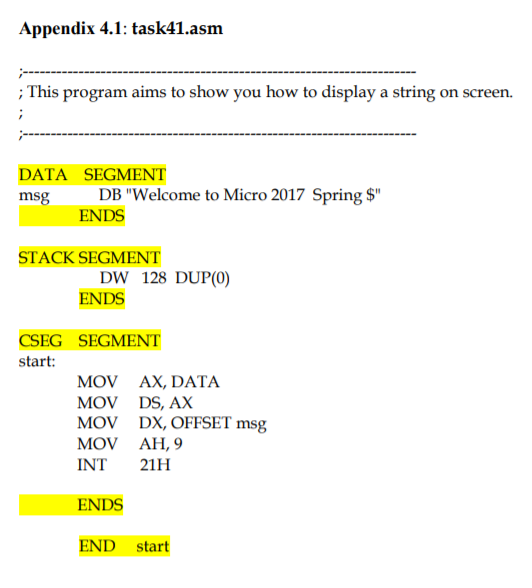
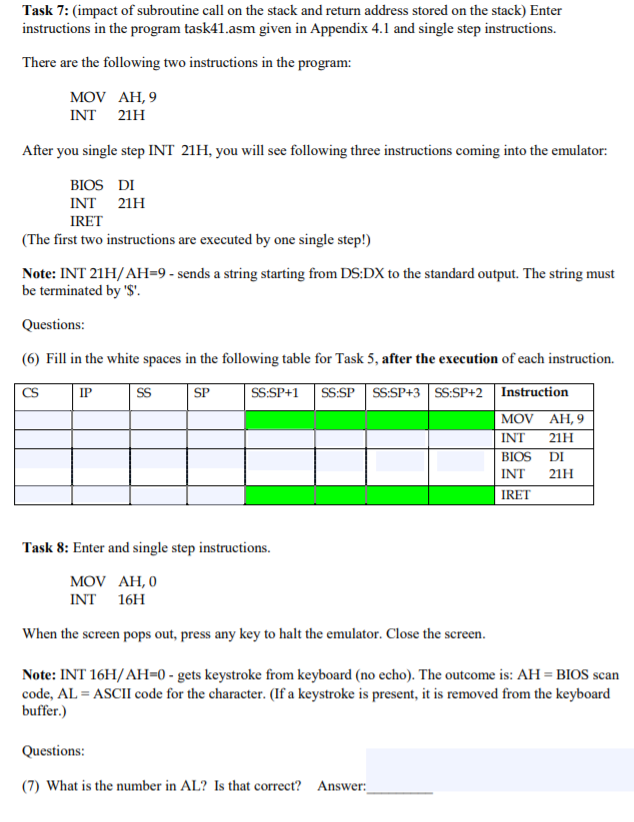
Appendix 4.1: task41.asm ; This program aims to show you how to display a string on screen. ; DATA SEGMENT msg DB "Welcome to Micro 2017 Spring $" ENDS STACK SEGMENT DW 128 DUP(0) ENDS CSEG SEGMENT start: MOV AX, DATA MOV DS, AX MOV DX, OFFSET msg MOV AH,9 INT 21H ENDS END start Task 7: (impact of subroutine call on the stack and return address stored on the stack) Enter instructions in the program task41.asm given in Appendix 4.1 and single step instructions. There are the following two instructions in the program: MOV AH,9 INT 21H After you single step INT 21H, you will see following three instructions coming into the emulator: BIOS DI INT 21H IRET (The first two instructions are executed by one single step!) Note: INT 21H/AH=9 - sends a string starting from DS:DX to the standard output. The string must be terminated by '$. Questions: (6) Fill in the white spaces in the following table for Task 5, after the execution of each instruction. IP SS SP SS:SP+1 SS:SPSS:SP+3 SS:SP+2 Instruction MOV AH,9 INT 21H BIOS DI INT 21H IRET Task 8: Enter and single step instructions. MOV AH,0 INT 16H When the screen pops out, press any key to halt the emulator. Close the screen. Note: INT 16H/AH=0 - gets keystroke from keyboard (no echo). The outcome is: AH = BIOS scan code, AL = ASCII code for the character. (If a keystroke is present, it is removed from the keyboard buffer.) Questions: (7) What is the number in AL? Is that correct? Answer: Appendix 4.1: task41.asm ; This program aims to show you how to display a string on screen. ; DATA SEGMENT msg DB "Welcome to Micro 2017 Spring $" ENDS STACK SEGMENT DW 128 DUP(0) ENDS CSEG SEGMENT start: MOV AX, DATA MOV DS, AX MOV DX, OFFSET msg MOV AH,9 INT 21H ENDS END start Task 7: (impact of subroutine call on the stack and return address stored on the stack) Enter instructions in the program task41.asm given in Appendix 4.1 and single step instructions. There are the following two instructions in the program: MOV AH,9 INT 21H After you single step INT 21H, you will see following three instructions coming into the emulator: BIOS DI INT 21H IRET (The first two instructions are executed by one single step!) Note: INT 21H/AH=9 - sends a string starting from DS:DX to the standard output. The string must be terminated by '$. Questions: (6) Fill in the white spaces in the following table for Task 5, after the execution of each instruction. IP SS SP SS:SP+1 SS:SPSS:SP+3 SS:SP+2 Instruction MOV AH,9 INT 21H BIOS DI INT 21H IRET Task 8: Enter and single step instructions. MOV AH,0 INT 16H When the screen pops out, press any key to halt the emulator. Close the screen. Note: INT 16H/AH=0 - gets keystroke from keyboard (no echo). The outcome is: AH = BIOS scan code, AL = ASCII code for the character. (If a keystroke is present, it is removed from the keyboard buffer.) Questions: (7) What is the number in AL? Is that correct
Step by Step Solution
There are 3 Steps involved in it

Get step-by-step solutions from verified subject matter experts
 Study Help