







Question: Application Exercises 3-21. EXCEL APPLICATION: Analyzing Growth in Computer Storage Capacities Since the computer hard drive was invented in 1956, a constantly increasing data storage
Application Exercises 3-21. EXCEL APPLICATION: Analyzing Growth in Computer Storage Capacities Since the computer hard drive was invented in 1956, a constantly increasing data storage capacity has been available at an ever-decreasing cost. Use the historical data of hard drive capacities and prices shown in Figure 3-29 (or download the Excel file named CH03Ex01). Modify the spreadsheet so that it includes a new column containing formulas that calculate a common measure of disk size (GB) and a second new column that computes the cost per GB for each year. (Recall 1 gigabyte = 1,024 megabytes; 1 terabyte = 1,024 gigabytes.) Now, create one line graph to show the cost per gigabyte from the period 1995 to 2016. Create a second line graph to show changes in the size of hard disks across the same period. (Tip: Use the Hide function to cover the columns you dont need for each graph.) Write a brief summary of the trends you found. What factors have contributed to these trends? What are the implications of these trends? 3-22. ACCESS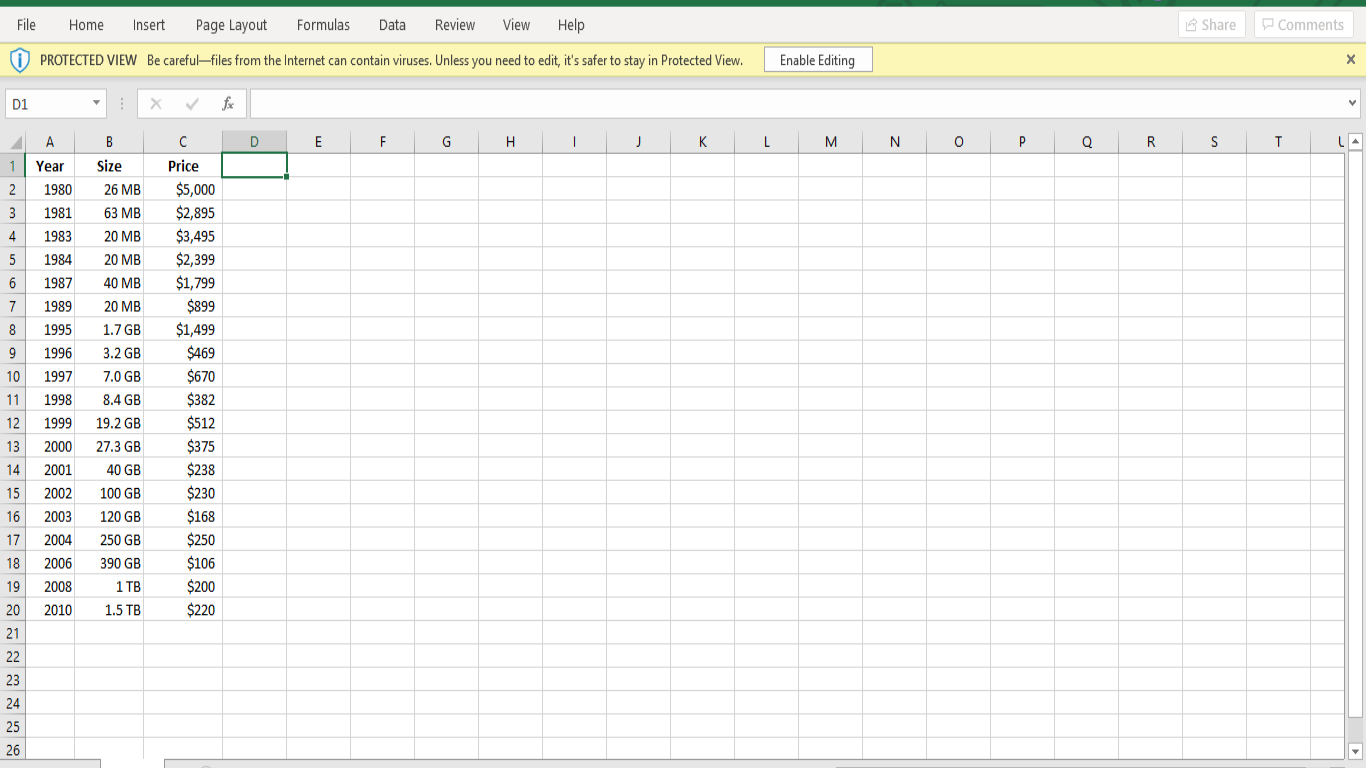
Step by Step Solution
There are 3 Steps involved in it

Get step-by-step solutions from verified subject matter experts
 Study Help