







Question: Application: Gaussian elimination Create a new folder for Module4 in your Matlab1051 folder (that you created last week). Make sure this your Current Folder. If
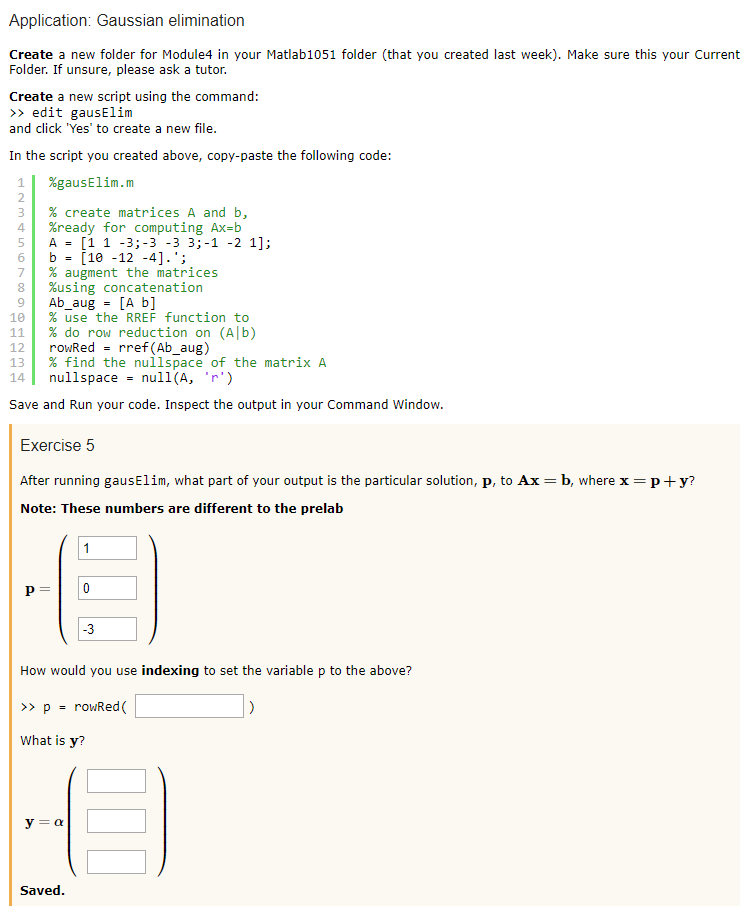
Application: Gaussian elimination Create a new folder for Module4 in your Matlab1051 folder (that you created last week). Make sure this your Current Folder. If unsure, please ask a tutor. Create a new script using the command: edit gausElim and click 'Yes' to create a new file In the script you created above, copy-paste the following code: 11 %gausElin.m % create matrices A and b, 4 %ready for computing Ax-b 5 A-[1 1 -3;-3 -3 3;-1 -2 1]; % augment the matrices %using concatenation 9Ab_aug-[A b] 1 % use the RREF function to 11 % do row reduction on (Alb) 12 roRed -rref (Ab_aug) 13 % find the nullspace of the matrix A 141 nullspace null(A, ,r.) Save and Run your code. Inspect the output in your Command Window Exercise 5 After running gausElim, what part of your output is the particular solution, p, to Ax = b, where x = p+ y? Note: These numbers are different to the prelab -3 How would you use indexing to set the variable p to the above? What is y? Saved
Step by Step Solution
There are 3 Steps involved in it

Get step-by-step solutions from verified subject matter experts
 Study Help