







Question: Application In the Proteus simulation environment, design a password authenticating circuit using the following components Make it . The design will work according to the
Application
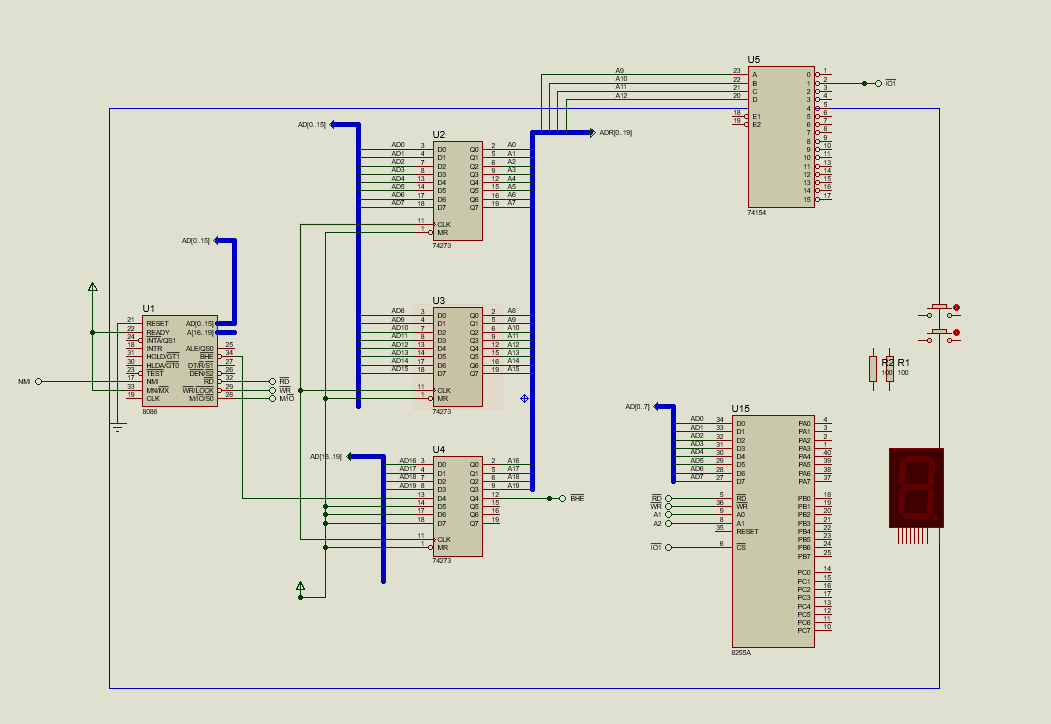
In the Proteus simulation environment, design a password authenticating circuit using the following components
Make it The design will work according to the following rules.
Components
Microprocessor piece
Octal Type D FlipFlop pieces
Demultiplexer piece
PA piece
Button Switch pcs
Piece Indicator with Common Anode Tip piece
Resistors:
Pulldown resistor for switches
pullup resistor for reset switch k
Requirements:
Port Forwarding:
s port addresses will be dynamically determined based on the student number.
Address Calculation:
o Base address: H StudentNo
o Ports
Port A: Base address.
Port B: Base address
Port C: Basic address
Control Port: Base address
With this method, each student's circuit will use a unique port address.
configured.
Login and Password Authentication:
switches buttons: Connected to the input port. Manual entry will be made with these keys. Each
The key will function as a onebit input.
Password check: The input will be compared with the password set by the microprocessor.
o If the input is correct:
The piece indicator will light all LEDs to show the number
o If the input is incorrect:
The part indicator will go off and no LEDs will be lit.
Reset Button:
A reset button will be connected to terminal of the input port.
Negative triggering: Reset operation
Step by Step Solution
There are 3 Steps involved in it
1 Expert Approved Answer
Step: 1 Unlock

Question Has Been Solved by an Expert!
Get step-by-step solutions from verified subject matter experts
Step: 2 Unlock
Step: 3 Unlock
 Study Help