







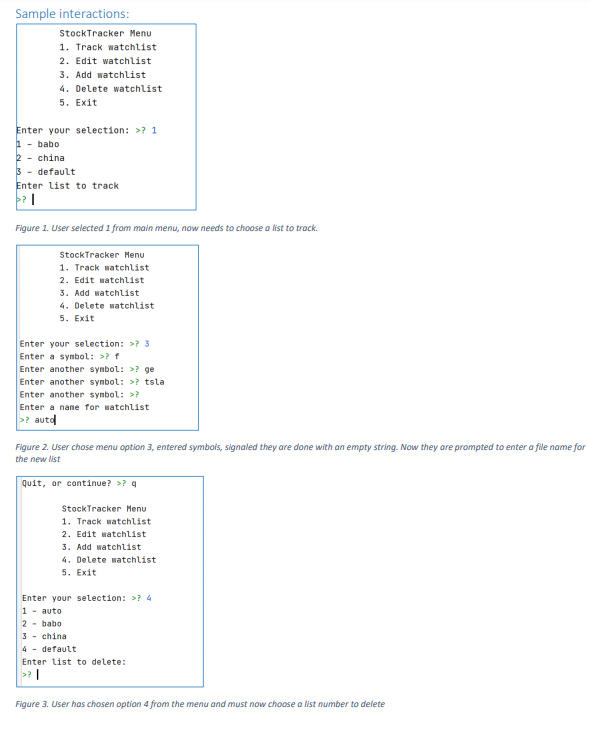
Question: Application shell for menu driven app import sys import pandas_datareader as pdr from time import time, sleep def display_menu () : print( StockTracker Menu
"""Application shell for menu driven app"""import sysimport pandas_datareader as pdrfrom time import time, sleepdef display_menu(): print( """ StockTracker Menu 1. Track Watchlist 2. Add Watchlist 3. Delete Watchlist 4. Edit Watchlist 5. Exit """ )def track(watchlist): start_time = time() while True: print(pdr.get_quote_yahoo(watchlist)['price']) elapsed = time() - start_time if elapsed >= 10: prompt = input("Would you like to continue? y: ") if prompt == 'n': break start_time = time() elapsed = 0 sleep(1)def add_list(): symbols = [] symbol = input("Enter a stock symbol: ") while symbol != '': if symbol not in symbols: symbols.append(symbol.upper()) symbol = input("Enter a stock symbol: ") return sorted(symbols)def edit_list(): passdef delete_list(): pass #actions = {'1' : track, '2' : add_list, '3' : delete_list, '4' : edit_list}def main(): while True: display_menu() choice = input("Enter your choice: ") if choice == '1': track(watchlist) elif choice == '2': watchlist = add_list() elif choice == '5': print("Thank you for using stonktracker!") sys.exit(0) else: print("Please make a valid choice") if __name__ == "__main__": main()
\f
Step by Step Solution
There are 3 Steps involved in it
1 Expert Approved Answer
Step: 1 Unlock

Question Has Been Solved by an Expert!
Get step-by-step solutions from verified subject matter experts
Step: 2 Unlock
Step: 3 Unlock
 Study Help