







Question: Apply conditional 2 - color - scale formatting to the Dollars column in such a manner that the cells with lowest ( minimum ) values
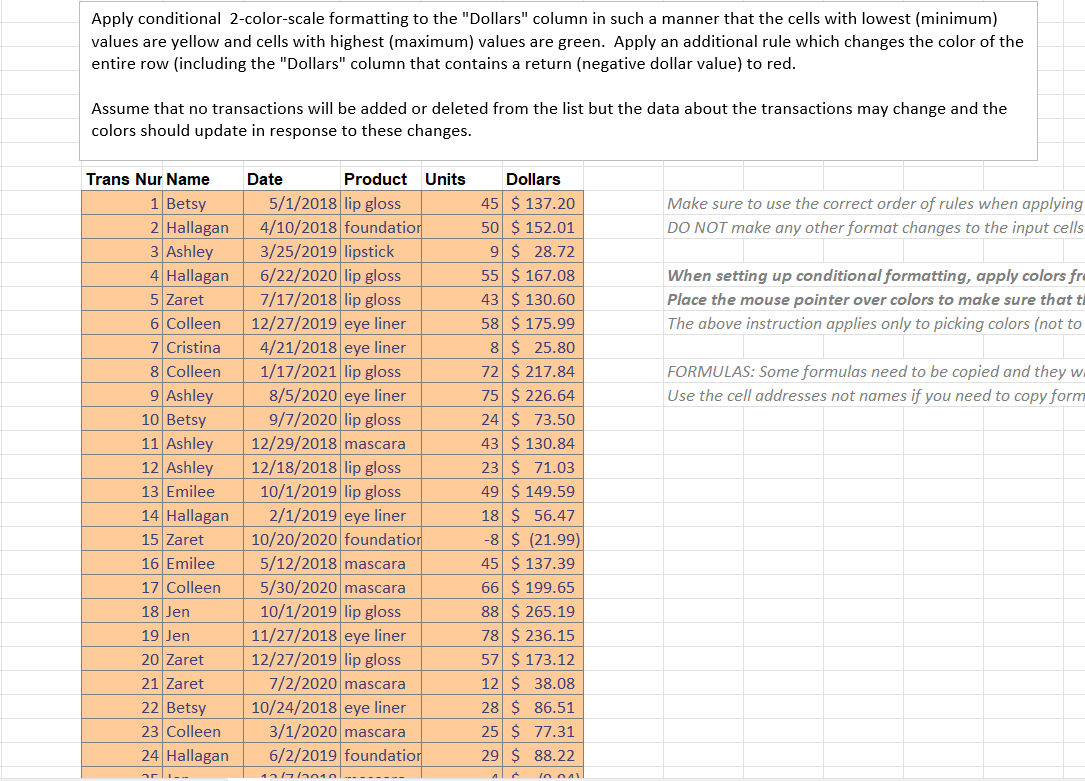
Apply conditional colorscale formatting to the "Dollars" column in such a manner that the cells with lowest minimum values are yellow and cells with highest maximum values are green. Apply an additional rule which changes the color of the entire row including the "Dollars" column that contains a return negative dollar value to red.
Assume that no transactions will be added or deleted from the list but the data about the transactions may change and the colors should update in response to these changes.Apply conditional colorscale formatting to the "Dollars" column in such a manner that the cells with lowest minimum
values are yellow and cells with highest maximum values are green. Apply an additional rule which changes the color of the
entire row including the "Dollars" column that contains a return negative dollar value to red.
Assume that no transactions will be added or deleted from the list but the data about the transactions may change and the
colors should update in response to these changes.
When setting up conditional formatting, apply colors fr
Place the mouse pointer over colors to make sure that
The above instruction applies only to picking colors not to
FORMULAS: Some formulas need to be copied and they w
Use the cell addresses not names if you need to copy form
Step by Step Solution
There are 3 Steps involved in it
1 Expert Approved Answer
Step: 1 Unlock

Question Has Been Solved by an Expert!
Get step-by-step solutions from verified subject matter experts
Step: 2 Unlock
Step: 3 Unlock
 Study Help