







Question: Apply the following procedure for solving the TMA problem. A . Read and analyze the problem statement. B . Formulate the algorithm using pseudocode and
Apply the following procedure for solving the TMA problem.
A Read and analyze the problem
statement.
B Formulate the algorithm using pseudocode and assume any required
missed data reasonably.
C Write a C# application.
D Write a comment for each line of code using your own words.
E Test, debug and execute the C# application.
F Copy and paste your code from Visual Studio to the Answer Booklet Dont
put your code as a screenshot
G Provide Screenshots for both the input and output of ALL cases of each
problem. DO NOT submit sample of screenshots.
H Your TMA Answer Booklet should be structured as follows:
Problem: ToDo List Application:
Algorithm pseudocode
Complete problem's application code Copied
Screenshots of both input and output for ALL cases of the problemToDo List Application marks
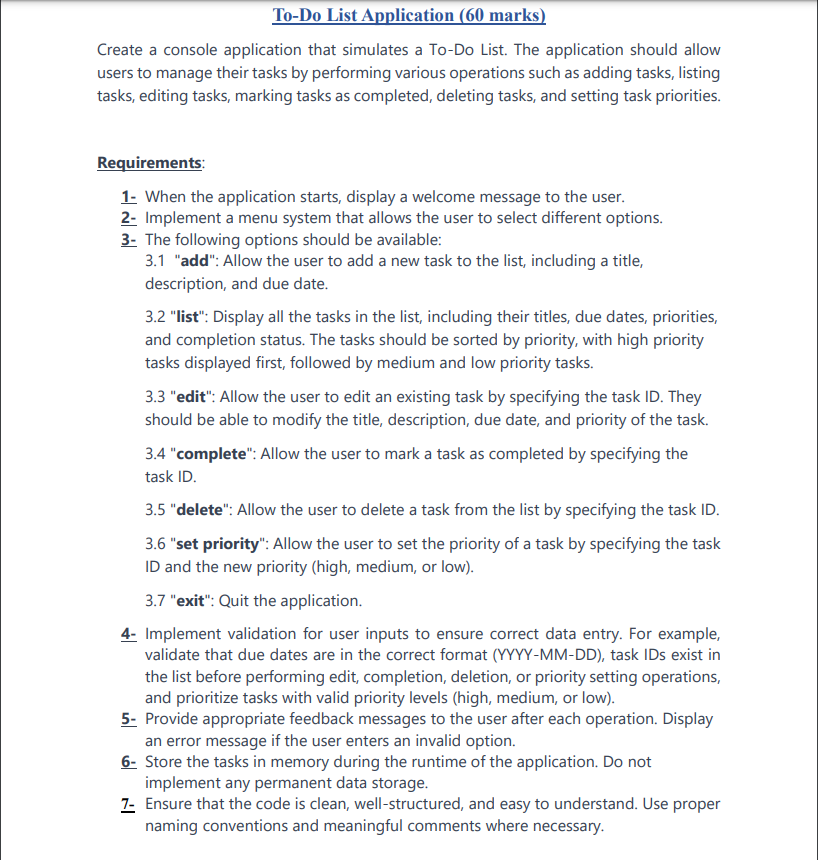
Create a console application that simulates a ToDo List. The application should allow
users to manage their tasks by performing various operations such as adding tasks, listing
tasks, editing tasks, marking tasks as completed, deleting tasks, and setting task priorities.
Requirements:
When the application starts, display a welcome message to the user.
Implement a menu system that allows the user to select different options.
The following options should be available:
"add": Allow the user to add a new task to the list, including a title,
description, and due date.
"list": Display all the tasks in the list, including their titles, due dates, priorities,
and completion status. The tasks should be sorted by priority, with high priority
tasks displayed first, followed by medium and low priority tasks.
"edit": Allow the user to edit an existing task by specifying the task ID They
should be able to modify the title, description, due date, and priority of the task.
"complete": Allow the user to mark a task as completed by specifying the
task ID
"delete": Allow the user to delete a task from the list by specifying the task ID
"set priority": Allow the user to set the priority of a task by specifying the task
ID and the new priority high medium, or low
"exit": Quit the application.
Implement validation for user inputs to ensure correct data entry. For example,
validate that due dates are in the correct format YYYYMMDD task IDs exist in
the list before performing edit, completion, deletion, or priority setting operations,
and prioritize tasks with valid priority levels high medium, or low
Provide appropriate feedback messages to the user after each operation. Display
an error message if the user enters an invalid option.
Store the tasks in memory during the runtime of the application. Do not
implement any permanent data storage.
Ensure that the code is clean, wellstructured, and easy to understand. Use proper
naming conventions and meaningful comments where necessary.
Step by Step Solution
There are 3 Steps involved in it
1 Expert Approved Answer
Step: 1 Unlock

Question Has Been Solved by an Expert!
Get step-by-step solutions from verified subject matter experts
Step: 2 Unlock
Step: 3 Unlock
 Study Help