



Question: Applying Excel 11-1: Using Excel to Complete the Operating Activities Section of the Statement of Cash Flows. [The following information applies to the questions displayed
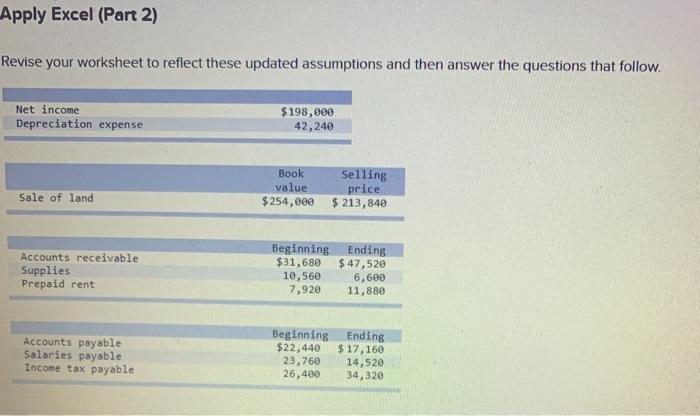
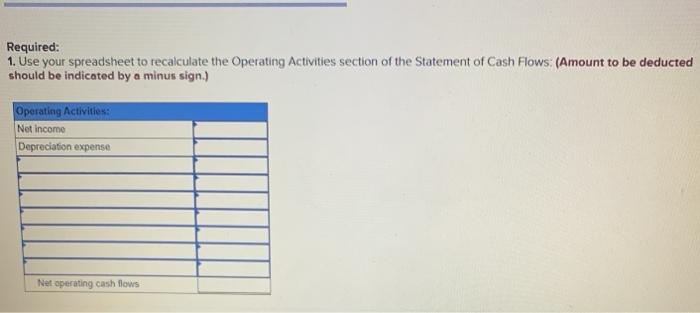
Applying Excel 11-1: Using Excel to Complete the Operating Activities Section of the Statement of Cash Flows. [The following information applies to the questions displayed below) In this Applying Excel exercise you will use Excel to complete the Operating Activities section of the Statement of Cash Flows Watch the tutorial video and then complete Parts 1 and 2 to practice and apply the skills demonstrated in the video Apply Excel (Part 2) Revise your worksheet to reflect these updated assumptions and then answer the questions that follow. Net income Depreciation expense $198,000 42,240 Book value $254,000 Selling price $ 213,840 Sale of land Accounts receivable Supplies Prepaid rent Beginning $31,680 10,560 7,920 Ending $ 47,520 6,600 11,880 Accounts payable Salaries payable Income tax payable Beginning $22,440 23,760 26,400 Ending $ 17, 160 14,520 34,320 Required: 1. Use your spreadsheet to recalculate the Operating Activities section of the Statement of Cash Flows: (Amount to be deducted should be indicated by a minus sign.) Operating Activities: Net Income Depreciation expense Net operating cash flows
Step by Step Solution
There are 3 Steps involved in it

Get step-by-step solutions from verified subject matter experts