







Question: Arduino help 4.6 Practice run-time debugging by fixing the following listing, so that the LED will blink like it was meant to. void New Delay
Arduino help
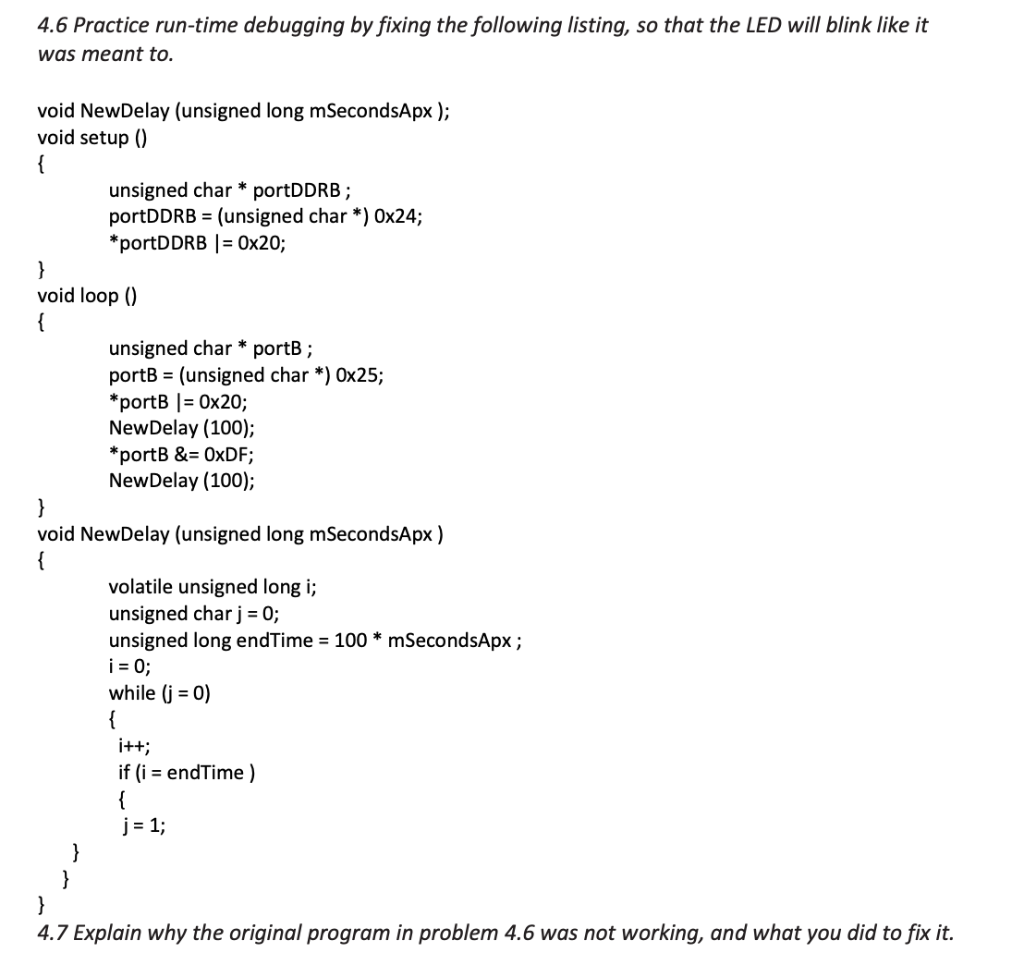
4.6 Practice run-time debugging by fixing the following listing, so that the LED will blink like it was meant to. void New Delay (unsigned long mSecondsApx ); void setup() unsigned char * portDDRB; portDDRB = (unsigned char *) Ox24; *portDDRB | = 0x20; } void loop() unsigned char * portB; portB = (unsigned char *) 0x25; *portB |= 0x20; New Delay (100); *ports &= OxDF; New Delay (100); void New Delay (unsigned long mSecondsApx ) volatile unsigned long i; unsigned char j = 0; unsigned long endTime = 100 * mSecondsApx; i = 0; while (j = 0) i++; if (i = endTime) j = 1; 4.7 Explain why the original program in problem 4.6 was not working, and what you did to fix it
Step by Step Solution
There are 3 Steps involved in it

Get step-by-step solutions from verified subject matter experts
 Study Help