







Question: Area of a Convex Polygon This problem is a modification of Gilat 7 . 1 6 and 7 . 1 7 . The area of
Area of a Convex Polygon
This problem is a modification of Gilat and
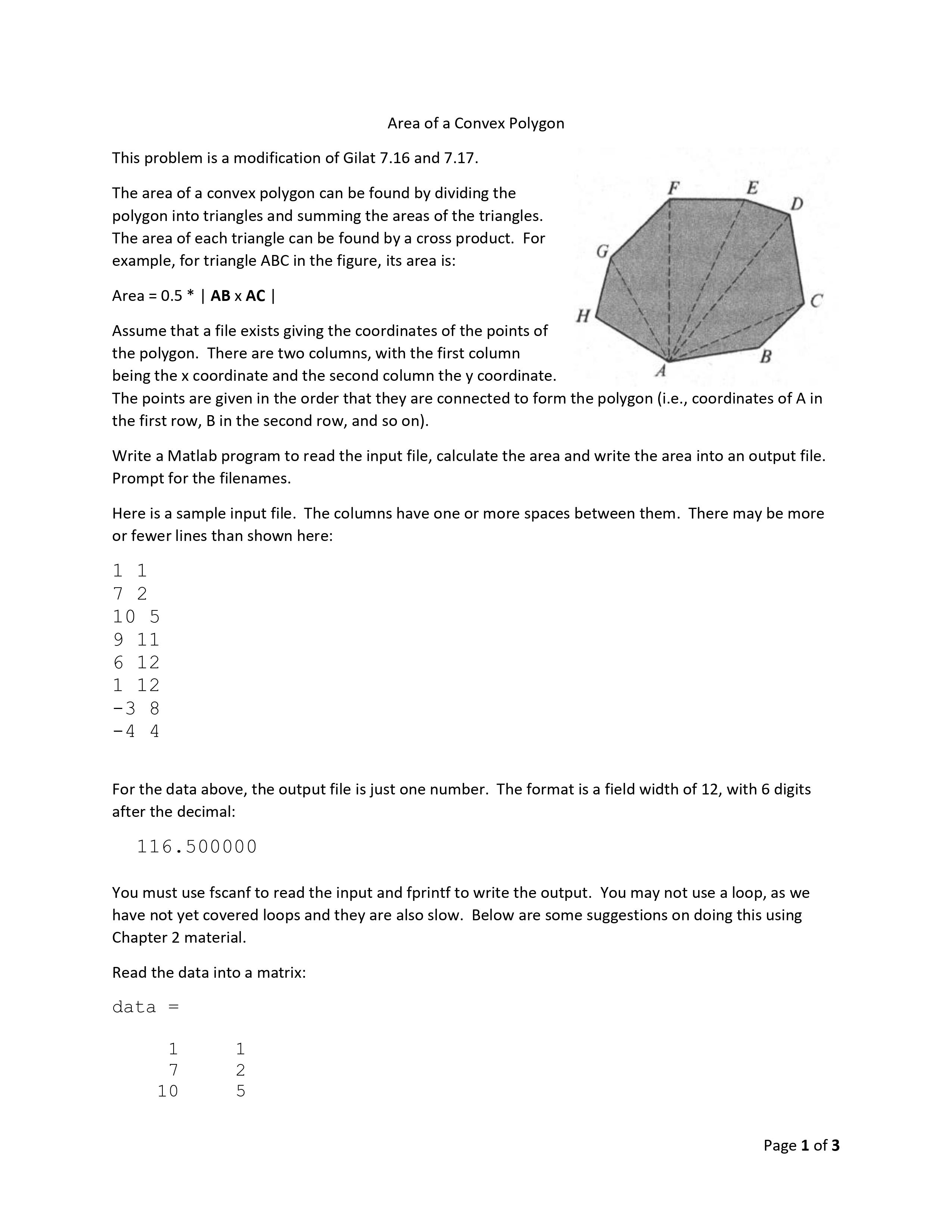
The area of a convex polygon can be found by dividing the
polygon into triangles and summing the areas of the triangles.
The area of each triangle can be found by a cross product. For
example, for triangle ABC in the figure, its area is:
Area
Assume that a file exists giving the coordinates of the points of
the polygon. There are two columns, with the first column
being the coordinate and the second column the coordinate.
The points are given in the order that they are connected to form the polygon ie coordinates of in
the first row, in the second row, and so on
Write a Matlab program to read the input file, calculate the area and write the area into an output file.
Prompt for the filenames.
Here is a sample input file. The columns have one or more spaces between them. There may be more
or fewer lines than shown here:
For the data above, the output file is just one number. The format is a field width of with digits
after the decimal:
You must use fscanf to read the input and fprintf to write the output. You may not use a loop, as we
have not yet covered loops and they are also slow. Below are some suggestions on doing this using
Chapter material.
Read the data into a matrix:
data
Page of
Subtract the first row from all the other rows to form:
vecs
Add a rd column of zeros:
vecs
Tranpose vecs:
vecs
Now create a matrix, first, that contains all the columns except for the last:
first
Page of
Create a matrix called second that contains all the columns of vec except for the first:
second
Now take the cross product of first with second, then take the absolute value and divide by :
areas
The rd row of matrix areas contains the areas of the triangles. Now just add them up and write the
output file.
One problem youll face is that you dont know how many vertices will be in the input file. There are a
couple of solutions:
Use the size function.
Use end. This is not in your textbook, but here is the relevant section from the Matlab help.
You can also find examples on end by typing doc end
end can also serve as the last index in an indexing expression. In
that context, end SIZEXk when used as part of the kth index.
Examples of this use are, X:end and X::end When using end
to grow an array, as in Xend make sure X exists first.
Step by Step Solution
There are 3 Steps involved in it
1 Expert Approved Answer
Step: 1 Unlock

Question Has Been Solved by an Expert!
Get step-by-step solutions from verified subject matter experts
Step: 2 Unlock
Step: 3 Unlock
 Study Help