







Question: Arm Assembly Programming Question What I got for each highlight: Highlight 1: MOV R0, SP Highlight 2: STR R1, [R0], #4 Highlight 3: MOV R0,
Arm Assembly Programming Question
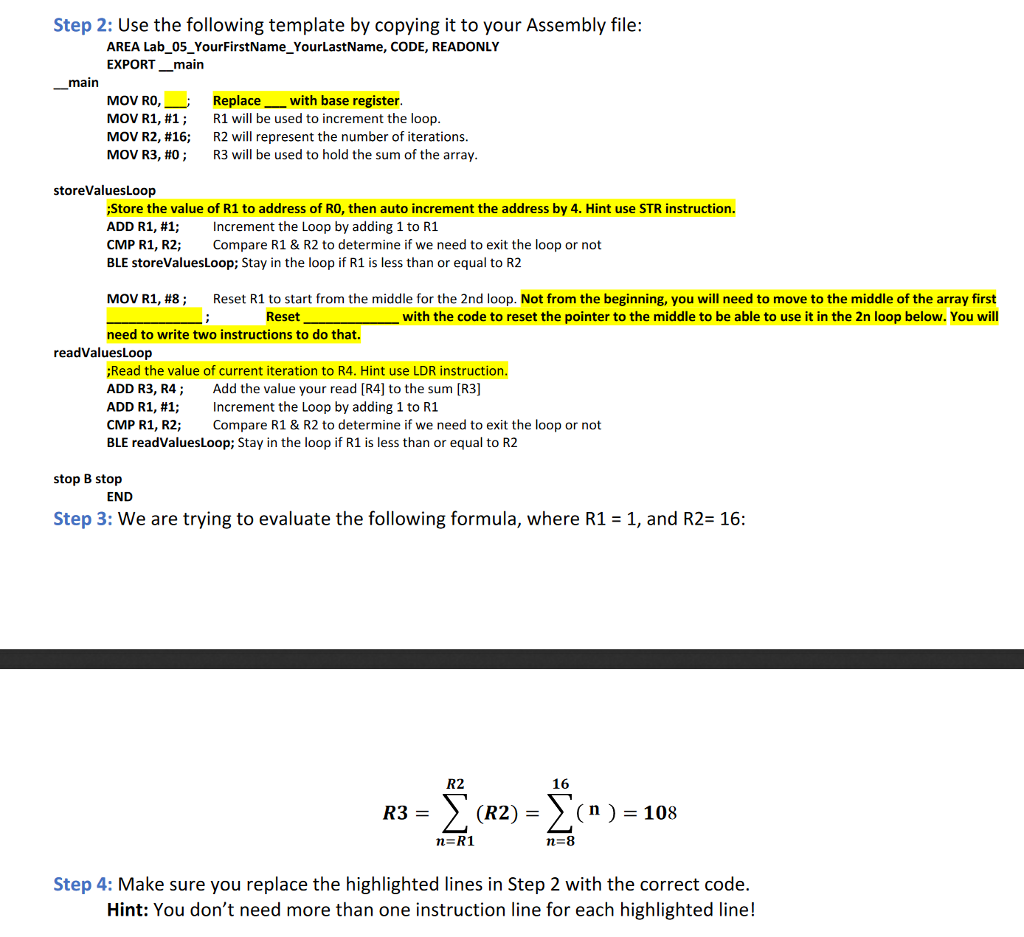
What I got for each highlight:
Highlight 1: MOV R0, SP
Highlight 2: STR R1, [R0], #4
Highlight 3: MOV R0, SP ; and LDR R1, [R0, #8]
Highlight 4: LDR R4, [R0], #4
I'm not sure about Highlight 3. Any help will be appreciated.
Step 2: Use the following template by copying it to your Assembly file: AREA Lab 05YourFirstName_YourLastName, CODE, READONLY EXPORT_main main MOV R0,--, MOV R1, #1 ; MOV R2, #16; MOV R3, #0 ; Replace with base register R1 will be used to increment the loop R2 will represent the number of iterations. R3 will be used to hold the sum of the array storeValuesLoop Store the value of R1 to address of RO, then auto increment the address by 4. Hint use STR instruction. ADD R1, #1; increment the Loop by adding 1 to R1 CMP R1, R2; BLE storeValuesLoop; Stay in the loop if R1 is less than or equal to R2 Compare R1 & R2 to determine if we need to exit the loop or not MOV R1, #8 ; Reset R1 to start from the middle for the 2nd loop. Not from the beginning, you will need to move to the middle of the array first Resetwith the code to reset the pointer to the middle to be able to use it in the 2n loop below. You will need to write two instructions to do that. readValuesLoop Read the value of current iteration to R4. Hint use LDR instruction. ADD R3, R4; Add the value your read [R4] to the sum R3] ADD R1, #1; Increment the Loop by adding 1 to R1 CMP R1, R2; BLE readValuesLoop; Stay in the loop if R1 is less than or equal to R2 Compare R1& R2 to determine if we need to exit the loop or not stop B stop END Step 3: We are trying to evaluate the following formula, where R1 -1, and R2 16 R2 16 (R2)- (n)-108 n-8 Step 4: Make sure you replace the highlighted lines in Step 2 with the correct code Hint: You don't need more than one instruction line for each highlighted line
Step by Step Solution
There are 3 Steps involved in it

Get step-by-step solutions from verified subject matter experts
 Study Help