







Question: array_list.py and array_list_tests.py outlines has been given below, use it please #array_list.py from __future__ import annotations from typing import Any class ArrayList: # NOTE: Initial
array_list.py and array_list_tests.py outlines has been given below, use it please
#array_list.py
from __future__ import annotations
from typing import Any
class ArrayList: # NOTE: Initial capacity is somewhat arbitrary. To making testing # resizing easier, you'll probably want a small initial capacity. # In practice, you'd probably have an initial capacity of 510. def __init__(self, capacity: int = 1): self.array: list[Any] = [None] * capacity self.capacity = capacity self.size = 0
def empty_list() -> ArrayList: ...
def add(lst: ArrayList, index: int, value: Any) -> ArrayList: ...
def length(lst: ArrayList) -> int: ...
def get(lst: ArrayList, index: int) -> Any: ...
def setitem(lst: ArrayList, index: int, value: Any) -> ArrayList: ...
def remove(lst: ArrayList, index: int) -> tuple[Any, ArrayList]: ...
#array_list_tests.py
from __future__ import annotations
from typing import Any
class ArrayList:
# NOTE: Initial capacity is somewhat arbitrary. To making testing
# resizing easier, you'll probably want a small initial capacity.
# In practice, you'd probably have an initial capacity of 510.
def __init__(self, capacity: int = 1):
self.array: list[Any] = [None] * capacity
self.capacity = capacity
self.size = 0
def empty_list() -> ArrayList:
...
def add(lst: ArrayList, index: int, value: Any) -> ArrayList:
...
def length(lst: ArrayList) -> int:
...
def get(lst: ArrayList, index: int) -> Any:
...
def setitem(lst: ArrayList, index: int, value: Any) -> ArrayList:
...
def remove(lst: ArrayList, index: int) -> tuple[Any, ArrayList]:
...
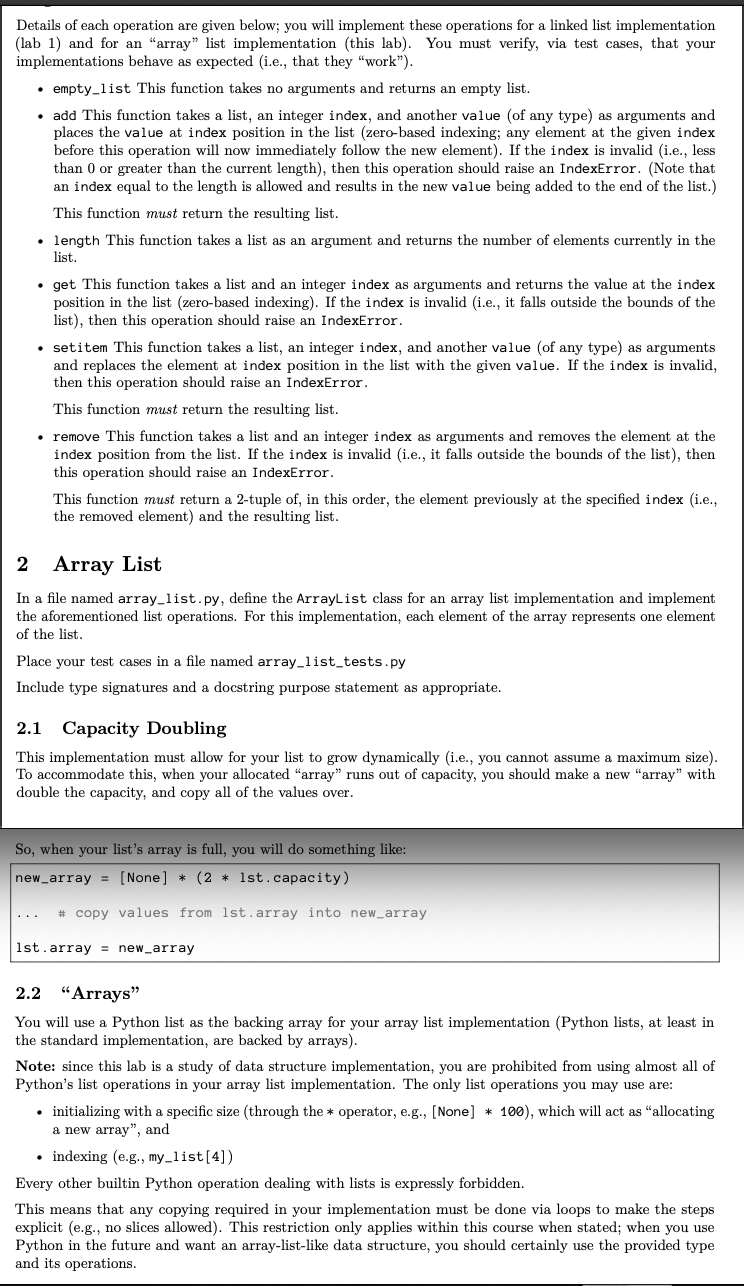
Details of each operation are given below; you will implement these operations for a linked list implementation (lab 1) and for an "array" list implementation (this lab). You must verify, via test cases, that your implementations behave as expected (i.e., that they "work"). - empty_1ist This function takes no arguments and returns an empty list. - add This function takes a list, an integer index, and another value (of any type) as arguments and places the value at index position in the list (zero-based indexing; any element at the given index before this operation will now immediately follow the new element). If the index is invalid (i.e., less than 0 or greater than the current length), then this operation should raise an IndexError. (Note that an index equal to the length is allowed and results in the new value being added to the end of the list.) This function must return the resulting list. - length This function takes a list as an argument and returns the number of elements currently in the list. - get This function takes a list and an integer index as arguments and returns the value at the index position in the list (zero-based indexing). If the index is invalid (i.e., it falls outside the bounds of the list), then this operation should raise an IndexError. - setitem This function takes a list, an integer index, and another value (of any type) as arguments and replaces the element at index position in the list with the given value. If the index is invalid, then this operation should raise an IndexError. This function must return the resulting list. - remove This function takes a list and an integer index as arguments and removes the element at the index position from the list. If the index is invalid (i.e., it falls outside the bounds of the list), then this operation should raise an IndexError. This function must return a 2-tuple of, in this order, the element previously at the specified index (i.e., the removed element) and the resulting list. 2 Array List In a file named array_list.py, define the ArrayList class for an array list implementation and implement the aforementioned list operations. For this implementation, each element of the array represents one element of the list. Place your test cases in a file named array_list_tests.py Include type signatures and a docstring purpose statement as appropriate. 2.1 Capacity Doubling This implementation must allow for your list to grow dynamically (i.e., you cannot assume a maximum size). To accommodate this, when your allocated "array" runs out of capacity, you should make a new "array" with double the capacity, and copy all of the values over. So, when your list's array is full, you will do something like: \[ \begin{array}{l} \text { new_array }=[\text { None }] *(2 * \text { lst.capacity }) \\ \ldots \text { \# copy values from lst.array into new_array } \\ \text { lst.array }=\text { new_array } \end{array} \] 2.2 "Arrays" You will use a Python list as the backing array for your array list implementation (Python lists, at least in the standard implementation, are backed by arrays). Note: since this lab is a study of data structure implementation, you are prohibited from using almost all of Python's list operations in your array list implementation. The only list operations you may use are: - initializing with a specific size (through the * operator, e.g., [None] * 100), which will act as "allocating a new array", and - indexing (e.g., my_list [4]) Every other builtin Python operation dealing with lists is expressly forbidden. This means that any copying required in your implementation must be done via loops to make the steps explicit (e.g., no slices allowed). This restriction only applies within this course when stated; when you use Python in the future and want an array-list-like data structure, you should certainly use the provided type and its operations
Step by Step Solution
There are 3 Steps involved in it

Get step-by-step solutions from verified subject matter experts
 Study Help