







Question: Arrays Assignment fgets getchar() getchar() 2 Create a program called arrays.c that does the following: Prompt the user for a string ( Display the frequency
| Arrays Assignment | |
|
fgets getchar() getchar() 2 | |
Create a program called arrays.c that does the following:
Prompt the user for a string (
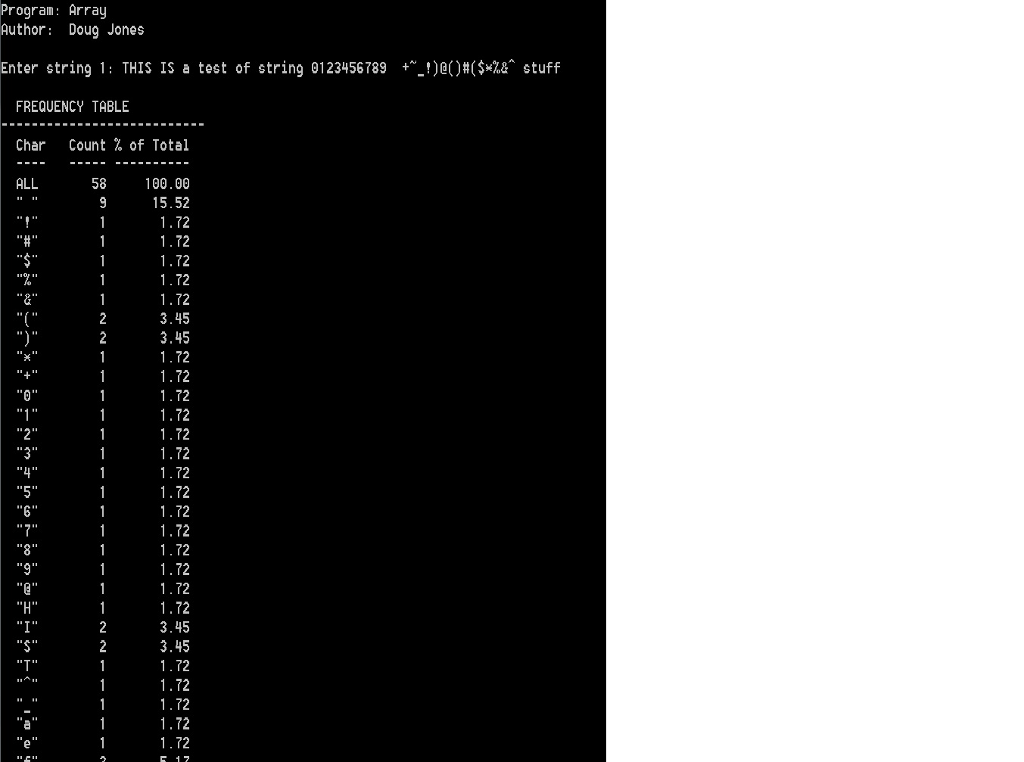
Display the frequency table showing the total number of characters entered by the user, the count for each character entered by the user, and the percentage of the total count that is attributed to each character.
The absolute frequency of a character is the number of times the character appears. For example, in the string "aaab" the absolute frequency of 'a' is 3, and the absolute frequency of 'b' is 1.
The relative frequency of a character is the absolute frequency divided by the total number of characters. For example, in the string "aaab" the relative frequency of 'a' is 3/4 = 0.75, and the relative frequency of 'b' is 1/4 = 0.25. Relative frequency * 100 will give you the result in percentage
Your program must adhere to the class coding standards, and will be graded using the assignment grading criteria. Submit your source code file to the Desire2Learn dropbox for this assignment.
Some help
array assignment help
copied from the content section, lessening the chance to miss it
fgets
getchar()
Sample Output (sample output in picture)
Program: Array Author: Doug Jones Enter string 1: THIS IS a test of string 0123456789 +~_!)@()#($*%&^ stuff FREQUENCY TABLE --------------------------- Char Count % of Total ---- ----- ---------- ALL 58 100.00 " " 9 15.52 "!" 1 1.72 "#" 1 1.72 "$" 1 1.72 "%" 1 1.72 "&" 1 1.72 "(" 2 3.45 ")" 2 3.45 "*" 1 1.72 "+" 1 1.72 "0" 1 1.72 "1" 1 1.72 "2" 1 1.72 "3" 1 1.72 "4" 1 1.72 "5" 1 1.72 "6" 1 1.72 "7" 1 1.72 "8" 1 1.72 "9" 1 1.72 "@" 1 1.72 "H" 1 1.72 "I" 2 3.45 "S" 2 3.45 "T" 1 1.72 "^" 1 1.72 "_" 1 1.72 "a" 1 1.72 "e" 1 1.72 "f" 3 5.17 "g" 1 1.72 "i" 1 1.72 "n" 1 1.72 "o" 1 1.72 "r" 1 1.72 "s" 3 5.17 "t" 4 6.90 "u" 1 1.72 "~" 1 1.72
Step by Step Solution
There are 3 Steps involved in it

Get step-by-step solutions from verified subject matter experts
 Study Help