







Question: ArtCollage.java import java.awt.Color; public class ArtCollage { // The orginal picture private Picture original; // The collage picture private Picture collage; // The collage Picture
ArtCollage.java
import java.awt.Color;
public class ArtCollage {
// The orginal picture
private Picture original;
// The collage picture
private Picture collage;
// The collage Picture consists of collageDimension X collageDimension tiles
private int collageDimension;
// A tile consists of tileDimension X tileDimension pixels
private int tileDimension;
/*
* One-argument Constructor
* 1. set default values of collageDimension to 4 and tileDimension to 100
* 2. initializes original with the filename image
* 3. initializes collage as a Picture of tileDimension*collageDimension x tileDimension*collageDimension,
* where each pixel is black (see all constructors for the Picture class).
* 4. update collage to be a scaled version of original (see scaling filter on Week 9 slides)
*
* @param filename the image filename
*/
public ArtCollage (String filename) {
// WRITE YOUR CODE HERE
}
/*
* Three-arguments Constructor
* 1. set default values of collageDimension to cd and tileDimension to td
* 2. initializes original with the filename image
* 3. initializes collage as a Picture of tileDimension*collageDimension x tileDimension*collageDimension,
* where each pixel is black (see all constructors for the Picture class).
* 4. update collage to be a scaled version of original (see scaling filter on Week 9 slides)
*
* @param filename the image filename
*/
public ArtCollage (String filename, int td, int cd) {
// WRITE YOUR CODE HERE
}
/*
* Returns the collageDimension instance variable
*
* @return collageDimension
*/
public int getCollageDimension() {
// WRITE YOUR CODE HERE
}
/*
* Returns the tileDimension instance variable
*
* @return tileDimension
*/
public int getTileDimension() {
// WRITE YOUR CODE HERE
}
/*
* Returns original instance variable
*
* @return original
*/
public Picture getOriginalPicture() {
// WRITE YOUR CODE HERE
}
/*
* Returns collage instance variable
*
* @return collage
*/
public Picture getCollagePicture() {
// WRITE YOUR CODE HERE
}
/*
* Display the original image
* Assumes that original has been initialized
*/
public void showOriginalPicture() {
// WRITE YOUR CODE HERE
}
/*
* Display the collage image
* Assumes that collage has been initialized
*/
public void showCollagePicture() {
// WRITE YOUR CODE HERE
}
/*
* Replaces the tile at collageCol,collageRow with the image from filename
* Tile (0,0) is the upper leftmost tile
*
* @param filename image to replace tile
* @param collageCol tile column
* @param collageRow tile row
*/
public void replaceTile (String filename, int collageCol, int collageRow) {
// WRITE YOUR CODE HERE
}
/*
* Makes a collage of tiles from original Picture
* original will have collageDimension x collageDimension tiles, each tile
* has tileDimension X tileDimension pixels
*/
public void makeCollage () {
// WRITE YOUR CODE HERE
}
/*
* Colorizes the tile at (collageCol, collageRow) with component
* (see CS111 Week 9 slides, the code for color separation is at the
* book's website)
*
* @param component is either red, blue or green
* @param collageCol tile column
* @param collageRow tile row
*/
public void colorizeTile (String component, int collageCol, int collageRow) {
// WRITE YOUR CODE HERE
}
/*
* Grayscale tile at (collageCol, collageRow)
* (see CS111 Week 9 slides, the code for luminance is at the book's website)
*
* @param collageCol tile column
* @param collageRow tile row
*/
public void grayscaleTile (int collageCol, int collageRow) {
// WRITE YOUR CODE HERE
}
/*
*
* Test client: use the examples given on the assignment description to test your ArtCollage
*/
public static void main (String[] args) {
ArtCollage art = new ArtCollage(args[0]);
art.showCollagePicture();
}
}
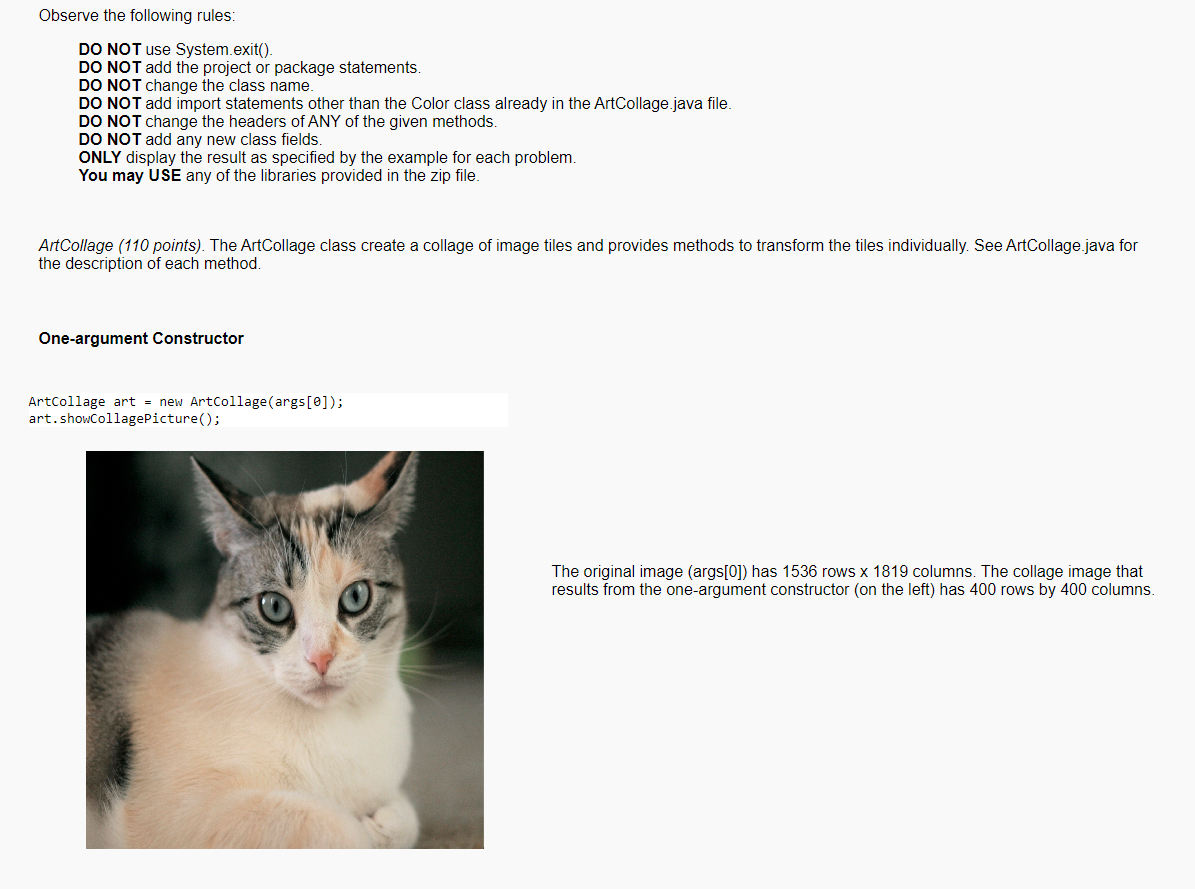
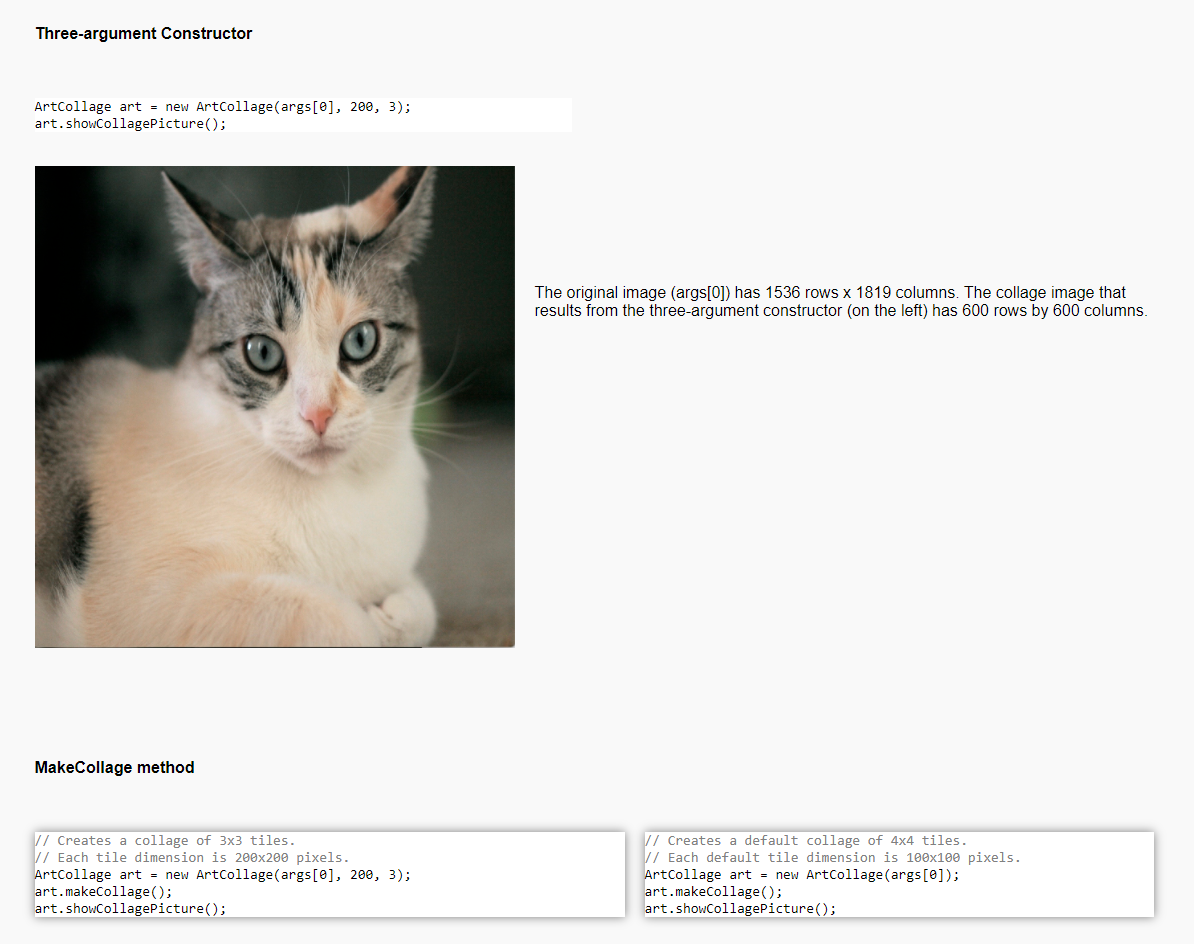
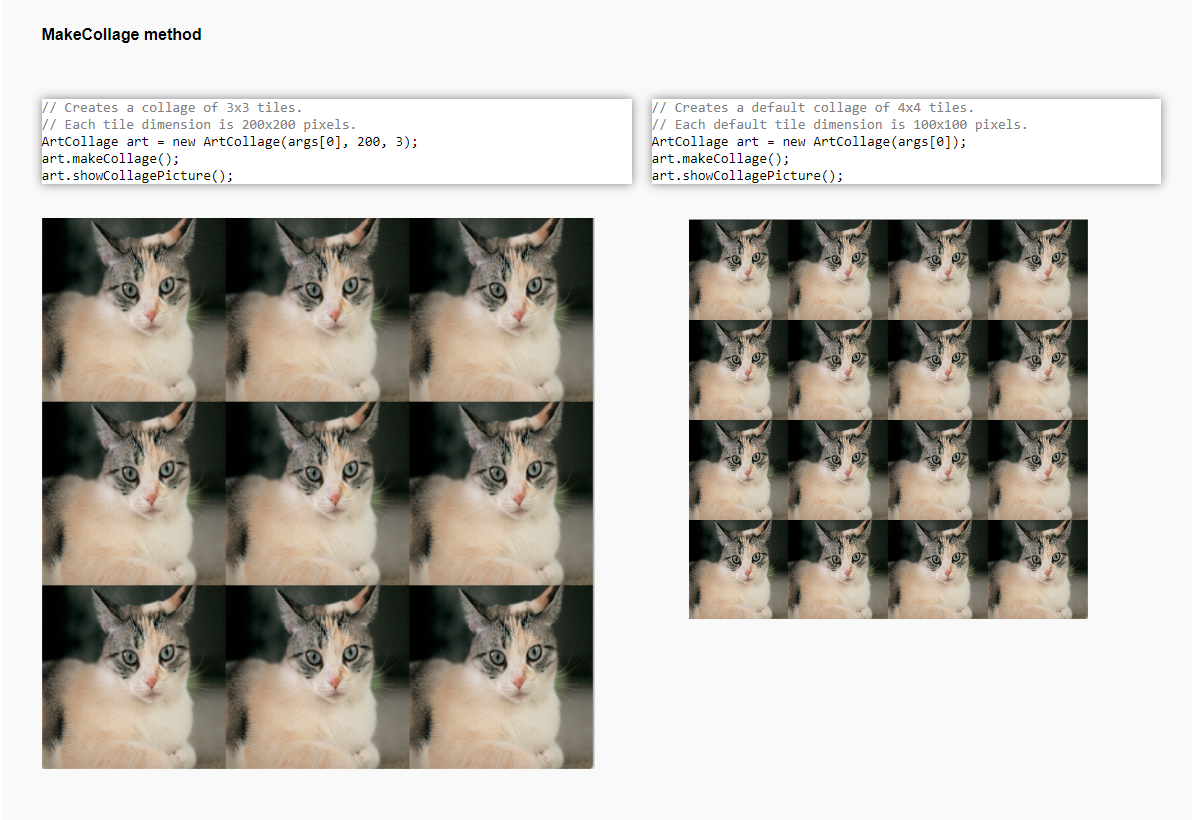
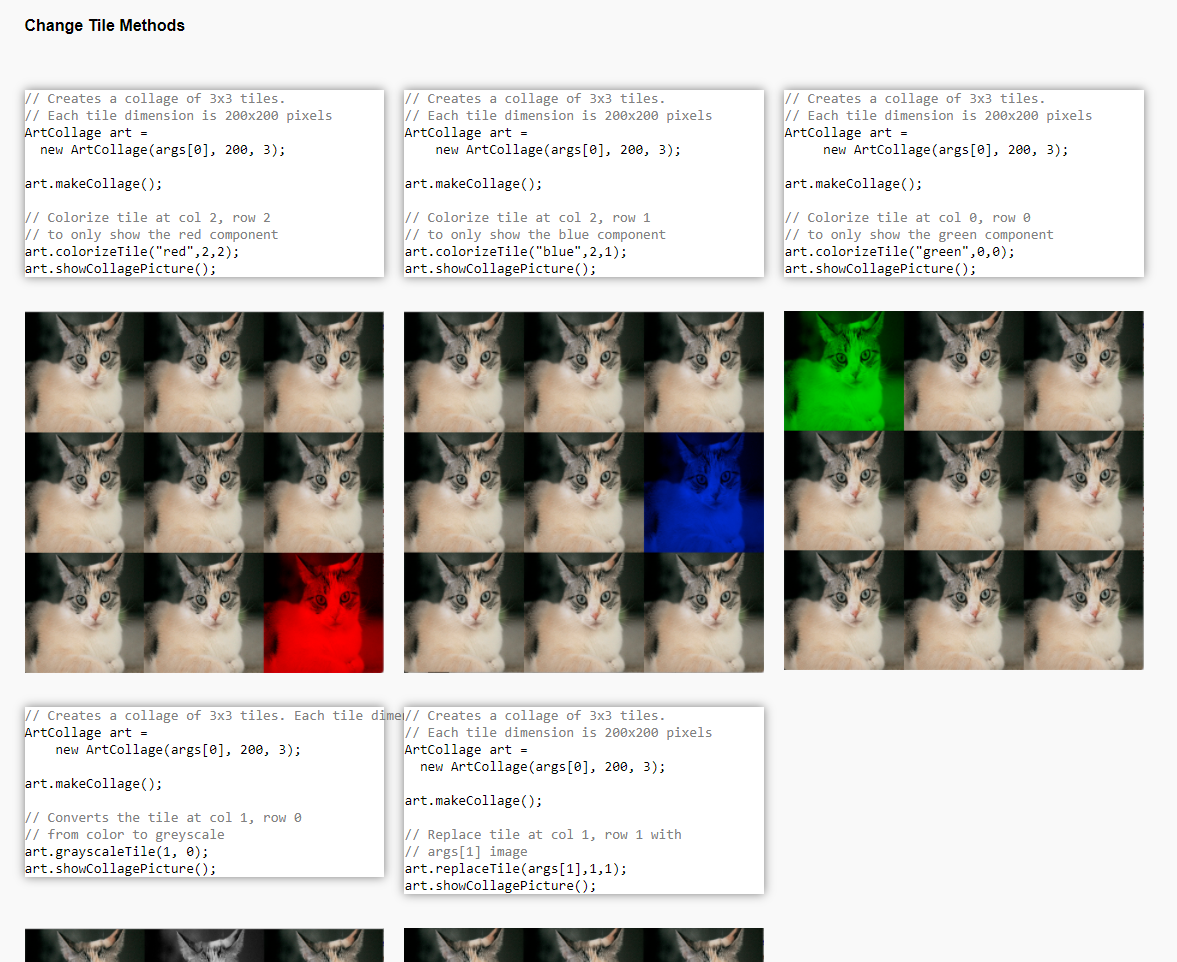
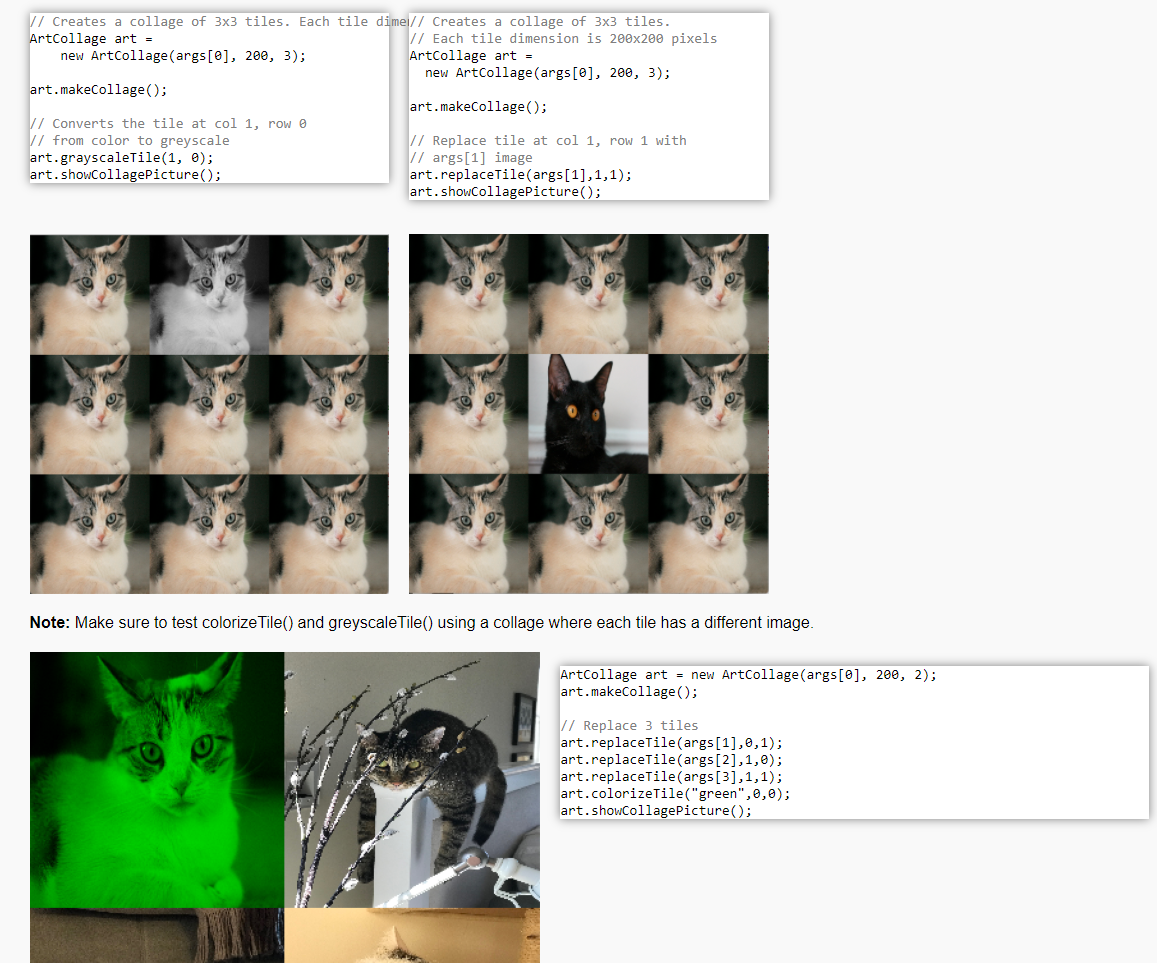
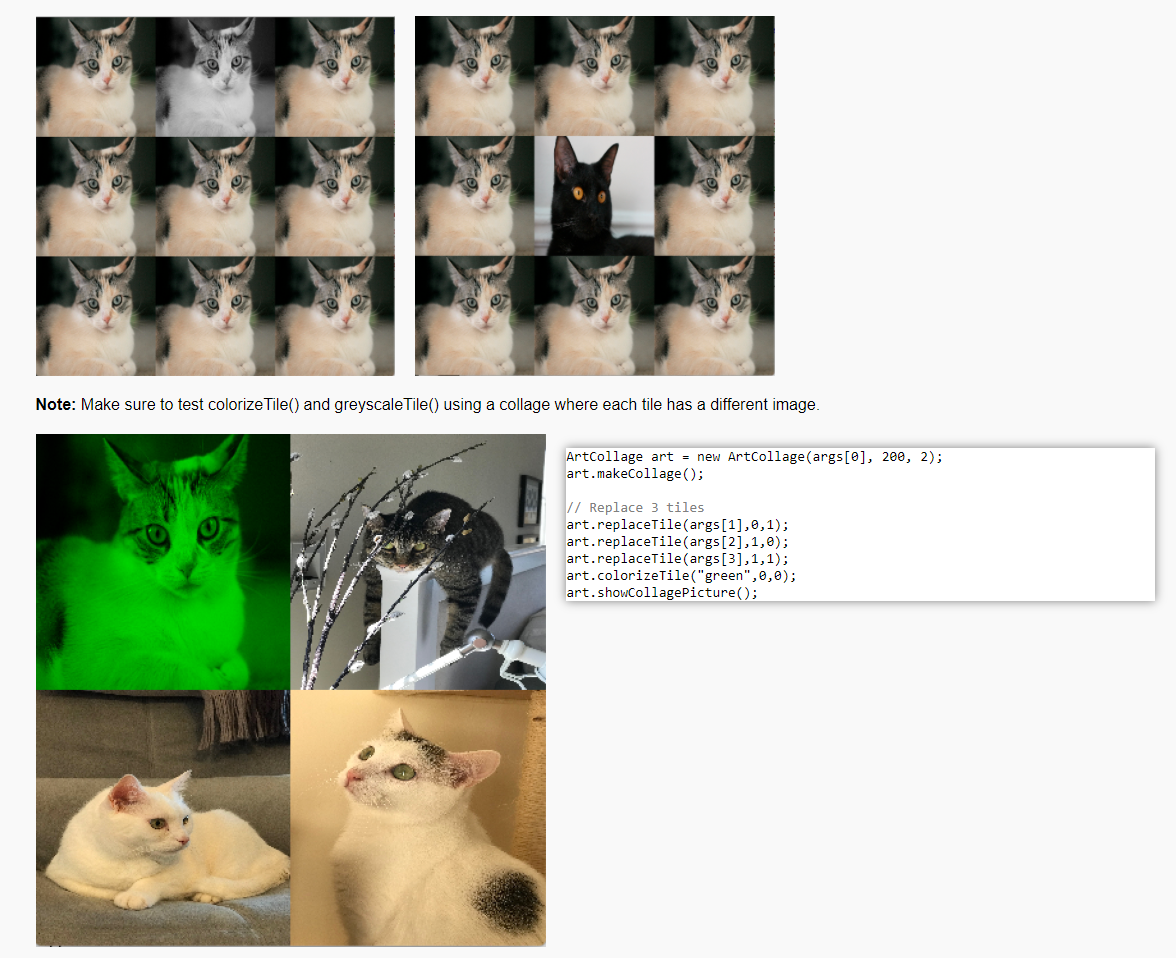
Observe the following rules: DO NOT use System.exit(). DO NOT add the project or package statements. DO NOT change the class name. DO NOT add import statements other than the Color class already in the ArtCollage.java file. DO NOT change the headers of ANY of the given methods. DO NOT add any new class fields. ONLY display the result as specified by the example for each problem. You may USE any of the libraries provided in the zip file. ArtCollage (110 points). The ArtCollage class create a collage of image tiles and provides methods to transform the tiles individually. See ArtCollage.java for the description of each method. One-argument Constructor Artcollage art = new ArtCollage (args[@]); art.showCollagePicture(); The original image (args[0]) has 1536 rows x 1819 columns. The collage image that results from the one-argument constructor (on the left) has 400 rows by 400 columns. Three-argument Constructor ArtCollage art = new ArtCollage (args[@], 200, 3); art. showCollagePicture(); The original image (args[0]) has 1536 rows x 1819 columns. The collage image that results from the three-argument constructor (on the left) has 600 rows by 600 columns MakeCollage method 1/ Creates a collage of 3x3 tiles. // Each tile dimension is 200x200 pixels. ArtCollage art = new ArtCollage (args[@], 200, 3); art.makeCollage(); art.showcollagePicture(); 1/ Creates a default collage of 4x4 tiles. \/ Each default tile dimension is 100x100 pixels. ArtCollage art = new ArtCollage (args[0]); art.makeCollage(); art.showcollagePicture(); MakeCollage method 1/ Creates a collage of 3x3 tiles. \/ Each tile dimension is 200x200 pixels. Artcollage art = new ArtCollage (args[@], 200, 3); art.makeCollage(); art. showCollagePicture(); 1/ Creates a default collage of 4x4 tiles. // Each default tile dimension is 100x100 pixels. Artcollage art = new ArtCollage (args[@]); art.makeCollage(); art.showcollagePicture(); Change Tile Methods // Creates a collage of 3x3 tiles. // Each tile dimension is 200x200 pixels ArtCollage art = new ArtCollage (args[@], 200, 3); // Creates a collage of 3x3 tiles. // Each tile dimension is 200x200 pixels ArtCollage art = new ArtCollage (args[@], 200, 3); 1/ Creates a collage of 3x3 tiles. // Each tile dimension is 200x200 pixels ArtCollage art = new ArtCollage (args[@], 200, 3); art.makeCollage(); art.makeCollage(); art.makeCollage(); // Colorize tile at col 2, row 2 11 to only show the red component art.colorizeTile("red",2,2); art.showCollagePicture(); 1/ Colorize tile at col 2, row 1 // to only show the blue component art.colorizeTile("blue",2,1); art.showCollagePicture(); 1/ Colorize tile at col o, row o // to only show the green component art.colorizeTile("green",0,0); art. showCollagePicture(); // Creates a collage of 3x3 tiles. Each tile dime// Creates a collage of 3x3 tiles. Artcollage art = // Each tile dimension is 200x200 pixels new ArtCollage (args[@], 200, 3); ArtCollage art = new ArtCollage (args[@], 200, 3); art.makeCollage(); art.makeCollage(); 1/ Converts the tile at col 1, row I from color to greyscale // Replace tile at col 1, row 1 with art.grayscaletile(1, 0); 11 args[1] image art. showcollagePicture(); art.replaceTile(args[1],1,1); art.showCollagePicture(); // Creates a collage of 3x3 tiles. Each tile dime// Creates a collage of 3x3 tiles. ArtCollage art = // Each tile dimension is 200x200 pixels new ArtCollage (args[@], 200, 3); Artcollage art = new ArtCollage (args[@], 200, 3); art.makeCollage(); art.makeCollage(); // Converts the tile at col 1, row o // from color to greyscale // Replace tile at col 1, row 1 with art.grayscaletile(1, ); // args[1] image art.showcollagePicture(); art.replaceTile(args[1],1,1); art.showcollagePicture(); Note: Make sure to test colorize Tile() and greyscale Tile() using a collage where each tile has a different image. ArtCollage art = new ArtCollage (args[@], 200, 2); art.makeCollage(); // Replace 3 tiles art.replaceTile(args[1],0,1); art.replaceTile(args[2],1,0); art.replaceTile(args[3],1,1); art.colorizeTile("green",0,0); art. showCollagePicture(); Note: Make sure to test colorize Tile() and greyscale Tile() using a collage where each tile has a different image. ArtCollage art = new ArtCollage (args[@], 200, 2); art.makeCollage(); // Replace 3 tiles art.replaceTile (args[1],0,1); art.replaceTile(args[2],1,0); art.replaceTile(args[3],1,1); art.colorizeTile("green",0,0); art.showCollagePicture(); Observe the following rules: DO NOT use System.exit(). DO NOT add the project or package statements. DO NOT change the class name. DO NOT add import statements other than the Color class already in the ArtCollage.java file. DO NOT change the headers of ANY of the given methods. DO NOT add any new class fields. ONLY display the result as specified by the example for each problem. You may USE any of the libraries provided in the zip file. ArtCollage (110 points). The ArtCollage class create a collage of image tiles and provides methods to transform the tiles individually. See ArtCollage.java for the description of each method. One-argument Constructor Artcollage art = new ArtCollage (args[@]); art.showCollagePicture(); The original image (args[0]) has 1536 rows x 1819 columns. The collage image that results from the one-argument constructor (on the left) has 400 rows by 400 columns. Three-argument Constructor ArtCollage art = new ArtCollage (args[@], 200, 3); art. showCollagePicture(); The original image (args[0]) has 1536 rows x 1819 columns. The collage image that results from the three-argument constructor (on the left) has 600 rows by 600 columns MakeCollage method 1/ Creates a collage of 3x3 tiles. // Each tile dimension is 200x200 pixels. ArtCollage art = new ArtCollage (args[@], 200, 3); art.makeCollage(); art.showcollagePicture(); 1/ Creates a default collage of 4x4 tiles. \/ Each default tile dimension is 100x100 pixels. ArtCollage art = new ArtCollage (args[0]); art.makeCollage(); art.showcollagePicture(); MakeCollage method 1/ Creates a collage of 3x3 tiles. \/ Each tile dimension is 200x200 pixels. Artcollage art = new ArtCollage (args[@], 200, 3); art.makeCollage(); art. showCollagePicture(); 1/ Creates a default collage of 4x4 tiles. // Each default tile dimension is 100x100 pixels. Artcollage art = new ArtCollage (args[@]); art.makeCollage(); art.showcollagePicture(); Change Tile Methods // Creates a collage of 3x3 tiles. // Each tile dimension is 200x200 pixels ArtCollage art = new ArtCollage (args[@], 200, 3); // Creates a collage of 3x3 tiles. // Each tile dimension is 200x200 pixels ArtCollage art = new ArtCollage (args[@], 200, 3); 1/ Creates a collage of 3x3 tiles. // Each tile dimension is 200x200 pixels ArtCollage art = new ArtCollage (args[@], 200, 3); art.makeCollage(); art.makeCollage(); art.makeCollage(); // Colorize tile at col 2, row 2 11 to only show the red component art.colorizeTile("red",2,2); art.showCollagePicture(); 1/ Colorize tile at col 2, row 1 // to only show the blue component art.colorizeTile("blue",2,1); art.showCollagePicture(); 1/ Colorize tile at col o, row o // to only show the green component art.colorizeTile("green",0,0); art. showCollagePicture(); // Creates a collage of 3x3 tiles. Each tile dime// Creates a collage of 3x3 tiles. Artcollage art = // Each tile dimension is 200x200 pixels new ArtCollage (args[@], 200, 3); ArtCollage art = new ArtCollage (args[@], 200, 3); art.makeCollage(); art.makeCollage(); 1/ Converts the tile at col 1, row I from color to greyscale // Replace tile at col 1, row 1 with art.grayscaletile(1, 0); 11 args[1] image art. showcollagePicture(); art.replaceTile(args[1],1,1); art.showCollagePicture(); // Creates a collage of 3x3 tiles. Each tile dime// Creates a collage of 3x3 tiles. ArtCollage art = // Each tile dimension is 200x200 pixels new ArtCollage (args[@], 200, 3); Artcollage art = new ArtCollage (args[@], 200, 3); art.makeCollage(); art.makeCollage(); // Converts the tile at col 1, row o // from color to greyscale // Replace tile at col 1, row 1 with art.grayscaletile(1, ); // args[1] image art.showcollagePicture(); art.replaceTile(args[1],1,1); art.showcollagePicture(); Note: Make sure to test colorize Tile() and greyscale Tile() using a collage where each tile has a different image. ArtCollage art = new ArtCollage (args[@], 200, 2); art.makeCollage(); // Replace 3 tiles art.replaceTile(args[1],0,1); art.replaceTile(args[2],1,0); art.replaceTile(args[3],1,1); art.colorizeTile("green",0,0); art. showCollagePicture(); Note: Make sure to test colorize Tile() and greyscale Tile() using a collage where each tile has a different image. ArtCollage art = new ArtCollage (args[@], 200, 2); art.makeCollage(); // Replace 3 tiles art.replaceTile (args[1],0,1); art.replaceTile(args[2],1,0); art.replaceTile(args[3],1,1); art.colorizeTile("green",0,0); art.showCollagePicture()
Step by Step Solution
There are 3 Steps involved in it

Get step-by-step solutions from verified subject matter experts
 Study Help