



Question: As per the chapter project, in addition to blank or non-numeric entries, negative numbers are not allowed. Also, use a Form Load Event and RadioButtons
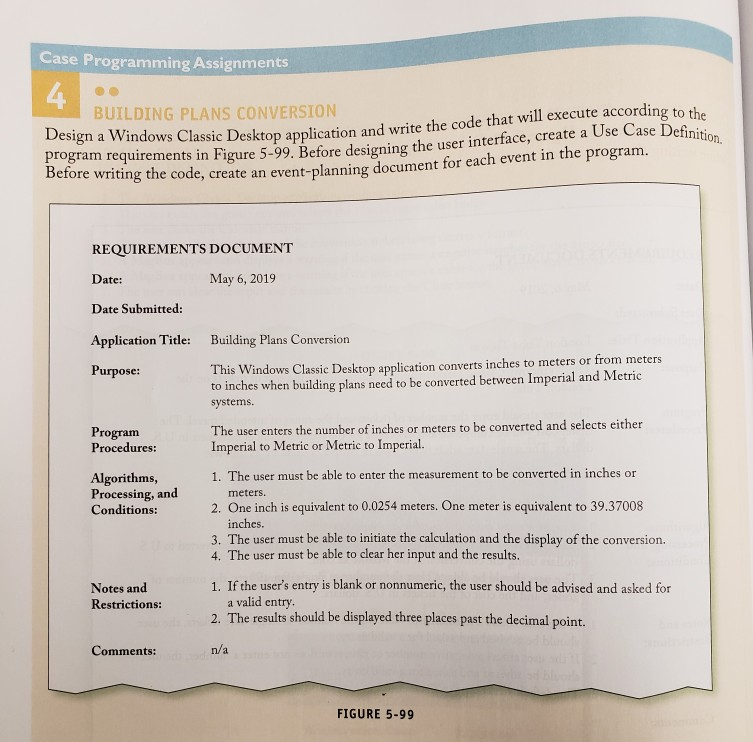
As per the chapter project, in addition to blank or non-numeric entries, negative numbers are not allowed. Also, use a Form Load Event and RadioButtons as demonstrated in the chapter project as well as set the AcceptButton and CancelButton Form properties.
Using Visual Basic. How to add a clear button to the format if added nonmeric or negative or black and click accept button
How to make the code stop calculating if added these?
Case Programming Assignments 4 n and write the code that will execute according to 5-99. Before designing the user interface, create a Use Case Def BUILDING PLANS CONVERSION Definition. Design a Windows Classic Desktop applicatio program requirements in Figure Betore writing the code, create an event-planning document for each event in the program. REQUIREMENTS DOCUMENT Date: Date Submitted: Application Title: Building Plans Conversion Purpose: May 6, 2019 This Windows Classic Desktop application converts inches to meters or from meters to inches when building plans need to be converted between Imperial and Metric systems Program Procedures: The user enters the number of inches or meters to be converted and selects either Imperial to Metric or Metric to Imperial. 1. The user must be able to enter the measurement to be converted in inches or Algorithms, Processing, and Conditions: meters. 2. One inch is equivalent to 0.0254 meters. One meter is equivalent to 39.37008 nches. 3. The user must be able to initiate the calculation and the display of the conversion. 4. The user must be able to clear her input and the results. 1. If the user's entry is blank or nonnumeric, the user should be advised and asked for Notes and Restrictions: a valid entry. 2. The results should be displayed three places past the decimal point. Comments: n/a FIGURE 5-99
Step by Step Solution
There are 3 Steps involved in it

Get step-by-step solutions from verified subject matter experts