



Question: ASAP 11. For this lab test: a. You can build the table structures, modify the table structures, and type in the original data in each
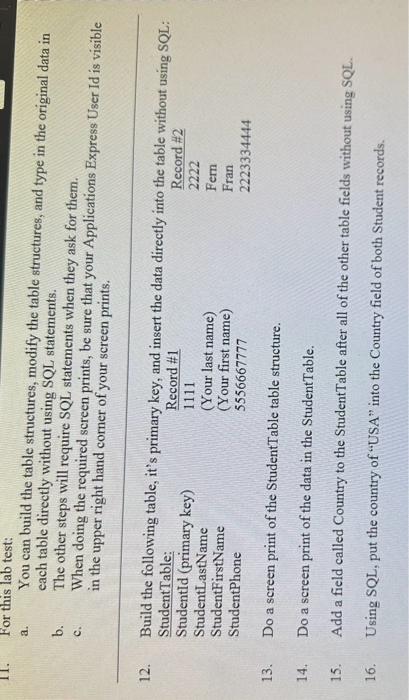
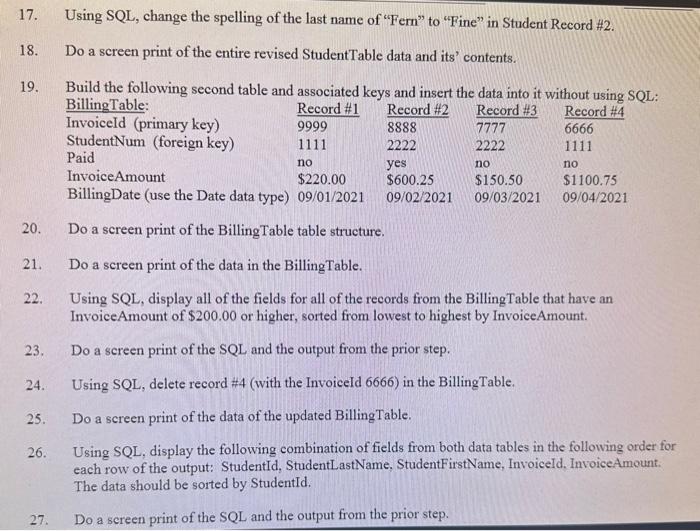
11. For this lab test: a. You can build the table structures, modify the table structures, and type in the original data in each table directly without using SQL statements, b. The other steps will require SQL statements when they ask for them. c. When doing the required sereen prints, be sure that your Applications Express User Id is visible in the upper right hand corner of your screen prints. 12. Build the following table, it's primary key, and insert the data directly into the table withnut noing SQL: 13. Do a screen print of the StudentTable table structure. 14. Do a screen print of the data in the StudentTable. 15. Add a field called Country to the StudentTable after all of the other table fields without using SQL. 16. Using SQL, put the country of "USA" into the Country field of both Student records. 17. Using SQL, change the spelling of the last name of "Fern" to "Fine" in Student Record \#2. 18. Do a screen print of the entire revised StudentTable data and its' contents. 19. Build the following second table and associated kevs and insert the data into it without neine enL: 20. Do a screen print of the BillingTable table structure. 21. Do a screen print of the data in the BillingTable. 22. Using SQL, display all of the fields for all of the records from the BillingTable that have an InvoiceAmount of $200.00 or higher, sorted from lowest to highest by InvoiceAmount. 23. Do a screen print of the SQL and the output from the prior step. 24. Using SQL, delete record #4 (with the InvoiceId 6666) in the BillingTable. 25. Do a screen print of the data of the updated BillingTable. 26. Using SQL, display the following combination of fields from both data tables in the following order for each row of the output: StudentId, StudentLastName, StudentFirstName, InvoiceId. InvoiceAmount. The data should be sorted by StudentId. 27. Do a sereen print of the SQL and the output from the prior step
Step by Step Solution
There are 3 Steps involved in it

Get step-by-step solutions from verified subject matter experts