







Question: ASAP Need Help Computer graphics programming Code.cpp #include #include #include code.h #include #include #include #include ////////////////////////////////////////////////////// // The Global Variables To Be Used struct Triangle
ASAP Need Help Computer graphics programming
![Triangle { double vertices[3][2]; double matrix[3][3]; int color_index; }; // list of](https://dsd5zvtm8ll6.cloudfront.net/si.experts.images/questions/2024/09/66fa418a4145b_80966fa4189d4995.jpg)
Code.cpp
#include #include
#include "code.h" #include #include #include #include
////////////////////////////////////////////////////// // The Global Variables To Be Used
struct Triangle { double vertices[3][2]; double matrix[3][3]; int color_index; };
// list of triangles, each element is of type Triangle // to access the kth triangle, just use triangles[k] // to get the number of triangles in the list, use triangles.size() std::vector triangles;
// a triangle object for temporary storage of points Triangle triangle_to_draw; // count the number of points specified in this triangle int point_count = 0;
// depth of recursion for IFS // inital value is 8 // change the initial value here int recursion_depth = 8;
// color array for triangles // size is 11. So color_index should range from 0 to 10 for triangles. double color_array[][3] = { {0.9,0,0}, //red {0,0.5,0.4}, {0.1,0.2,0.46}, {0.9,0.9,0}, {0,1.0,0}, {0,1.0,1.0}, {0,0,1.0}, {1.0,0,1.0}, {0.9,0.6,0}, {0.9,1.0,0.6}, {0.2,0.2,0.2} };
///////////////////////////////////////////////////////////////////////////////////////// // This function is called to clear triangles.
void ClearTriangles() { triangles.clear(); point_count = 0; }
///////////////////////////////////////////////////////////////////////////////////////// // This function is called to draw triangles in the Triangles window.
void DrawTriangles() { // uncomment this line if you would like to unfill triangles // glPolygonMode(GL_FRONT_AND_BACK,GL_LINE);
// sample code to draw vertices of triangle glColor3d(1.0, 1.0, 1.0); glPointSize(4); glBegin(GL_POINTS); for (int i = 0; i
// TO DO: Add code to draw triangles here. Use triangles.size() to get number of triangles. // Use triangles[i] to get the ith triangle. }
///////////////////////////////////////////////////////////////////////////////////////// // This function draws the factal in a recursion manner. The depth of recursion is k. // When k=0, the function draw the most basic shape, that is, the original triangle, and // stops recursion.
void RecursiveFractal(int k) {
// TO DO: Add code to implement the IFS method to draw fractal. // Use triangles.size() to get number of triangles. // Use triangles[i] to get the ith triangle. // The fields of struct Triangle include: // double vertices[3][2]; // double matrix[3][3];
}
///////////////////////////////////////////////////////////////////////////////////////// // This function invokes RecursiveFractal()
void ConstructiveFractals() {
if (triangles.size()
glColor3f(1.0, 1.0, 0.0); RecursiveFractal(recursion_depth); }
///////////////////////////////////////////////////////////////////////////////////////// // This function is called to handle mouse left click events. // m_x and m_y are the x and y coordinates of the clicked point in OpenGL coordinate system.
void MouseInteraction(double m_x, double m_y) { // TO DO: Store the point temporarily into the variable triangle_to_draw. // When 3 points are specified, we get a new triangle. // Compute the matrix for affine transformation from the first triangle to this one // by invoking AffineMatricesCalculation(). // Store both the points and matrix of the triangle into a new element of the list 'triangles' //
}
/////////////////////////////////////////////////////////////////////////////////////////////////////// // This function is a tool function that computes matrix for the affine transformation from one original // triangle to another triangle. // Input: // v_original[][2] the pointer to an array containing data of original triangle // v_transformed[][2] the pointer to an array containing data of triangle obtained by transforming original triangle // Output: // matrix[][3] a pointer to 3x3 matrix that is the affine transformation that changes original triangle to the later one.
void AffineMatricesCalculation(double v_original[][2], double v_transformed[][2], double matrix[][3]) {
// TO DO: Compute the affine transformation matrix that transforms triangle specified in v_original to the one specified in v_transformed. // Base the computation on the formula M = T'T^(-1), where T' is the 3x3 matrix with each column the homogeneous coordinates of transformed triangle's vertex // and T is 3x3 matrix organized in a similar manner but stores data of the original triangle. // If you do not want to calculate the inverse of T yourself, we provide a tool function InverseMatrix(). This function could compute the inverse of T.
}
//////////////////////////////////////////////////////////////////////////////////////////////////////// // A routine to calculate inverse matrix of a 3x3 matrix which has all its values in the third row being 1. // original_m: 3x3 matrix with original_m[2][0]=original_m[2][1]=original_m[2][2]=1. // inverse_m: 3x3 matrix, the inverse of original_m. // void InverseMatrix(double original_m[][3], double inverse_m[][3]) { double determinant; determinant = original_m[0][0] * (original_m[1][1] - original_m[1][2]) - original_m[0][1] * (original_m[1][0] - original_m[1][2]) + original_m[0][2] * (original_m[1][0] - original_m[1][1]);
inverse_m[0][0] = (original_m[1][1] - original_m[1][2]) / determinant; inverse_m[1][0] = (original_m[1][2] - original_m[1][0]) / determinant; inverse_m[2][0] = (original_m[1][0] - original_m[1][1]) / determinant;
inverse_m[0][1] = (original_m[0][2] - original_m[0][1]) / determinant; inverse_m[1][1] = (original_m[0][0] - original_m[0][2]) / determinant; inverse_m[2][1] = (original_m[0][1] - original_m[0][0]) / determinant;
inverse_m[0][2] = (original_m[0][1] * original_m[1][2] - original_m[0][2] * original_m[1][1]) / determinant; inverse_m[1][2] = (original_m[0][2] * original_m[1][0] - original_m[0][0] * original_m[1][2]) / determinant; inverse_m[2][2] = (original_m[0][0] * original_m[1][1] - original_m[0][1] * original_m[1][0]) / determinant; }
-------------------------------------------------------------------------------------------------------------------------------------------------------
main.cpp:
#include #include
#include #include #include
#include "code.h"
// settings const unsigned int SCR_WIDTH = 600; const unsigned int SCR_HEIGHT = 600;
// states double gl_frame_bound_x = 1; double gl_frame_bound_y = 1;
int last_mouse_state = 0;
double coords_sample_1[4][3][2] = { {{-0.5, -0.5}, {0, 0.5}, {0.5, -0.5}}, {{-0.5, -0.5}, {-0.25, 0}, {0, -0.5}}, {{-0.25, 0}, {0, 0.5}, {0.25, 0}}, {{0, -0.5}, {0.25, 0}, {0.5,-0.5}}};
// process all input: query GLFW whether relevant keys are pressed/released this frame and react accordingly void ProcessInput(GLFWwindow* window) { if (glfwGetKey(window, GLFW_KEY_0) == GLFW_PRESS) { ClearTriangles(); } if (glfwGetKey(window, GLFW_KEY_1) == GLFW_PRESS) { // Test Sierpinski Gasket ClearTriangles(); for (int i = 0; i
// Call mouse interaction. MouseInteraction(x, y); } last_mouse_state = current_mouse_state; }
int main() { // glfw: initialize and configure if (!glfwInit()) { std::cout
// glfw window creation, set viewport with width=800 and height=600 GLFWwindow* window_0 = glfwCreateWindow(SCR_WIDTH, SCR_HEIGHT, "Triangles", NULL, NULL); glfwMakeContextCurrent(window_0); GLFWwindow* window_1 = glfwCreateWindow(SCR_WIDTH, SCR_HEIGHT, "Fractals", NULL, NULL); glfwMakeContextCurrent(window_1);
// glad: load all OpenGL function pointers gladLoadGLLoader((GLADloadproc)glfwGetProcAddress);
// render loop while (!glfwWindowShouldClose(window_0) && !glfwWindowShouldClose(window_1)) { // window 0 glfwMakeContextCurrent(window_0); ProcessInput(window_0);
glMatrixMode(GL_MODELVIEW); glLoadIdentity();
glClearColor(0.0, 0.0, 0.0, 1.0); glClear(GL_COLOR_BUFFER_BIT); // Clear the display
DrawTriangles(); glfwSwapBuffers(window_0);
// window 1
glfwMakeContextCurrent(window_1);
glClearColor(0.0, 0.0, 0.0, 1.0); glClear(GL_COLOR_BUFFER_BIT); // Clear the display
glMatrixMode(GL_MODELVIEW); glLoadIdentity();
ConstructiveFractals();
glfwSwapBuffers(window_1); glfwPollEvents(); }
// glfw: terminate, clearing addl previously allocated GLFW resources. glfwTerminate(); return 0; }
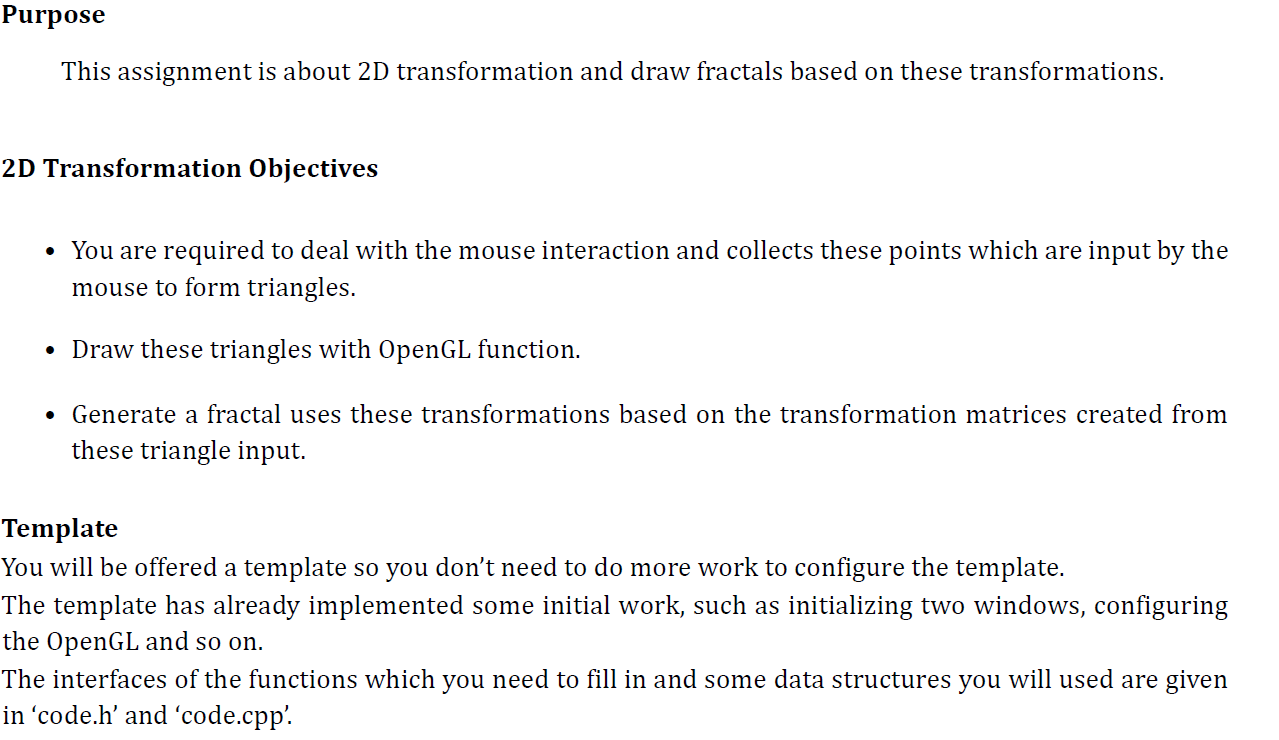
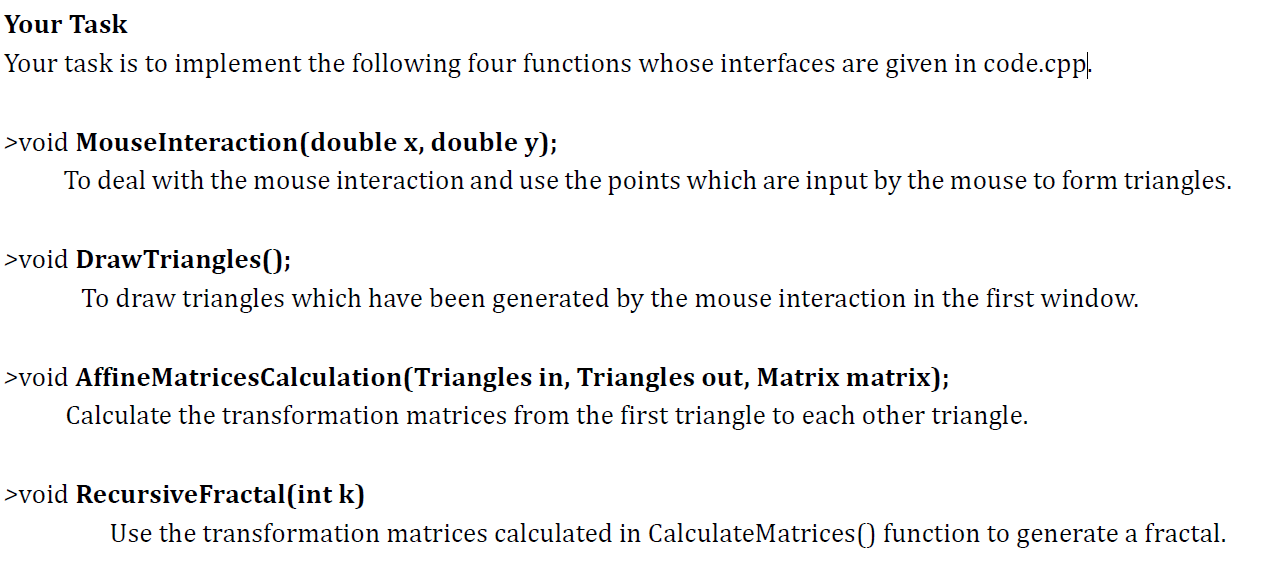
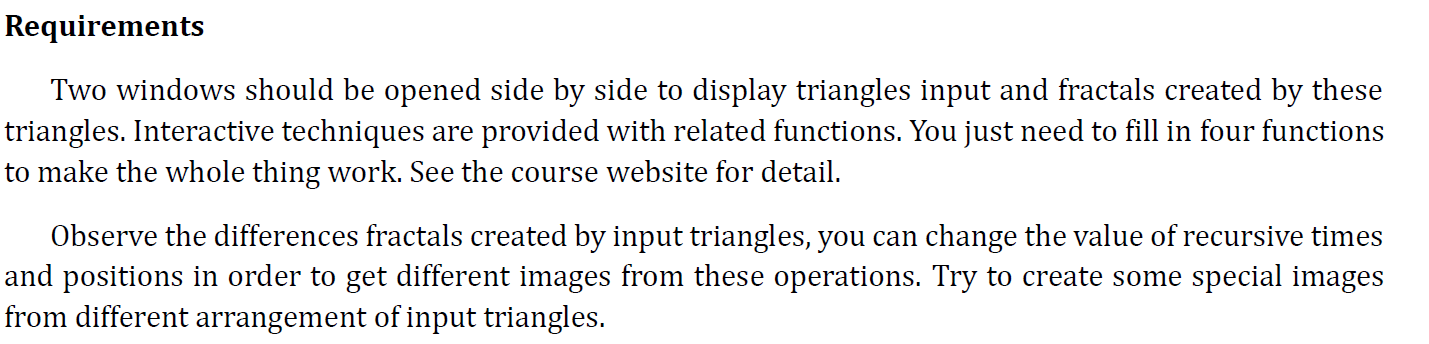
Purpose This assignment is about 2D transformation and draw fractals based on these transformations. 2D Transformation Objectives You are required to deal with the mouse interaction and collects these points which are input by the mouse to form triangles. Draw these triangles with OpenGL function. Generate a fractal uses these transformations based on the transformation matrices created from these triangle input. Template You will be offered a template so you don't need to do more work to configure the template. The template has already implemented some initial work, such as initializing two windows, configuring the OpenGL and so on. The interfaces of the functions which you need to fill in and some data structures you will used are given in code.h' and 'code.cpp. Your Task Your task is to implement the following four functions whose interfaces are given in code.cppl. >void MouseInteraction(double x, double y); To deal with the mouse interaction and use the points which are input by the mouse to form triangles. >void DrawTriangles(); To draw triangles which have been generated by the mouse interaction in the first window. >void AffineMatricesCalculation(Triangles in, Triangles out, Matrix matrix); Calculate the transformation matrices from the first triangle to each other triangle. >void Recursive Fractal(int k) Use the transformation matrices calculated in CalculateMatrices() function to generate a fractal. Procedure: RecursiveFractal (k) Begin if (k> 0) { For each triangle T; and transformation matrix Mo~i{ (Step 1) glPushMatrix(); // Push current transform matrix (Step 2) glMultiMatrixd(Mo-i); // Multiply current matrix with Moi (Step 3) Recursive Fractal(k-1); (Step 4) glPopMatrix(); // Recover transform matrix } } else { (Step 5) // Draw Triangle Here. } End Requirements Two windows should be opened side by side to display triangles input and fractals created by these triangles. Interactive techniques are provided with related functions. You just need to fill in four functions to make the whole thing work. See the course website for detail. Observe the differences fractals created by input triangles, you can change the value of recursive times and positions in order to get different images from these operations. Try to create some special images from different arrangement of input triangles. Purpose This assignment is about 2D transformation and draw fractals based on these transformations. 2D Transformation Objectives You are required to deal with the mouse interaction and collects these points which are input by the mouse to form triangles. Draw these triangles with OpenGL function. Generate a fractal uses these transformations based on the transformation matrices created from these triangle input. Template You will be offered a template so you don't need to do more work to configure the template. The template has already implemented some initial work, such as initializing two windows, configuring the OpenGL and so on. The interfaces of the functions which you need to fill in and some data structures you will used are given in code.h' and 'code.cpp. Your Task Your task is to implement the following four functions whose interfaces are given in code.cppl. >void MouseInteraction(double x, double y); To deal with the mouse interaction and use the points which are input by the mouse to form triangles. >void DrawTriangles(); To draw triangles which have been generated by the mouse interaction in the first window. >void AffineMatricesCalculation(Triangles in, Triangles out, Matrix matrix); Calculate the transformation matrices from the first triangle to each other triangle. >void Recursive Fractal(int k) Use the transformation matrices calculated in CalculateMatrices() function to generate a fractal. Procedure: RecursiveFractal (k) Begin if (k> 0) { For each triangle T; and transformation matrix Mo~i{ (Step 1) glPushMatrix(); // Push current transform matrix (Step 2) glMultiMatrixd(Mo-i); // Multiply current matrix with Moi (Step 3) Recursive Fractal(k-1); (Step 4) glPopMatrix(); // Recover transform matrix } } else { (Step 5) // Draw Triangle Here. } End Requirements Two windows should be opened side by side to display triangles input and fractals created by these triangles. Interactive techniques are provided with related functions. You just need to fill in four functions to make the whole thing work. See the course website for detail. Observe the differences fractals created by input triangles, you can change the value of recursive times and positions in order to get different images from these operations. Try to create some special images from different arrangement of input triangles
Step by Step Solution
There are 3 Steps involved in it
To complete the assignment implement the specified functions using the given template Heres a detailed guide 1 MouseInteractiondouble mx double my Thi... View full answer

Get step-by-step solutions from verified subject matter experts
 Study Help