







Question: Assembly language Multiple_ByteKey_Encryption (Chapter 6, Pr 8, Modified) This program demonstrates simple S multi-byte key entered by the user. Use this key to encrypt and
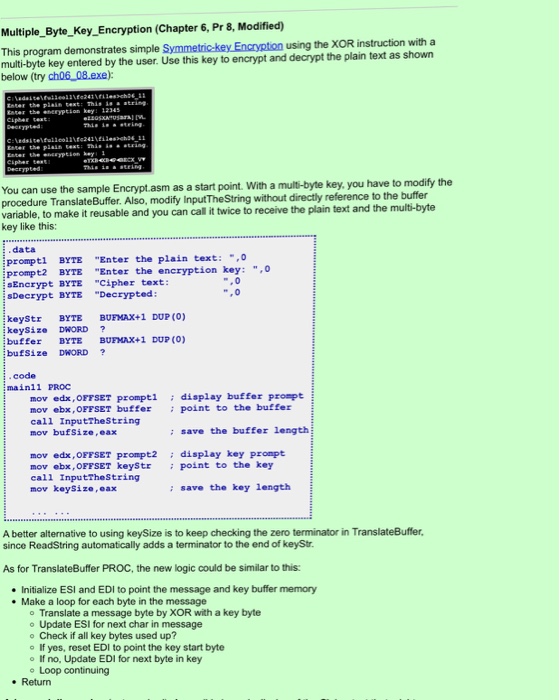
Multiple_ByteKey_Encryption (Chapter 6, Pr 8, Modified) This program demonstrates simple S multi-byte key entered by the user. Use this key to encrypt and decrypt the plain text as shown below (try ch06 08.exe): mmetric-key Encryption using the XOR instruction witha Eater the eneryption key can use the sample Encrypt.asm as a start point. With a multi-byte key, you have to modify the procedure Transla variable, to make it reusable and you can call it twice to receive the plain text and the multi-byte key like this: teBuffer. Also, modify InputTheString without directly reference to the buffer data promp prompt2 BYTE "Enter SEncrypt BYTE Cipher text: sDecrypt BYTE "Decrypted tl BYTE "Enter the plain text:,0 the encryption key: ", keyStr BYTE BUFMAX+1 DUP (0) keySize DWORD buffer BYTE BUFMAX+1 DUP (0) bufSize DWORD ? code mainll PROC mov edx, OFFSET promptl display buffer prompt mov ebx, OFFSET buffer point to the buffer call InputTheString mov bufSize, eax : save the buffer length edx, OFFSET pmt2 display key prompt mov ebx, OFFSET keystr point to the key call InputTheString mov keySize, eax : save the key length A better alternative to using keySize is to keep checking the zero terminator in TranslateBuffer, since ReadString automatically adds a terminator to the end of keyStr. As for TranslateBuffer PROC, the new logic could be similar to this: Initialize ESI and EDI to point the message and key buffer memory . Make a loop for each byte in the message o Translate a message byte by XOR with a key byte o Update ESI for next char in message o Check if all key bytes used up? o If yes, reset EDI to point the key start byte o If no, Update EDI for next byte in key o Loop continuing . Return Multiple_ByteKey_Encryption (Chapter 6, Pr 8, Modified) This program demonstrates simple S multi-byte key entered by the user. Use this key to encrypt and decrypt the plain text as shown below (try ch06 08.exe): mmetric-key Encryption using the XOR instruction witha Eater the eneryption key can use the sample Encrypt.asm as a start point. With a multi-byte key, you have to modify the procedure Transla variable, to make it reusable and you can call it twice to receive the plain text and the multi-byte key like this: teBuffer. Also, modify InputTheString without directly reference to the buffer data promp prompt2 BYTE "Enter SEncrypt BYTE Cipher text: sDecrypt BYTE "Decrypted tl BYTE "Enter the plain text:,0 the encryption key: ", keyStr BYTE BUFMAX+1 DUP (0) keySize DWORD buffer BYTE BUFMAX+1 DUP (0) bufSize DWORD ? code mainll PROC mov edx, OFFSET promptl display buffer prompt mov ebx, OFFSET buffer point to the buffer call InputTheString mov bufSize, eax : save the buffer length edx, OFFSET pmt2 display key prompt mov ebx, OFFSET keystr point to the key call InputTheString mov keySize, eax : save the key length A better alternative to using keySize is to keep checking the zero terminator in TranslateBuffer, since ReadString automatically adds a terminator to the end of keyStr. As for TranslateBuffer PROC, the new logic could be similar to this: Initialize ESI and EDI to point the message and key buffer memory . Make a loop for each byte in the message o Translate a message byte by XOR with a key byte o Update ESI for next char in message o Check if all key bytes used up? o If yes, reset EDI to point the key start byte o If no, Update EDI for next byte in key o Loop continuing . Return
Step by Step Solution
There are 3 Steps involved in it

Get step-by-step solutions from verified subject matter experts
 Study Help