







Question: Assembly Language x86 Display SumArray.asm in the Visual Studio Debugger (See p. 125-126 and C:/irvine/ch04/SumArray.asm): 1. Assemble source code 2. Record memory window displaying the
Assembly Language x86
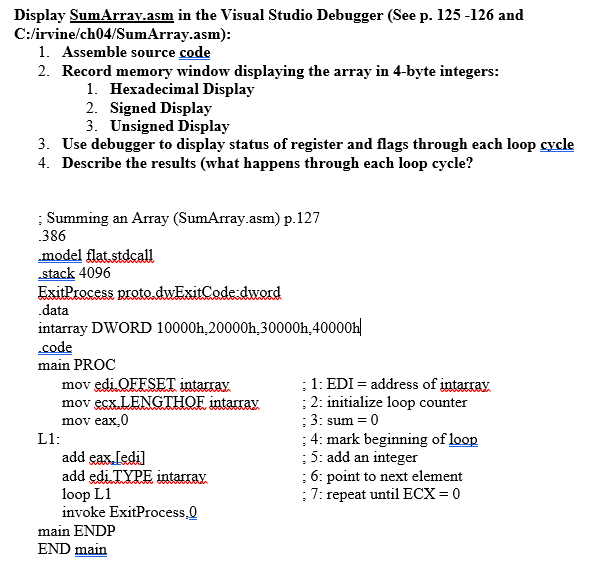
Display SumArray.asm in the Visual Studio Debugger (See p. 125-126 and C:/irvine/ch04/SumArray.asm): 1. Assemble source code 2. Record memory window displaying the array in 4-byte integers: 1. Hexadecimal Display 2. Signed Display 3. Unsigned Display 3. Use debugger to display status of register and flags through each loop cycle 4. Describe the results (what happens through each loop cycle? : Summing an Array (SumArray.asm) p.127 386 model flat stdcall .stack 4096 ExitProcess piete.dwExitCodedward data intarray DWORD 10000h,20000h 30000h 40000h| code main PROC mov edi.OFFSET intarrax : 1: EDI = address of intarrax mov esx.LENGTHOF intarray : 2: initialize loop counter mov eax,0 :3: sum = 0 L1: : 4: mark beginning of loop add eax.[edi] :5: add an integer add edi.TYPE intarrax ; 6: point to next element loop L1 : 7: repeat until ECX = 0 invoke ExitProcess, main ENDP END main Display SumArray.asm in the Visual Studio Debugger (See p. 125-126 and C:/irvine/ch04/SumArray.asm): 1. Assemble source code 2. Record memory window displaying the array in 4-byte integers: 1. Hexadecimal Display 2. Signed Display 3. Unsigned Display 3. Use debugger to display status of register and flags through each loop cycle 4. Describe the results (what happens through each loop cycle? : Summing an Array (SumArray.asm) p.127 386 model flat stdcall .stack 4096 ExitProcess piete.dwExitCodedward data intarray DWORD 10000h,20000h 30000h 40000h| code main PROC mov edi.OFFSET intarrax : 1: EDI = address of intarrax mov esx.LENGTHOF intarray : 2: initialize loop counter mov eax,0 :3: sum = 0 L1: : 4: mark beginning of loop add eax.[edi] :5: add an integer add edi.TYPE intarrax ; 6: point to next element loop L1 : 7: repeat until ECX = 0 invoke ExitProcess, main ENDP END main
Step by Step Solution
There are 3 Steps involved in it

Get step-by-step solutions from verified subject matter experts
 Study Help